What should you consider when choosing?
A desktop HDD suits an archive that usually stays in one place; a portable SSD is an alternative if you regularly move projects. Start by working out how much space you need, then consider recovery, transport, compatibility and privacy.
| What to consider |
What should you check? |
Who is this important for? |
| Room for growing folders |
Check the size of your current folders and allow for growth. Compare this with the capacity of the exact model, and set aside space for a separate copy. |
If I keep lots of scanned letters, I want to know whether the storage will be enough now and as my archive grows. Around 26% of consumers put capacity first. |
| Keeping files safe and easy to find |
Plan a separate storage location, test that you can retrieve files, and use a consistent folder and naming structure. |
I want to be able to find and restore letters later, rather than keep them on just one drive. Around 26% of consumers put recoverability first. |
| Taking projects with you |
Compare a portable model with a desktop model that uses a separate power adapter. Check the capacity and the cable required for the exact model. |
If I move scan projects between workstations, portability is an important factor in my choice. Around 16% of consumers put portability first. |
| Using the drive with different computers |
Decide whether you need to share individual files or use the drive as a dedicated backup destination. Apple Support says exFAT is compatible with Windows, warns that macOS may not be able to write to NTFS, and recommends APFS or encrypted APFS for Time Machine. |
I want to be able to open and save project folders on all my computers. Around 16% of consumers put compatibility first. |
| Privacy of letters |
Decide who needs access and check that the drive and any software support the protection you need. The Dutch Data Protection Authority says organisations that process personal data must assess risks and decide on appropriate measures. |
If my scan folders contain personal data, I want to consider access as well as the risk of loss or theft. Around 16% of consumers put privacy first. |
Brands to consider
The product lines mentioned here illustrate different storage options. Check the specifications and terms for the exact model; inclusion here does not indicate availability.
Seagate
The Expansion desktop range is worth considering for large folders kept at a fixed workstation.
- Seagate lists USB 3.0 and a separate power adapter for the desktop range reviewed. For EMEA, the data sheet lists an 8TB model.
- Seagate says its Rescue Data Recovery Service is not available in every country. Don’t treat a recovery service as a replacement for your own backup.
Samsung
The 2TB T7 Shield is a portable SSD option for scan folders you regularly take with you.
- Samsung lists USB 3.2 Gen 2, sequential speeds of up to 1.050/1.000 MB/s and an IP65 rating for the T7 Shield.
- These are manufacturer specifications, not independent measurements of scan speeds or a guarantee against data loss. Check that 2TB is enough for your current folders and expected growth.
Crucial
The 4TB X9 Portable SSD is a portable, high-capacity option for project folders.
- Crucial lists a USB-C connection and a maximum read speed of 1.050 MB/s.
- Crucial says speeds depend on the host device. Reformatting erases data on the drive, so check before using it with multiple computers.
Western Digital
WD Elements Desktop is a desktop range to compare if the drive will stay at one workstation.
- The range offers another desktop option to consider alongside other fixed-storage choices.
- Check the capacity and connection for the exact model before comparing it with specific alternatives.
Joybuy product picks
This selection includes external drives for large project folders, with desktop storage for a fixed workstation and portable SSDs for projects you take with you.
 No image available
My Passport USB-C 5TB Black
An option for large project folders if 5TB suits your current folder size and expected growth.
View at Joybuy
 No image available
Western Digital My Passport USB-C 4TB Black
Compare the stated 4TB capacity with the size of your scan folders, allowing for expected growth.
View at Joybuy
 No image available
Samsung Portable SSD T7 2TB USB Type-C 3.2 Gen 2 (3.1 Gen 2) Blue
This portable SSD is an option if you take scan projects with you and 2TB is enough for your folders and expected growth.
View at Joybuy
 No image available
Samsung Portable SSD T9 4 TB Black MU-PG4T0B
A portable option for project folders you want to take with you; compare 4 TB with your current storage needs and expected growth.
View at Joybuy
 No image available
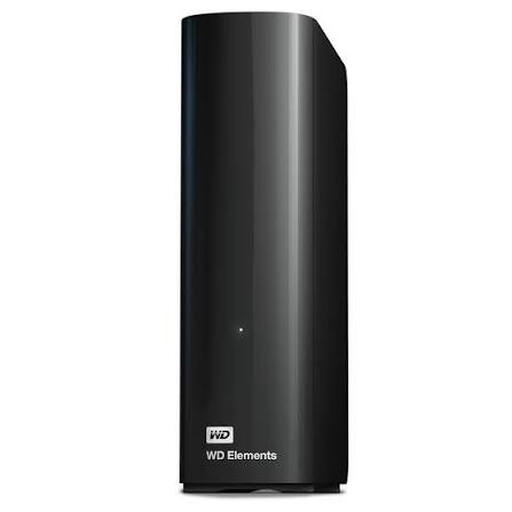
WD Elements Desktop Storage 8 TB Black
Desktop storage for a fixed workstation; check that the stated 8 TB suits your archive folders and your plan for a separate copy.
View at Joybuy
Frequently asked questions
Is one external drive enough to archive scanned letters?
Not if you also want to be able to recover your files if that drive is lost. Keep a separate copy and test that you can retrieve your files; organise and label your scans so you can find them later. Veeam recommends keeping multiple copies as part of its 3-2-1 rule.
Can I use the same drive with Windows, Mac and Time Machine?
It depends on the file system and how you use the drive. Apple Support says exFAT is compatible with Windows for sharing files, but recommends APFS or encrypted APFS for Time Machine. You may need to reformat the drive, which will erase any existing data on it.
What should I check about a recovery service or warranty?
Check the current terms for the exact model in the Netherlands before relying on them. Seagate says its Rescue Data Recovery Service is not available in every country; you should also keep your own separate copy.
Is there one fixed legal retention period in the Netherlands for all scanned letters containing personal data?
No. According to the Dutch Data Protection Authority, the GDPR does not set a general, specific retention period: personal data must not be kept for longer than necessary for its purpose, although other laws may set time limits in certain situations. The applicable period depends on the contents of the letters and who is responsible for them.
Does an organisation need to secure a drive containing scanned personal data?
An organisation that processes personal data must assess the risks and decide on appropriate security measures. The Dutch Data Protection Authority does not prescribe one specific drive model or a single encryption feature for everyone.


