Who is this relevant to?

Student in a room with weak Wi-Fi

If you download your course materials somewhere the router’s signal is weak, the key question is whether there’s a midway spot where a repeater can still get a signal. The Consumers’ Association recommends placing a booster in the middle of the home if reception is poor at the back of the house.

Household with several people online at once

If several people and devices are online at the same time, consider coverage and use in different rooms rather than focusing on just one laptop. The Consumers’ Association describes tests involving several devices, while VodafoneZiggo highlights the extra strain on the network when more people and devices are online at once.

Family with old and new devices

If you want to keep using your existing phones or laptops, check which Wi-Fi standards they support. According to the Consumers’ Association, older devices can stay connected to the network, but won’t get the specific improvements of Wi-Fi 6.

What to consider when choosing

Wireless repeater

Suitable when: only one room has weak reception and there’s still a spot between the router and that room with a usable signal.

Trade-off: the connection to the router remains wireless, so placement and obstacles matter.

Mesh with multiple Wi-Fi points

Suitable when: several rooms need coverage, or you already use a compatible mesh system.

Trade-off: you may need several points. Check that the mesh features work with your exact router and the additional device.

Wired access point or mesh point

Suitable when: you can run a network cable to the area with weak Wi-Fi.

Trade-off: check that your chosen device has both an Ethernet port and the access point or LAN mode you need.

Powerline with Wi-Fi

Suitable when: running a cable isn’t practical and walls or floors make wireless extension difficult.

Trade-off: electrical interference and socket locations can affect data transmission. Check how it performs in the places where you plan to use it.

Consideration What to check before buying Who is it important for?
Coverage where you download Compare reception near the router and in your study area; with a repeater, look for a midway spot with a usable signal. If I download course materials in one room, I want to know whether a wireless point can extend the connection there. Around 36% of consumers say coverage where they download is their main concern.
Downloads while others are online Consider how many rooms need coverage and compare the connection at quiet and busy times. When other people at home are online at the same time, I want my download area to remain usable while other devices share the network. For around 29% of consumers, using the network while others are online is the top priority.
Old and new devices Check the Wi-Fi standards supported by your devices; check mesh compatibility separately from ordinary connection to the router. If I want to keep using my current laptop or phone, I make sure it can connect to the network without assuming older devices will get Wi-Fi 6 benefits. Around 21% of consumers prioritise compatibility with their existing devices.
Installation and use Check what kind of placement and connection are needed, and how many Wi-Fi points will stay switched on long-term. If I install and use the system myself every day, I want to know in advance which connections and settings are needed. For around 14% of consumers, installation and use after purchase are the most important factors.

Common pitfalls

  • Placing a repeater where the router’s signal has already dropped out

    A wireless point needs to receive a signal from the router itself, so the spot with the poorest reception isn’t automatically the right place for it.

    First, check a possible midway spot. If there’s no usable signal there, compare a wired access point or another way of extending the connection.

  • Assuming the stated Wi-Fi speed is the same as your download speed

    Real-world performance also depends on placement, connected devices and the connection between Wi-Fi points. The Consumers’ Association tests Wi-Fi boosters at different distances and with different devices.

    Use specifications to compare features, then check the connection where you download your course materials.

  • Assuming every repeater supports all mesh features

    Manufacturers describe mesh features for specific combinations of devices. Standard Wi-Fi extension doesn’t automatically give you access to all the features of your existing mesh network.

    Check mesh compatibility between your exact router and extender separately from standard Wi-Fi compatibility.

  • Not testing powerline at the sockets you plan to use

    Electrical interference and the sockets you choose can affect data transmission over your home’s electrical wiring.

    Try the adapters in the places where you intend to use them, and follow the manufacturer’s guidance on checking for sources of interference.

Brands to consider

TP-Link

The RE705X is worth considering if you want to compare wireless extension with access point mode over Ethernet.

  • TP-Link says the RE705X can work as an extender with Wi-Fi routers and has a gigabit Ethernet port with access point mode.
  • OneMesh is a separate feature, so check that it works with your router. The stated band speeds are not measured home download speeds.

FRITZ!

The FRITZ!Repeater 1200 AX is particularly relevant if you want to extend an existing FRITZ!Box network. It also has a gigabit LAN connection.

  • FRITZ! describes management within its own mesh network and connection via LAN.
  • Using it with another router doesn’t mean that all FRITZ! Mesh features will be available.

NETGEAR

The EAX15 is a dual-band Wi-Fi 6 extender with gigabit Ethernet, designed to extend an existing network.

  • NETGEAR lists an Ethernet port for wired devices.
  • The stated speed of up to 1.8 Gbit/s is a specification, not a guaranteed download speed.

ASUS

The RP-AX58 is worth considering for extending an existing network in the usual way, or when used with a compatible ASUS router.

  • ASUS describes compatibility with a range of Wi-Fi routers, as well as separate AiMesh integration with compatible devices.
  • Check whether your existing router supports AiMesh before relying on those mesh features.

devolo

The Magic 2 WiFi 6 next Starter Kit uses your home’s electrical wiring to connect the adapters and provides Wi-Fi through the second adapter.

  • devolo lists two gigabit ports on the Wi-Fi adapter.
  • devolo says electrical appliances and unsuitable sockets can reduce powerline performance. Check how it works in your own home.

Wi-Fi solutions at Joybuy

This product selection focuses on mesh systems for several rooms and wired access points. For any specific model, check that the connections and network features suit your existing router and setup.

Three-pack TP-Link Deco X50 mesh system

TP-Link Deco X50 (3-Pack) Wi-Fi 6

A three-point mesh system is designed to extend coverage to several areas of your home.

Dual-band (2.4 GHz/5 GHz); Wi-Fi 6 (802.11ax); three gigabit Ethernet ports per point. Support for older Wi-Fi standards is listed.

View at Joybuy

TP-Link EAP725-Wall wired access point

TP-Link EAP725-Wall

A wired access point to consider if you can run a network cable to the area you want to cover.

Wi-Fi 7; three Ethernet ports, including 2.5G support; Power over Ethernet (PoE). This wired access point option requires a suitable Ethernet connection and PoE power for a PoE setup.

View at Joybuy

TP-Link Deco XE75 mesh system with three points

TP-Link Deco XE75 Wi-Fi 6E

A three-point mesh system to consider if you need Wi-Fi in several areas.

Tri-band (2.4 GHz/5 GHz/6 GHz); Wi-Fi 6E (802.11ax); three Ethernet ports per point.

View at Joybuy

Three-pack TP-Link Deco X50-PoE mesh system

TP-Link Deco X50-PoE (3-Pack) Wi-Fi 6

A three-point mesh system to consider if you want to extend coverage to several rooms and are considering PoE as an installation option.

Dual-band (2.4 GHz/5 GHz); Wi-Fi 6 (802.11ax); two Ethernet ports per point; PoE support.

View at Joybuy
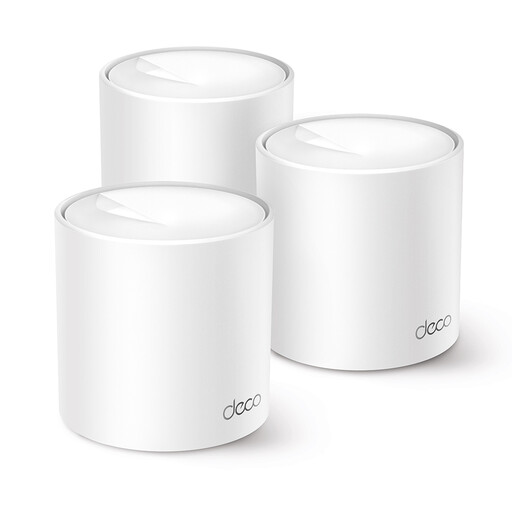
TP-Link Deco X10 mesh device

TP-Link Deco X10 Wi-Fi 6

This mesh device is worth considering if you want to use several mesh points on one network.

Dual-band (2.4 GHz/5 GHz); Wi-Fi 6 (802.11ax); support for earlier Wi-Fi standards is listed.

View at Joybuy

Frequently asked questions

Will a Wi-Fi booster make my broadband package faster?

No, a Wi-Fi booster won’t increase the speed of your broadband package. Compare the connection near the router with the one where you download your course materials to see whether wireless coverage differs between the two places.

Where should I place a wireless repeater?

Place a repeater between the router and the room with weak Wi-Fi, somewhere the repeater itself can still get good reception. The Consumers’ Association recommends a central spot if reception is poor at the back of the house. An indicator light or app can help you find a suitable location.

Do my existing devices need to support Wi-Fi 6?

No, older devices can stay connected to a compatible network. According to the Consumers’ Association, devices with an older Wi-Fi version won’t get the specific improvements of Wi-Fi 6.

What can I try if powerline is slow where I want to use it?

devolo recommends plugging the adapters directly into wall sockets where possible and checking for nearby sources of electrical interference. This advice doesn’t guarantee a particular speed; performance also depends on conditions in the locations you choose.

What rules apply to selling a Wi-Fi booster in the Netherlands?

According to the Dutch Authority for Digital Infrastructure, radio equipment is subject to European requirements, and manufacturers must apply the CE marking when their products comply. Since 1 August 2025, RED 3.3 cybersecurity requirements have also applied to the radio equipment covered by those rules. Check whether the requirements apply to the specific product and model.

What about the cooling-off period and warranty for an online purchase in the Netherlands?

For a standard online purchase, you generally have 14 days from delivery to change your mind, subject to legal exceptions, according to ACM ConsuWijzer. Statutory consumer rights also apply alongside any manufacturer’s warranty. What you can expect from a product depends, among other things, on the product and the circumstances.
