What should you look for when buying?
Start by checking your tablet’s port. Then decide whether you also want to charge it while using a wired connection, or need a higher speed on your local network.
Standalone USB-C adapter
Suitable if: your tablet has USB-C and you only need an Ethernet port.
Bear in mind: a basic adapter doesn’t automatically include a separate charging port. TP-Link lists an RJ45 port supporting 10/100/1000 Mbps for the UE300C; this is a port specification, not a guaranteed internet speed.
USB-C with pass-through charging
Suitable if: you want to use the same USB-C port for Ethernet and charging.
Bear in mind: Belkin lists Power Delivery pass-through of up to 100 W for the INC019btBK. This is the adapter’s maximum pass-through capacity, not the amount of power every tablet will draw.
Ethernet for an iPad with Lightning
Suitable if: you have a supported iPad with Lightning, rather than a model with USB-C.
Bear in mind: the Belkin F8J227 is a Lightning model. Belkin lists a maximum speed of 180 Mbps and requires iOS 10.3.3 or later. Check compatibility with your exact iPad model.
USB-C with 2.5GbE
Suitable if: you transfer large files over a local network, for example, and your other equipment supports the higher speed.
Bear in mind: TP-Link specifies Cat5e or higher for the UE302C to achieve peak performance. A higher port speed won’t make your internet connection faster by itself.
| What to consider | What should you check? | Who is this important for? |
|---|
| Tablet compatibility | Check the connector, your exact tablet model and the stated operating system compatibility. A USB-C plug alone doesn’t prove compatibility. | If my tablet has a specific USB-C or Lightning port, I want to know first whether the adapter works with my model and operating system. Around 36% of consumers prioritise compatibility. |
| A wired connection | Check that the adapter has an RJ45 port and that you have a compatible network cable and port at your workstation. TP-Link lists 10/100/1000 Mbps for the UE300C. | At a fixed home workstation, I mainly want an RJ45 connection, without assuming that a higher port speed guarantees better video calls. Around 29% of consumers prioritise a wired connection. |
| Ethernet and charging at the same time | Look for a dedicated pass-through charging port and check that your tablet and charger support it. Belkin lists pass-through charging of up to 100 W for the INC019btBK. | If I work over a wired connection for long periods, I want to be able to charge my tablet at the same time. Around 21% of consumers prioritise this feature. |
| Speed on the local network | Check that your tablet, network equipment and cable support the speed you’re aiming for. For peak performance with the TP-Link UE302C, TP-Link specifies Cat5e or higher. | A higher port speed may be useful when transferring large files over my local network, provided the rest of the connection can support it. Around 14% of consumers prioritise this speed. |
Joybuy products
This selection focuses on USB-C to Ethernet adapters and hubs for working on a tablet over a wired connection. Check each model’s compatibility and whether it supports charging.
 Image unavailable
TP-Link USB Type-C to RJ45 Gigabit Ethernet Network Adapter
For a USB-C tablet at a workstation where you need a wired network connection.
USB Type-C to RJ45; Gigabit Ethernet.
 Image unavailable
HP USB-C to RJ45 Adapter G2
An option if you need to convert a USB-C connection to RJ45; check the system requirements before using it with a tablet.
The product description lists Windows 10 or Windows 11 as the system requirements for optimal performance.
 Image unavailable
Acer Type C to Giga LAN Dongle
For a USB-C device that needs a wired LAN connection; check whether your tablet supports this model.
USB Type-C to Giga LAN.
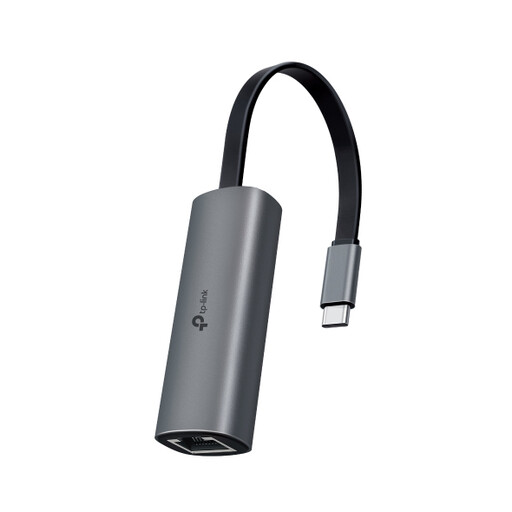 Image unavailable
TP-Link UE302C
For a tablet with USB-C when you need a higher rated network port speed; the rest of your network must support that speed too.
TP-Link lists 2.5GbE and support for iPadOS 13.3 and later. For peak performance, TP-Link specifies Cat5e or higher.
 Image unavailable
Verbatim CMH-13 USB Type-C 10000 Mbit/s
A hub for a USB-C workstation where you want to combine Ethernet and power. Check that its ports and charging function suit your tablet and charger.
The product name lists USB Type-C and 10000 Mbit/s.
Frequently asked questions
Can I use a USB-C Ethernet adapter with any tablet that has USB-C?
No, don’t judge compatibility by the shape of the plug alone. Check whether the manufacturer lists support for your exact tablet model and operating system. For example, TP-Link lists iPadOS 13.3 and later for the UE302C.
What can I try if my iPad doesn’t recognise the adapter?
Unlock your iPad before connecting the accessory. If it isn’t recognised, Apple Support recommends disconnecting it, unlocking your iPad and reconnecting it; this doesn’t guarantee that the adapter is compatible.
Do I need a separate feature to charge my tablet and use Ethernet at the same time?
Yes, look for an adapter that explicitly lists a pass-through charging port. Belkin lists this feature for the INC019btBK; also check that your tablet and charger support it. The stated 100 W is the adapter’s maximum pass-through capacity.
What are my rights in the Netherlands if an adapter I bought online is faulty?
For online purchases from a business, you usually have a 14-day cooling-off period, according to the Dutch Government. You’re also entitled to a product that works properly if it’s faulty, and the seller is your point of contact for a solution. The Dutch Government states that there is no fixed statutory guarantee period in the Netherlands; a manufacturer’s guarantee is separate from your statutory rights.
Does an Ethernet adapter always need a CE mark in the Netherlands?
A CE mark is required when the EU rules that apply to a product say it must have one. The European Commission explains that such rules may apply to certain product groups; you’ll need to establish which rules apply to a specific adapter model.


