
Vandaag of morgen in huis

Kwaliteit gegarandeerd

Welkomstaanbiedingen ontgrendelen: GRATIS bezorging | Tot 80% korting | Gratis 30 dagen JoyPlus-proefperiode
Download de app
Anyone who works at a computer every day quickly notices that not every mouse remains comfortable. A flat model can leave your hand twisted for long periods, while a mouse that is too small requires extra movement. If you are looking for an ergonomic vertical wireless mouse, you will usually want to consider a natural hand position, quiet operation and fewer cables on your desk.
Do bear in mind how products are marketed. An ergonomic shape does not guarantee that discomfort will disappear. If you experience persistent pain, tingling or numbness, it is sensible to seek professional advice. A mouse can help you arrange your workstation differently, alongside taking regular breaks and setting your desk to a suitable height.
The word ergonomic alone does not tell you much. Check whether the manufacturer specifies the angle, dimensions and hand orientation. For example, a vertical right-handed mouse should provide enough room for your palm and thumb. A model with only a rounded housing is not automatically vertical or suitable for long periods of work.
According to the product information, the Trust Bayo II uses a 57-degree angle. This keeps your hand more vertical than with a traditional mouse. It is a specific design feature that you can compare, but whether this grip suits your hand is still a personal matter.
An ergonomic wireless mouse does not always work via Bluetooth. Some models use a small USB receiver at 2.4 GHz. This can be convenient with a desktop computer or laptop that has a spare USB port, but less practical if you only have USB-C connections.
Therefore, check the following before buying:
The Bayo II is a 2.4 GHz USB mouse and comes with a USB receiver. According to the product information, Bluetooth and multi-device pairing are not available.
A higher DPI figure does not automatically make a mouse more accurate or comfortable. DPI mainly determines how far the cursor moves with the same hand movement. For word processing and spreadsheets, a moderate setting is often sufficient; for large screens or fast navigation, a higher value may be more practical.
Battery claims also need to be viewed in context. A rechargeable mouse eliminates the need for loose batteries, but you still need to know how it charges and how quickly. With an AA-battery model, running costs depend on the type of battery and how intensively you use the mouse.
Look at the relationship between the mouse dimensions and the size of your hand. According to the product specifications, the Trust Bayo II measures 120 × 75 × 45 mm and weighs 110 grams. The design is intended for right-handed use and a vertical palm grip.
A vertical shape may feel different from a standard mouse at first. Give yourself time to get used to the cursor movement and learn to use the thumb buttons. If your wrist still feels tense, the width, height or position of the thumb rest may not be a good fit.
For office work, a scroll wheel, main buttons and, optionally, two thumb buttons are useful. According to the product specifications, the Bayo II has six buttons, including forward and back buttons for the browser. The DPI button switches between 800 and 2400 DPI, allowing you to adjust the cursor speed.
The product information also mentions two quiet buttons. According to Trust’s own product information, these are designed to reduce clicking noise. This is particularly relevant in a shared office, library or home office with other members of the household. Do check whether all the buttons are quiet, as on some mice the silent operation applies only to the primary buttons.
A rechargeable mouse is convenient if you do not want to replace AA batteries regularly. According to Trust’s product information, the Bayo II’s battery lasts for up to three months per charge. A five-minute quick charge is said to provide around eight hours of use. These are the brand’s stated figures; actual battery life depends on usage and settings.
According to the same product information, the mouse can be used while charging via the supplied USB cable. The USB receiver can be stored inside the mouse when not in use, reducing the chance of losing it.
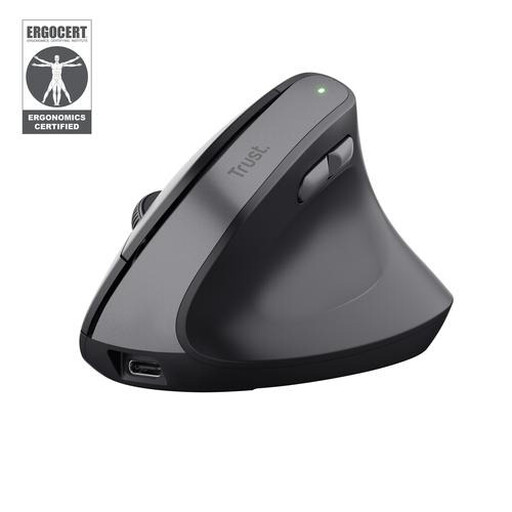
Why it suits this profile: Right-handed office and home workers get a vertical grip, wireless operation and adjustable cursor speed in one model.
The 57-degree angle and right-handed design are clearly specified. The connection works via a supplied 2.4 GHz USB receiver.
Rechargeable battery, two quiet main buttons, six buttons and DPI settings from 800 to 2400.

Why it suits this profile: Suitable for users who consider multiple devices, programmable buttons and USB-C charging important.
The connection options are clearly defined: Bluetooth and a Logi Bolt receiver. The mouse is right-handed and has a thumb rest.
Adjustable sensor up to 8000 DPI, eight buttons, horizontal scrolling and a rechargeable USB-C battery.
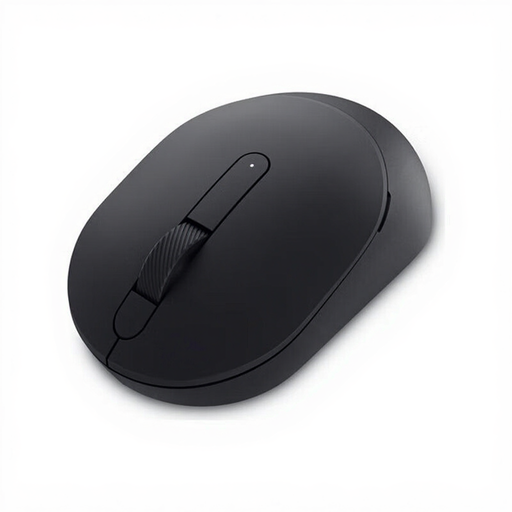
Why it suits this profile: A practical choice for quiet workspaces and users who switch between a laptop and desktop computer.
The mouse supports both RF and Bluetooth. This means you are not dependent on just one type of connection.
Quiet clicking and scrolling, ambidextrous design, DPI up to 4020 and a stated battery life of up to 36 months.
There is no mouse that universally solves wrist problems. However, you can reduce strain on your workstation by keeping the mouse close to your keyboard, relaxing your shoulder and avoiding an unnecessarily low cursor-speed setting. Use the DPI button or system settings to find a setting that means you do not have to move the mouse constantly from side to side.
Getting used to a vertical mouse may take a few days. Do not grip it more tightly to maintain control. Where possible, alternate between typing, reading and other tasks. A quiet wireless mouse reduces noise, but it does not correct poor posture or an excessive workload.
We have put together a complete, up-to-date list of products that fully meet these strict selection criteria and the applicable European safety regulations.
That depends on your hand size, grip and working posture. A vertical shape can change the orientation of your hand, but it does not guarantee fewer problems. Pay attention to the dimensions, hand orientation and position of the thumb buttons. Take regular breaks and adjust your desk height and chair.
Insert the USB receiver into a spare USB port, charge or insert the battery, and switch the mouse on. The Trust Bayo II comes with the receiver, which can be stored inside the mouse after use. If your laptop only has USB-C ports, check whether you need a suitable adapter.
That depends on the purchase price, charging frequency and lifespan of the built-in battery. A rechargeable mouse eliminates the need to keep buying AA or AAA batteries. A standard battery-powered model may be more convenient when you need to replace the batteries immediately without waiting for it to charge. Therefore, compare not only battery life, but also the connection type and how you use the mouse every day.
