
Vandaag of morgen in huis

Kwaliteit gegarandeerd

Welkomstaanbiedingen ontgrendelen: GRATIS bezorging | Tot 80% korting | Gratis 30 dagen JoyPlus-proefperiode
Download de app
An ergonomic vertical mouse can be a sensible choice if you want to position your hand and wrist differently while working at a desk. Right-handed home and office workers in particular often look for a mouse for long working days, an ergonomic mouse for wrist problems or a mouse to help prevent RSI. Please note: a mouse is no substitute for a properly adjusted workstation, regular breaks or professional advice if symptoms persist.
Product pages often use terms such as “ergonomic”, “comfortable” or “suitable for prolonged use”. These descriptions only tell you so much unless you also consider the design and connection options. Below, we look at the key pitfalls and specifications.
Not every vertical mouse feels the same. The angle, length, width and position of the thumb buttons all affect how your hand rests. A mouse that is too small can encourage a cramped grip. A model that is too large may require extra movement from your fingers and forearm.
Always check:
A vertical mouse is not automatically suitable for both left- and right-handed use either. The Trust Bayo II, for example, is designed for right-handed users.
Wireless mice are convenient for keeping your desk tidy, but they use batteries or a built-in rechargeable battery. This means charging, replacing batteries and sometimes using an additional receiver. For a fixed workstation, a wired vertical mouse may be simpler.
A wired USB mouse:
Do check that your computer has a suitable USB port and that the cable is long enough. The Trust Bayo II has a fixed 1.50-metre cable.
A high DPI figure may sound appealing, but for word processing, spreadsheets and web browsing, the most important thing is being able to set the speed appropriately. Excessive sensitivity can actually make the mouse feel less controlled.
Pay attention to:
According to the product specifications, the Trust Bayo II lets you switch between 800 and 2400 DPI. This range suits both steady document work and faster navigation.
With a vertical mouse, your hand sits more on its side than it does with a traditional flat model. The Trust Bayo II has a stated angle of 57 degrees. According to the product description, this position is intended to place the wrist and forearm in a more natural posture. This is a design feature, not a medical effect or treatment.
When using the mouse, let your hand rest as naturally and relaxed as possible. Avoid gripping it tightly and make sure your forearm can rest on the desk or an armrest.
If you want a wired USB mouse, check the connection type and cable length. USB-A fits many desktop computers and older laptops. Modern laptops with USB-C ports only may require an adapter.
A cable prevents interruptions caused by charging, but it can rub against the edge of your desk or get in the way. Route the cable to your computer with enough slack. Never pull the cable to disconnect the mouse.
A DPI button is useful when you switch between precise selection and moving quickly across a large screen. Additional thumb buttons can speed up forward and back navigation in a browser.
As well as the number of buttons, consider how they are operated. More buttons are not automatically useful if you rarely use them or press them accidentally.
According to the product information, the Trust Bayo II measures 12 x 7.70 x 7.30 cm and weighs 121 grams. Compare these measurements with your current mouse. A vertical design takes up more room because of its height, so also check that it fits comfortably next to your keyboard.
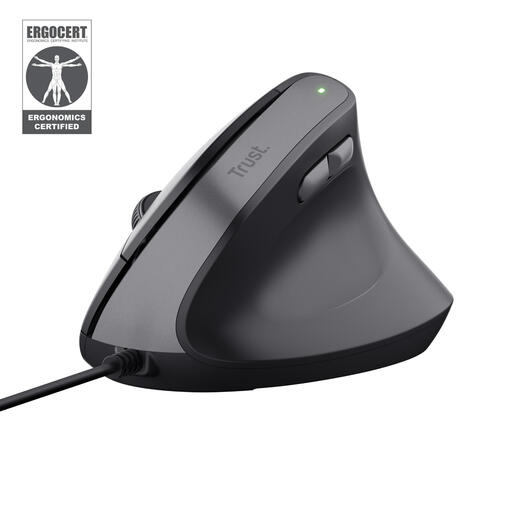
Why it suits this profile: This model combines a vertical design with a direct USB connection and an adjustable DPI button. That makes it a straightforward choice for office workers who do not want to manage a rechargeable battery or wireless receiver.
The product specifications clearly state the 57-degree angle, right-handed design, 1.50-metre cable and DPI range of 800 to 2400.
Vertical 57-degree design, five buttons, adjustable DPI, USB plug-and-play and a stated three-star ErgoCert rating.

Why it suits this profile: Suitable for right-handed users who want to combine a vertical mouse with wireless freedom, programmable buttons and use across multiple devices.
The connection is not limited to a single fixed workstation: according to the product specifications, the model supports Bluetooth and wireless connections. Remember that it needs charging.
Vertical design, up to 30,000 DPI according to the product details, six buttons and connection to multiple devices.
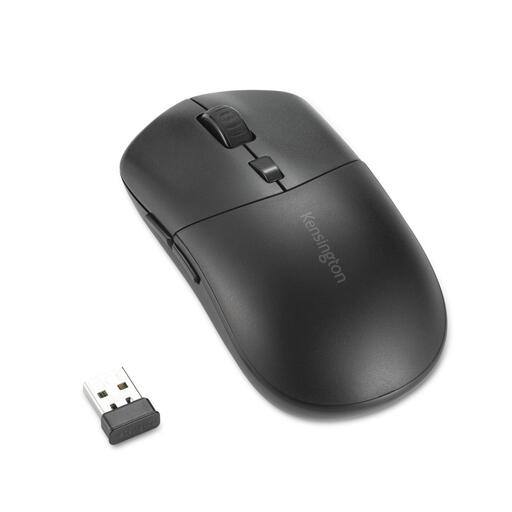
Why it suits this profile: A practical choice for users who switch between multiple devices and want a quiet mouse with both Bluetooth and a USB receiver.
The product specifications clearly state that this is not a vertical mouse. This prevents you from mistaking a standard ergonomic model for a genuine vertical design.
Up to three active devices, quiet buttons, six buttons, USB-C charging and, according to the product information, up to four months of battery life.
Place the mouse close to your keyboard so that your shoulder remains relaxed. Keep your wrist as straight as possible and let your palm rest lightly. Start with a low DPI setting and increase it gradually until you can control the cursor with small movements.
Take regular short breaks during long working days. If you experience persistent or worsening pain, tingling or numbness, it is advisable to seek medical advice. An ergonomic mouse for wrist problems may change your working posture, but it cannot guarantee that symptoms will disappear.
We have put together a complete, up-to-date list of products that fully meet these strict selection criteria and the applicable European safety regulations.
A vertical mouse can change the grip and position of your hand and forearm. Whether this feels comfortable varies from person to person. According to the Trust Bayo II product description, the model is intended to support a natural hand position, but this is not a medical claim or treatment. Set up your workstation correctly and seek advice if symptoms persist.
A wired mouse does not use batteries and does not need charging. This means you avoid the cost of disposable batteries or a replacement rechargeable battery. However, the cable takes up space and may be less suitable for a flexible or tidy workstation.
Its lifespan depends on usage, cleaning and how the cable is handled. Check the warranty and your statutory rights on the product page. The Trust Bayo II is listed as having a five-year manufacturer’s warranty. Keep the mouse dry, do not pull on the cable and take breaks during prolonged use.
