
Vandaag of morgen in huis

Kwaliteit gegarandeerd

Welkomstaanbiedingen ontgrendelen: GRATIS bezorging | Tot 80% korting | Gratis 30 dagen JoyPlus-proefperiode
Download de app
An ergonomic mouse can be comfortable if you spend long hours working at a computer every day. However, not every mouse labelled “ergonomic” is automatically right for your hand, workspace or way of moving. The wrong shape, limited connectivity or unclear battery information can quickly lead to frustration after you buy.
Joybuy Product Recommendation Officer highlights the key points to consider. This will help you compare a vertical mouse, wireless ergonomic mouse or Bluetooth mouse based on verifiable features rather than marketing claims.
A vertical mouse turns your hand towards more of a handshake position. This can feel natural for some users, but the shape and size determine whether your hand is properly supported. A mouse that’s too large forces your fingers too far apart; one that’s too small can make you grip it tensely.
So, check the following:
A right-handed mouse isn’t suitable if you regularly use your left hand. An ambidextrous model offers more flexibility, but it won’t always support your hand as well as an ergonomic mouse designed for a specific hand.
Wireless models usually work via 2.4GHz radio with a USB receiver or via Bluetooth. These aren’t the same connections. A laptop with few USB ports is often more practical to use with a Bluetooth mouse. A desktop computer or business laptop with a spare USB port can work perfectly well with a receiver.
Also check:
A rechargeable mouse saves you from having to buy loose batteries, but you do need to charge it in time. For models with replaceable batteries, battery life depends on the type of battery and how intensively you use the mouse.
Don’t just look for “long battery life”; check the specification itself. Examples in this range vary from around 16 weeks to several months. Also check whether you can continue using the mouse while it charges. This is useful to know if you’re choosing a mouse for the office or home working.
A vertical mouse often has an angle of around 50 to 60 degrees. For example, the Trust Bayo II models have an angle of 57 degrees. According to Trust’s product information, this shape is designed to place your wrist and forearm in a more natural position. That doesn’t mean the mouse prevents or treats pain. If you have persistent pain or tingling, it’s a good idea to look at your working posture and breaks as well as replacing your mouse.
DPI indicates how far the cursor moves in response to a particular hand movement. A higher DPI can be useful on a large screen, while a lower setting gives you more control for precise work.
Extremely high DPI is usually unnecessary for office work. A range of 800 to 2400 DPI, as offered by the Trust Bayo II, is generally practical for documents, spreadsheets and browsing the internet. The Logitech MX Vertical goes up to 4000 DPI, while the Razer Pro Click V2 Vertical specifies up to 30,000 DPI. These higher values are mainly of interest if you want to adjust lots of settings or use the same mouse for other tasks too.
A quiet mouse can be useful in a shared workspace, library or home office. But check how many buttons you actually need. Two thumb buttons are handy for navigating forwards and backwards. Programmable buttons can save time on repetitive tasks, but they aren’t essential for basic text and web use.
A trackball, such as the one on the Logitech ERGO M575S, moves the cursor with your thumb instead of by moving the whole mouse. This may suit a small desk, but it takes some getting used to compared with a traditional optical sensor.
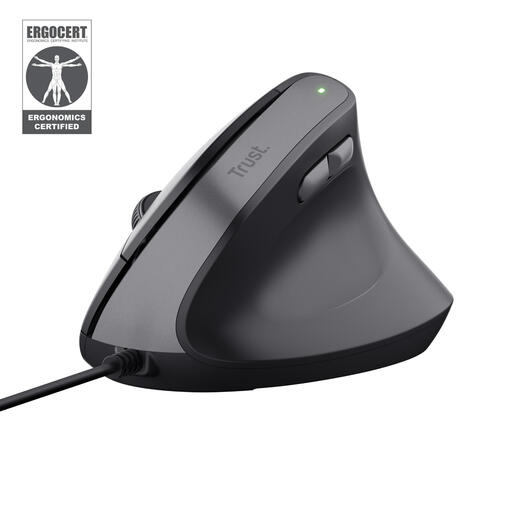
Why it suits this profile: This wired model connects via USB and doesn’t need batteries or charging. That makes it a straightforward choice for a fixed workspace.
The USB connection removes any uncertainty about Bluetooth or wireless receivers. The 57-degree shape, five buttons and adjustable 800-2400 DPI are clearly specified.
Vertical, right-handed shape, two thumb buttons and a 1.5-metre cable. According to the product information, the model has a 3-star ErgoCert rating.

Why it suits this profile: This wireless ergonomic mouse combines a vertical shape with Bluetooth and a 2.4GHz receiver. It’s a good fit for users who switch between a desk and a laptop.
The connection options and maximum DPI are clearly specified. So you don’t have to choose between Bluetooth and a USB receiver; both options are listed.
Adjustable DPI up to 4000, a rechargeable battery and a stated battery life of up to four months. The mouse is designed for right-handed use.
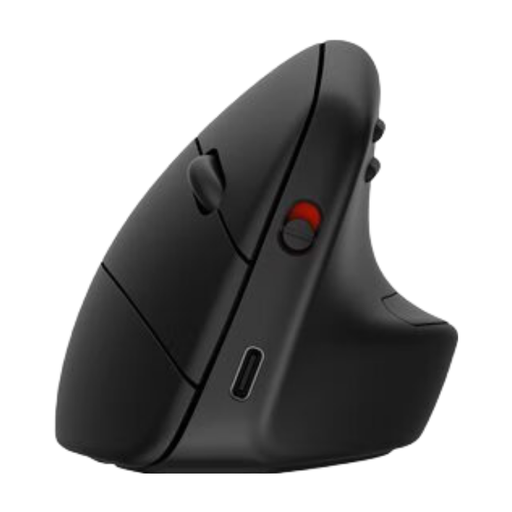
Why it suits this profile: The HP 925 supports connections to up to three devices via Bluetooth 5.3 or a USB receiver. This is practical for intensive users with several computers.
Compatibility, the vertical right-handed shape, USB-C charging port and six buttons are all specified separately. This makes it clear what you do and don’t get.
Rechargeable battery, sensor resolution up to 4000 DPI and support for Windows, Mac and ChromeOS. HP states a battery life of up to 16 weeks.
Place the mouse close to your keyboard so your arm doesn’t have to stretch out to the side all the time. Keep your shoulder relaxed and rest your hand lightly on the mouse. Adjust the DPI so you can move the cursor without making large or fast movements.
An ergonomic mouse isn’t a medical solution for early symptoms of RSI or wrist problems. Alternate between typing and using the mouse, take short breaks and check the height of your desk and chair. Stop using the mouse if your symptoms get worse, and seek professional advice if necessary.
We’ve put together a complete, up-to-date list of products that fully meet these strict selection criteria and the current European safety regulations.
A vertical mouse can offer a different hand position from a traditional model. According to the brands’ own product information, this position is designed to reduce strain during use. The effect varies from person to person, and a mouse doesn’t treat a medical condition. Also consider your posture, breaks and whether the mouse fits your hand.
Neither connection is better in every situation. Bluetooth saves a USB port and is handy for laptops. A 2.4GHz receiver is often easy to set up on computers with USB-A. Check in advance which ports and operating systems your device supports.
Battery life per charge varies by model. The product information for the models mentioned, for example, states up to three months, four months, 16 weeks or 70 days. Actual battery life depends on use and settings. A built-in battery loses capacity over time, so also check the warranty and charging options.
