
Vandaag of morgen in huis

Kwaliteit gegarandeerd

Welkomstaanbiedingen ontgrendelen: GRATIS bezorging | Tot 80% korting | Gratis 30 dagen JoyPlus-proefperiode
Download de app
Finished a long workday only to feel that familiar, nagging pain in your neck or lower back? You're not alone. A growing number of remote workers and professionals are seeking a solution in an ergonomic workspace. The market is flooded with products promising a more comfortable and productive posture. But how do you separate the good from the bad?
As a Product Recommendation Officer at Joybuy, I see the challenges consumers face every day. Many well-intentioned purchases end in disappointment. Before you invest, it's crucial to recognise the most common pitfalls.
To avoid buyer's remorse, it's smart to focus on a few objective specifications. These determine whether a product will genuinely contribute to a better posture.
The core of ergonomics is adaptability. Whether you're looking at a height-adjustable desk or a monitor riser, the adjustment range is crucial.
A stable base is non-negotiable. Pay attention to the following points:
Think beyond a single product. A sit-stand workstation is a smart solution that combines a monitor arm and keyboard tray and can be mounted on an existing desk. This ensures your screen and keyboard always move in the correct proportion to each other. If you choose separate components, make sure they work together to create a comfortable posture.
To help you with your choice, we have selected a few products that suit different needs and budgets, based on their specifications.
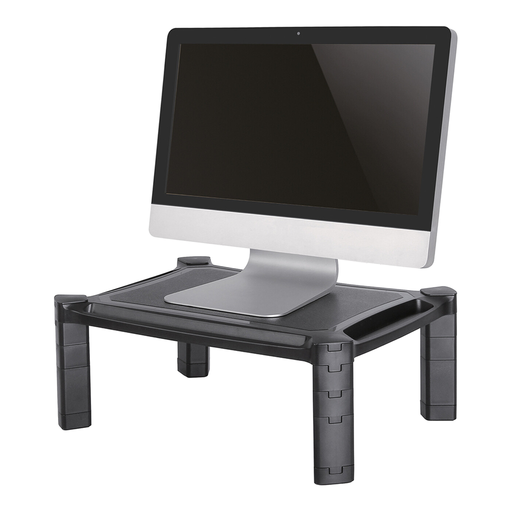
Why This Fits Their Persona: Ideal for those looking for a quick and affordable upgrade without replacing their entire desk. This riser immediately tackles the problem of a screen that's too low, whether you're using a monitor or a laptop.
This product bypasses the "one-size-fits-all" pitfall. Unlike a stack of books, its height is adjustable, allowing you to find the correct viewing height for you.
Adjustable range: Height adjustable from 4.6 to 16.8 cm. Extras: Convenient storage compartments and cable management keep your desk tidy.
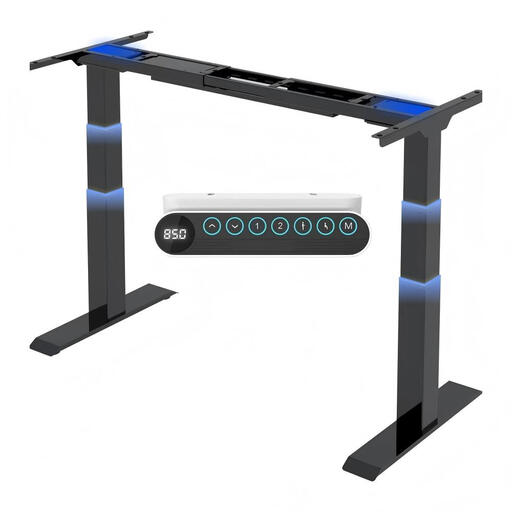
Why This Fits Their Persona: For those who spend many hours at their desk daily and are ready for a long-term investment in an active work posture. This frame is the foundation for a professional sit-stand desk.
This frame tackles the instability factor. The dual motors and 3-stage legs ensure a robust and smooth movement, even at the highest setting and with a heavy load.
High load capacity: Can support up to 160 kg, suitable for multiple monitors. Memory presets: 4 programmable settings for quick changes.
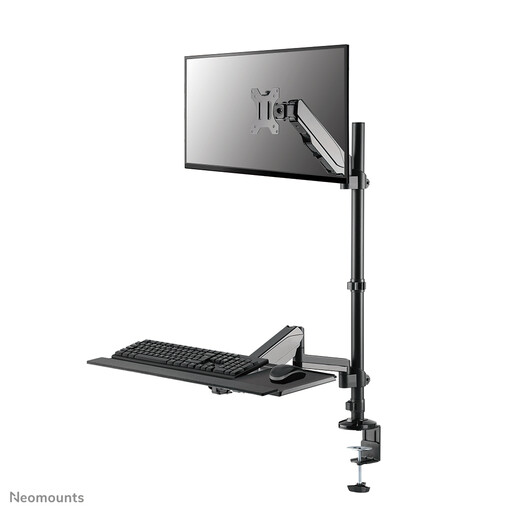
Why This Fits Their Persona: Perfect for those who want to upgrade their existing desk to a full-fledged sit-stand workstation. Ideal for smaller spaces or if you're attached to your current desktop.
This is a complete solution. It integrates the monitor arm and keyboard tray, so you don't end up with separate components that aren't properly aligned with each other.
Gas spring adjustment: Smooth and quick height adjustment for both the monitor and keyboard. All-in-one: Includes a VESA monitor mount and a tray for your keyboard/mouse.
An adjustable keyboard tray can be a crucial addition to your workspace. We have compiled a complete list of products that meet strict selection criteria.
For people who do sedentary work for many hours a day, the ability to change posture can make a huge difference in comfort. An electric desk makes this transition so easy that you'll actually do it. It's not just about standing, but about the variation. Whether the investment is worth it depends on your budget and how much time you spend at your desk.
A simple rule of thumb is to ensure the top edge of your screen is at or just below eye level when you are sitting upright. You should be looking slightly downwards without bending your neck. Maintain an arm's length distance from the screen for a comfortable viewing distance.
Yes, it is highly recommended. A laptop stand is designed to bring the screen to the correct height. If you continue to use the built-in keyboard and trackpad, you will force your arms and wrists into an unnatural, raised position. An external keyboard and mouse allow your arms to rest comfortably on the desk, with your elbows at an approximately 90-degree angle.
