
Vandaag of morgen in huis

Kwaliteit gegarandeerd
Download de app
Categorieën

Prolonged computer use can lead to discomfort in the wrist, arm, and shoulder. An ergonomic vertical mouse is designed to alleviate these issues by promoting a more natural posture. However, the selection is vast, and the wrong purchase can lead to new frustrations. This guide will help you make an informed decision based on specifications, not marketing promises.
To find a model that suits your needs, it's important to understand a few key specifications. These criteria will help you compare your options objectively.
The most defining feature of a vertical mouse is its angle. Most models feature an angle of around 57 degrees. This places your hand in a 'handshake' position, which can reduce muscle strain in the forearm compared to the flat posture required by a traditional mouse. This position is considered more neutral and comfortable for the wrist.
A mouse that is too large or too small negates the ergonomic benefit. Manufacturers often specify the intended hand size (small, medium, large) for a mouse. Also, pay attention to whether the model is specifically designed for right-handed or left-handed use. A proper fit ensures you can reach the buttons without overextending your fingers.
The choice between a wired and a wireless ergonomic mouse depends on your workspace and preference.
Modern mice offer more than just left and right clicks. Additional, often programmable, buttons can speed up your workflow. The DPI (Dots Per Inch) value indicates the sensor's sensitivity. A higher DPI means the cursor travels further on the screen with a small movement of the mouse. An adjustable DPI is useful for tailoring the sensitivity to your task, such as precision work or swift navigation.
Below is a selection of three vertical mice with different features, aimed at various user profiles.
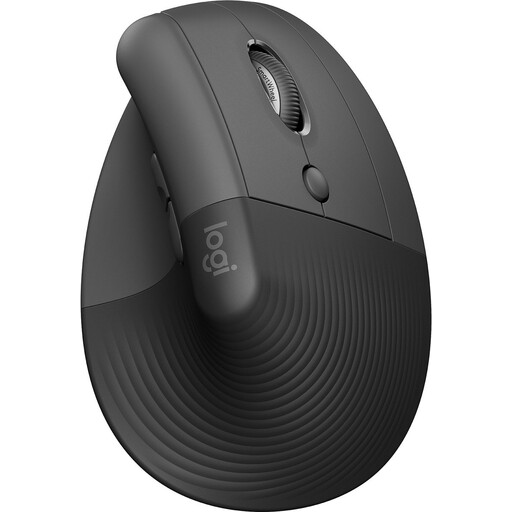
Why This Product? The Logitech Lift is designed with a focus on ergonomics and sustainability. Its 57-degree vertical angle is specifically intended to relieve wrist pressure. This model is Ergo-certified and, according to the manufacturer, is made from 70% recycled plastic. It is a wireless mouse that can be connected via both Bluetooth and the included USB receiver.
Pros
Who Is This For? This model is specifically designed for right-handed users with small to medium-sized hands who are looking for a reliable and quiet wireless mouse for daily office work.
View the Logitech Lift Vertical Ergonomic Mouse
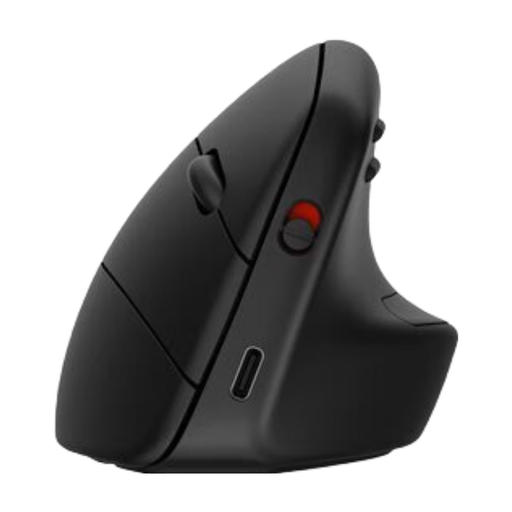
Why This Product? The HP 925 stands out with its multi-device connectivity and a detachable wrist rest for added support. According to HP, the design reduces muscle activity by 12%. The mouse can be connected to up to three devices simultaneously via Bluetooth 5.3, allowing you to easily switch between a laptop, tablet, and desktop, for example.
Pros
Who Is This For? This mouse is an excellent choice for professionals who work with multiple devices and value a rechargeable battery and the added support of a wrist rest.
View the HP 925 Ergonomic Vertical Mouse
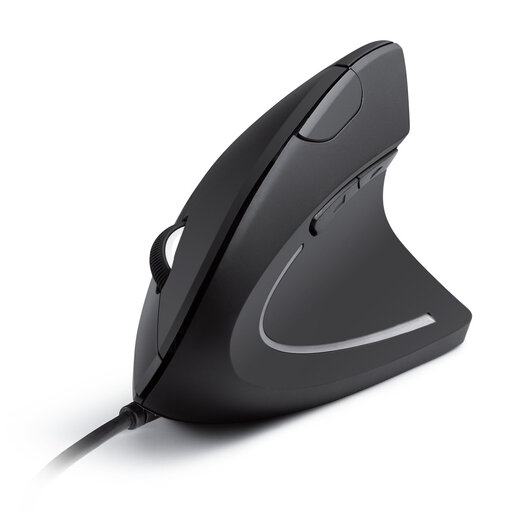
Why This Product? The Anker CE100 is a straightforward wired RSI mouse. It offers the ergonomic benefits of a vertical mouse in a simple and reliable plug-and-play package. With no batteries or wireless pairing, this is a stable solution for a fixed workstation.
Pros
Who Is This For? Ideal for users seeking an affordable and dependable mouse to combat wrist strain for a fixed computer setup and who prefer a wired connection.
View the Anker CE100 USB Wired Vertical Mouse
The selection above represents popular choices for different needs. However, your ideal comfortable computer mouse may depend on specific requirements, such as a left-handed model, a different size, or specific button configurations.
For a broader overview of models that meet various demands, you can browse our entire collection. View our full range of ergonomic computer mice for more models.
1. What is the advantage of a vertical mouse over a traditional mouse? A vertical mouse promotes a neutral 'handshake' posture. This can reduce the strain on the muscles and tendons in the wrist and forearm, which is especially beneficial for people who spend long hours at the computer or are prone to RSI-related issues.
2. How long does it take to get used to an ergonomic vertical mouse? The adjustment period varies per person, but most users get accustomed to it within a few days to a week. The posture may feel awkward at first, but as you use the mouse more, many find it more comfortable than a traditional model.
3. Is a vertical mouse suitable for gaming? This depends on the type of game. For strategy games or other slower-paced games, a vertical mouse can work just fine. For fast-paced, competitive games (like first-person shooters) that require lightning-fast and extremely precise movements, most gamers prefer a traditional gaming mouse designed for speed and grip.
Written by the Joybuy Product Recommendation Officer