
Vandaag of morgen in huis

Kwaliteit gegarandeerd

Welkomstaanbiedingen ontgrendelen: GRATIS bezorging | Tot 80% korting | Gratis 30 dagen JoyPlus-proefperiode
Download de app
Anyone who spends long days working at a computer will often notice that a standard mouse no longer feels comfortable. An ergonomic vertical mouse can support a more natural hand position, but not every model suits every user. So don’t just look for words such as “ergonomic” or “comfortable” on the packaging. The shape, connection and adjustment options determine whether it feels comfortable to use in practice.
A vertical mouse is not a medical solution either. If discomfort persists or gets worse, it is sensible to take breaks, adjust your workstation and seek professional advice if necessary.
A mouse may have a striking angle but still be too small, too large or too narrow. This is particularly important with a right-handed vertical mouse: your hand should rest comfortably on the casing without your fingers having to stretch constantly.
So check the dimensions and consider whether you prefer a full palm grip or a compact mouse. A lightweight travel mouse is handy when you’re out and about, but it does not always offer the same support as a larger model.
Most wireless models work via a 2.4GHz USB receiver. This is straightforward on a laptop or desktop computer with a spare USB port, but less convenient if you use Bluetooth exclusively or have few ports available. Also check whether the receiver can be stored inside the mouse. This reduces the chance of losing the small component.
If you switch between several devices, a mouse with Bluetooth and multi-device pairing may be more suitable. A model that only works with a USB receiver is less versatile in this respect.
DPI determines cursor sensitivity: at a higher setting, the pointer travels further with the same hand movement. This is useful for large screens or fast navigation, but a 2400 DPI mouse is not automatically more comfortable or accurate for office work.
For word processing, spreadsheets and administration, adjustable settings between around 800 and 1600 DPI are often practical. The main advantage is being able to adjust the speed to suit your screen, software and personal preference.
With the Trust Bayo II, the hand is positioned at an angle of 57 degrees, according to Trust’s product information. The design is intended to place the wrist and forearm in a more natural position. This may feel comfortable for users who find a traditional horizontal grip strenuous, but the experience varies depending on your hand and working position.
Also consider:
A wireless ergonomic mouse usually works with a USB receiver, Bluetooth or both. A receiver is often plug-and-play, while Bluetooth is useful for tablets and laptops without a spare USB port.
Choose between:
For a mouse with a built-in battery, always check the stated battery life. Trust states that the Bayo II lasts up to three months per charge and provides around eight hours of use after five minutes of fast charging. These are the manufacturer’s stated figures; actual battery life depends on usage and settings.
A quiet wireless mouse is useful in a shared workspace, library or home office where you do not want to disturb other people. Check, however, whether all the buttons are quiet or only the main buttons.
For everyday office work, three buttons and a scroll wheel are often sufficient. Additional thumb buttons are useful for browser navigation. If you regularly work with wide spreadsheets or timelines, you may also want to consider a side-to-side scroll wheel.
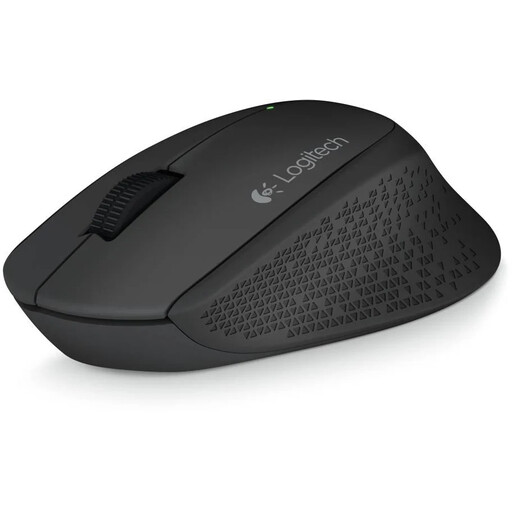
Why it suits this profile: A straightforward wireless mouse for home or office use, with a 2.4GHz connection, 1000 DPI and one AA battery.
The specifications are straightforward, so you do not pay for extra features you will not use. Please note: this is not a vertical mouse.
Right-handed shape, rubber grips, optical sensor and a wireless range of up to 10 metres according to the product description.
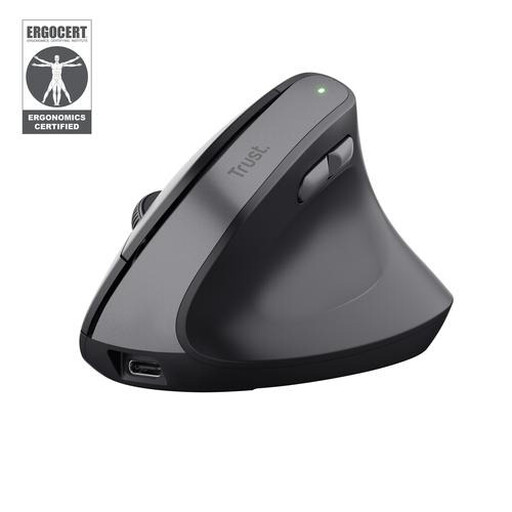
Why it suits this profile: For right-handed office and home workers who deliberately choose a vertical shape, quiet main buttons and a rechargeable battery.
The 57-degree angle, right-handed design and DPI button are clearly specified. The USB receiver does not work as a Bluetooth connection.
Adjustable from 800 to 2400 DPI, two thumb buttons, quiet clicks and an ErgoCert rating of 3 stars, as stated by Trust.

Why it suits this profile: For users who work with a laptop, desktop and tablet, or regularly edit wide spreadsheets and timelines.
The connection options are clear: one USB receiver and two Bluetooth channels. If you are looking for a vertical grip, choose a different model instead.
Up to 3200 DPI, rechargeable battery, quiet buttons and an extra side wheel for horizontal scrolling.
We have put together a complete, up-to-date list of products that fully meet these strict selection criteria and the applicable European safety regulations.
An ergonomic mouse only works well when the rest of your workstation is set up properly too. Position the mouse close to your keyboard so that your arm is not constantly held out to the side. Keep your shoulder relaxed and avoid bending your wrist sharply upwards or downwards.
Set the DPI so that you can move the pointer with small, controlled movements. Also take regular short breaks. A vertical grip can change your posture, but it may take several days to get used to. If necessary, start with shorter periods of use before using the mouse for a full working day.
A vertical shape can change your hand position and may therefore feel more comfortable for some users. It does not guarantee that symptoms will disappear. Adjust your workstation as well, and stop using the mouse if the discomfort increases.
This varies depending on the model and how it is used. According to Trust, the Trust Bayo II offers up to three months of use per charge. A mouse with separate AA or AAA batteries does not need charging, but battery life depends on the batteries and power management.
No. For office applications, a low or medium setting is often sufficient. The benefit of adjustable DPI is that you can adapt the cursor speed to your screen size and task. So look at the available settings, not just the highest number.
