
Vandaag of morgen in huis

Kwaliteit gegarandeerd

Welkomstaanbiedingen ontgrendelen: GRATIS bezorging | Tot 80% korting | Gratis 30 dagen JoyPlus-proefperiode
Download de app
An ergonomic vertical mouse could be a sensible choice if you spend long hours at a computer every day and want to try a different hand position. With this type of mouse, your hand sits more upright than it does with a standard model. This can change how your wrist and forearm rest, but it is not a medical solution for RSI or ongoing discomfort.
Your choice depends mainly on your hand, connection and working style. A striking design or high DPI rating tells you little about comfort on its own. So keep an eye out for these common pitfalls.
A 57-degree angle, a tall body or a wide thumb rest may feel comfortable, but not for every hand. A vertical mouse for right-handed users is also unsuitable for left-handed use. So always check:
A mouse that is too small can make your hand cramp. A model that is too large may be difficult to move around.
DPI determines how far the cursor moves in response to a given mouse movement. Extremely high settings are rarely necessary for office work. An adjustable DPI mouse is useful because you can tailor the speed to your screen, software and personal preference.
Look beyond the maximum figure and check which settings are available. A range of 800 to 2400 DPI may be enough for word processing, spreadsheets and browsing. Gaming may call for different features, such as a higher polling rate, sensor performance and programmable buttons.
A wireless mouse keeps your desk free of cables, but it runs on batteries or a built-in rechargeable battery. You will need to consider charging, pairing and the possibility of needing a receiver. A wired ergonomic mouse is ready to use straight away and does not need charging.
A USB mouse is particularly suitable for a fixed workspace. Just check that your laptop or desktop has a compatible USB port. Cable length matters too: a short cable can be awkward at a large desk or if your computer is further away.
A vertical ergonomic computer mouse should feel natural when you click and scroll. Check the position of the thumb buttons, the support for your palm and the resistance of the main buttons. Extra buttons are useful for navigating the web, but not essential if you mainly work with documents and emails.
Take it easy when you first start using a new mouse. A vertical grip feels different from a traditional mouse. Rest your forearm comfortably on the desk and avoid making large movements from your wrist. Take regular breaks during long working days.
A USB mouse with plug-and-play functionality often works without installation. This is useful on a work computer where you are not allowed to install software. Before you buy, check:
The size determines how your hand rests on the mouse. A lighter model is easier to move, while a heavier one may feel more stable. Neither is automatically better for everyone.
Clean the mouse with a soft, slightly damp cloth and keep liquid away from the buttons and sensor. Do not pull on the cable of a wired mouse. If you have persistent pain, tingling or loss of strength, seek medical advice rather than simply buying a different mouse.
The recommendations below are based on verifiable product information, such as shape, connection, DPI, buttons and intended use. Product claims about ergonomics or comfort come from the relevant product descriptions and should be treated as product specifications, not medical guarantees.
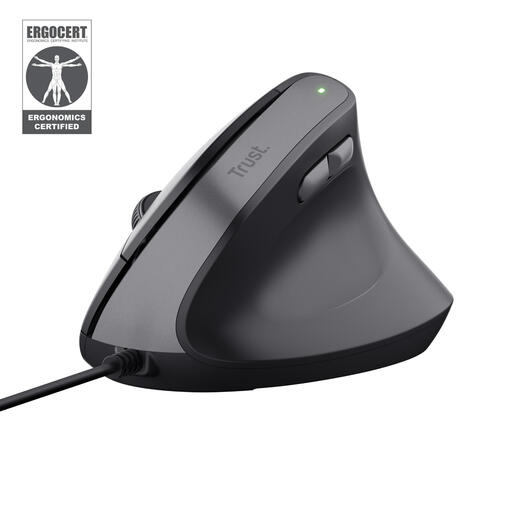
Why it suits this user profile: This vertical USB mouse is designed for right-handed office and home workers with a fixed workspace. The wired connection means there is no need to charge or pair it.
The product information specifies a 57-degree angle, five buttons and adjustable DPI from 800 to 2400. This gives you concrete details about what you are buying, rather than just a general comfort claim.
Vertical design, USB plug-and-play, two thumb buttons, a 1.5-metre cable and a weight of 121 grams.

Why it suits this user profile: This model is aimed at right-handed users who want to combine a vertical shape with wireless freedom, multiple settings and use across different devices.
You are not limited to a single connection method: the product details list USB-C, Bluetooth and wireless connectivity. Check in advance which connection will work with your computer.
Vertical design, six buttons, programmable functions, up to 30,000 DPI and a rechargeable battery, according to the product information.
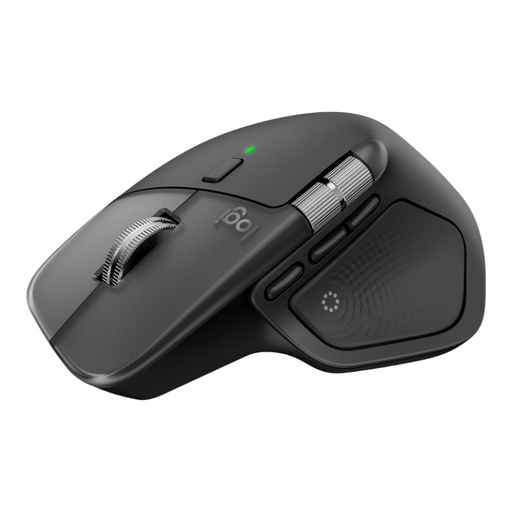
Why it suits this user profile: A good fit for users who scroll a lot, work across multiple devices and need extra features for spreadsheets, creative software or everyday office work.
The product description lists eight programmable buttons, horizontal scrolling and a connection to up to three devices. This puts the focus on practical workflow features, rather than just the shape.
Bluetooth and Logi Bolt, USB-C charging, a thumb scroll wheel and a MagSpeed scroll wheel, according to the product specifications. This is not a vertical mouse, but it is an alternative if extra controls matter more to you than an upright grip.
We’ve put together a complete, up-to-date list of products that meet these strict selection criteria and the applicable European safety regulations.
A vertical mouse can support a different hand and wrist position. According to brands’ own product information, the vertical shape may reduce strain during prolonged use, but this is not an established medical effect. Also adjust your desk height, chair, keyboard position and breaks. If your symptoms persist or get worse, it is important to seek professional advice.
Start with a low to medium setting, such as 800 or 1200 DPI, and see whether you can move the cursor comfortably across the screen. Increase the speed if you use a lot of screen space or want to make fewer arm movements. An adjustable DPI mouse is useful because you can change the setting to suit different tasks.
A wired model does not use batteries and does not need to be charged. This keeps ongoing energy costs to the electricity used through the USB port. On the other hand, the cable takes up space and limits your freedom of movement. A USB mouse can therefore be a practical choice for a fixed workspace.
