
Vandaag of morgen in huis

Kwaliteit gegarandeerd

Welkomstaanbiedingen ontgrendelen: GRATIS bezorging | Tot 80% korting | Gratis 30 dagen JoyPlus-proefperiode
Download de app
A long day at your desk doesn't have to end with an aching back or a stiff neck. Whether you work from home, study, or enjoy long gaming sessions, the right chair is the foundation of a comfortable and productive workspace. But the market is flooded with chairs that make big promises. How do you distinguish a long-term investment from a poor purchase?
As a Product Recommendation Officer at Joybuy, I'm here to help you cut through the marketing jargon. We'll look at the common pitfalls that cost you money and the specifications that truly matter.
Before you make a choice, it's crucial to recognise the most common mistakes. Many chairs look good at first glance but fall short in the long run.
designer office chair might complement your decor, but if aesthetics come at the expense of support, you'll pay the physical price. A beautiful design doesn't guarantee comfort.To avoid these pitfalls, focus on the specifications that directly contribute to proper posture. These are the three non-negotiables.
A good ergonomic office chair adapts to you, not the other way around. At a minimum, check for the following settings:
One of the most critical features is the office chair with lumbar support. It supports the natural curve of your lower back and helps prevent slouching. Note the difference:
Your chair is a crucial part of a larger system. For a truly ergonomic setup, the interplay with your desk and monitor is just as important. Consider a sit-stand desk or a height-adjustable desk to vary your posture throughout the day. A separate monitor stand or a monitor arm ensures your screen is at eye level, which helps reduce neck strain.
Not every chair is right for every user. Below is a selection of popular choices tailored to different needs and budgets.
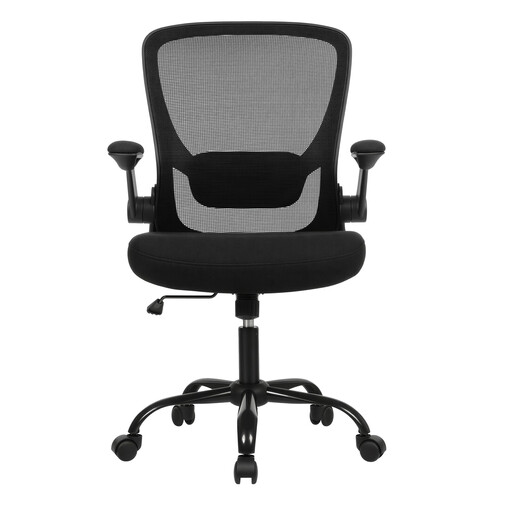
Why This Fits Their Persona: This chair provides the essential ergonomic features for a comfortable home office chair without the high price tag. Ideal for anyone seeking a functional and affordable solution.
This chair goes beyond a basic design by offering adjustable lumbar support and flip-up armrests. These are tangible features that avoid the "hollow ergonomics" trap.
The flip-up armrests make the chair space-saving; you can easily slide it under your desk. The breathable fabric and thick seat cushion ensure comfort while you work.
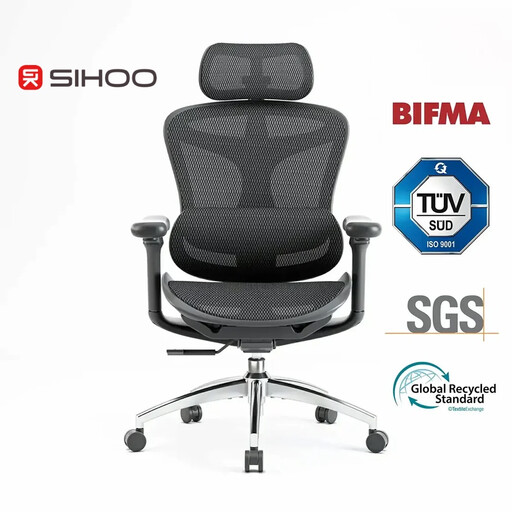
Why This Fits Their Persona: For those who spend 8+ hours a day at a desk, maximum adjustability is crucial. This chair is designed for long-term, intensive use, with advanced support that moves with your body.
This model bypasses the "one-size-fits-all" pitfall with a self-adjusting lumbar support and 3D-adjustable armrests. The chair dynamically adapts to your posture for a personalized fit.
The dynamic support follows your movements, providing continuous support. The chair meets various international standards (like BIFMA and TUV), which substantiates its quality and safety.
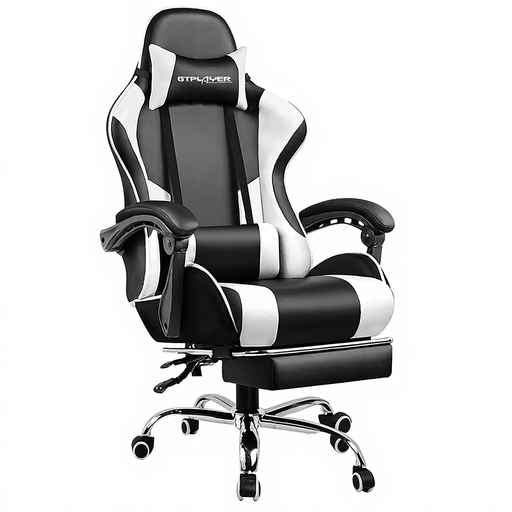
Why This Fits Their Persona: A gaming chair needs to do more than just support; it must provide comfort during intense, long sessions. This chair is designed for relaxation with a deep recline function, footrest, and massage cushion.
While many gaming chairs focus on a racing aesthetic, this model adds functional comfort features. The USB-powered massage lumbar support is a tangible feature that goes beyond the standard.
The combination of a deep recline (up to 150 degrees), a retractable footrest, and a massage cushion offers a complete solution for both focused gaming and relaxation.
We have compiled a complete, real-time list of products that fully satisfy these strict selection criteria and UK safety regulations.
1. How do I correctly adjust my ergonomic office chair? Start with the seat height: ensure your feet are flat on the floor and your knees are at an approximate 90-degree angle. Next, adjust the lumbar support to fit the curve of your lower back. Position the armrests so your shoulders are relaxed and your arms form a 90-degree angle with the desk. Make sure there are a few centimetres of space between the edge of the seat and the back of your knees.
2. What is the average lifespan of a good office chair? The lifespan depends on the quality of the materials and the intensity of use. An entry-level model often lasts 2 to 3 years. A mid-range chair with a sturdy frame and durable upholstery can last 5 to 7 years. High-end models with robust mechanisms and quality guarantees can remain functional for 10 years or more.
3. Is a gaming chair also suitable for office work? It can be, but pay close attention to the features. Many gaming chairs are designed with a deep recline function and prominent side "wings," which may not be comfortable for everyone during focused work. However, if the gaming chair has good adjustable armrests, proper lumbar support, and a seat that isn't too restrictive, it can serve perfectly well as an office chair.
