
Vandaag of morgen in huis

Kwaliteit gegarandeerd

Welkomstaanbiedingen ontgrendelen: GRATIS bezorging | Tot 80% korting | Gratis 30 dagen JoyPlus-proefperiode
Download de app
A comfortable workspace is about more than just an office chair. Your keyboard, mouse, monitor setup and seating support all affect how efficiently you work. However, when you’re looking for ergonomic office accessories, you can quickly come across broad marketing claims. A product may be described as ergonomic, even if its adjustability, dimensions or compatibility aren’t right for your desk.
So focus on features you can verify. These are some common pitfalls to watch out for:
With a keyboard, the layout matters more than the appearance. An ANSI-layout QWERTY keyboard may have a different key shape and Enter key from the one you’re used to. Also check whether you want a full-size, TKL or compact keyboard.
A Bluetooth keyboard is handy for laptops, tablets and smartphones, but check how many devices you can connect at the same time. A USB receiver is often straightforward to use with a desktop computer, while Bluetooth offers extra flexibility. For a wireless keyboard and mouse set, it’s convenient if both devices work through a single receiver.
Switch type also matters for gaming. A mechanical gaming keyboard may have hot-swappable switches, backlighting and a detachable wrist rest. These are useful features, but they don’t automatically make a keyboard suitable for everyone. Also consider noise levels, key travel and the amount of desk space available.
An ergonomic keyboard stand or keyboard tray should suit the way you work. Check:
VESA 75 x 75 mm and 100 x 100 mm are common patterns for monitor stands and arms, but always check your screen’s manual. Also check the maximum weight per arm. Four lightweight screens put different demands on a desk from four large models.
A monitor arm for 4 screens takes up less desk space, but it needs a sturdy, suitable desktop. A glass or hollow desk isn’t necessarily suitable for a heavy clamp. Also make sure the total weight stays within the limit.
Materials affect weight, durability and maintenance. Aluminium can provide a sturdy casing, while plastic is often lighter. For recycled materials, it’s worth checking the stated percentage rather than relying on a general sustainability claim.
Charging and battery details matter for wireless accessories. According to Trust’s product description, the Lyra set has a rechargeable battery with a stated battery life of up to six months per charge. According to Eastern Times Technology’s product description, the ET set can run on batteries for up to twelve months under certain conditions. These are the brands’ stated product specifications; actual battery life depends on usage, settings and battery quality.

Why it suits this profile: This set is designed for a simple office or home-working setup, with a US QWERTY layout, a full-size keyboard and a single wireless receiver.
The product specifications state the layout, 104 keys, adjustable mouse resolution and a range of up to 10 metres. Check beforehand that US QWERTY suits the way you work.
Full-size layout, one USB receiver, optical mouse and stated energy-saving operation of up to 12 months.
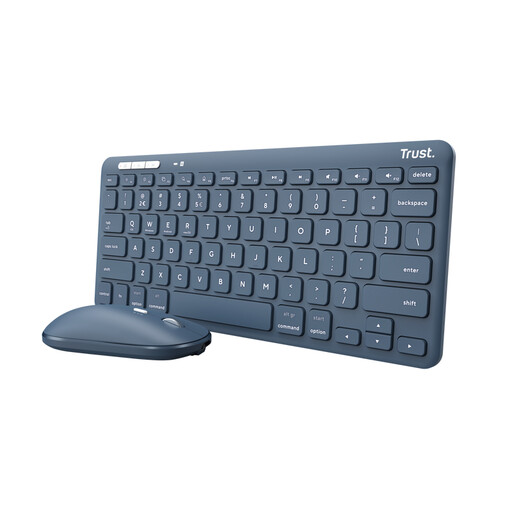
Why it suits this profile: A good fit if you switch between a computer, tablet and smartphone and want a compact set for the office, home or on the go.
According to Trust, the set supports three connected devices via USB or Bluetooth. Its 78-key TKL layout is compact, but less suitable if you need a number pad.
Scissor keys, adjustable feet with three height settings, Bluetooth 5.0, compatibility with multiple operating systems and a rechargeable battery.
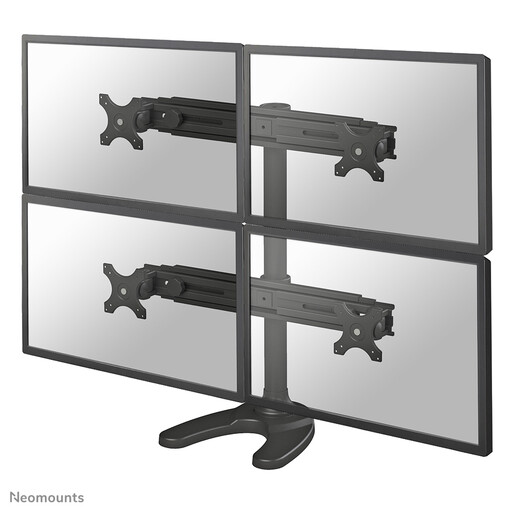
Why it suits this profile: A practical choice for office professionals, IT workspaces and reception areas where four screens need to be arranged neatly on one desk.
The specifications state a maximum of 8 kg per screen, screen sizes from 19 to 30 inches and VESA 75 x 75 or 100 x 100 mm. Check all three before installation.
Four screen positions, height adjustment from 24 to 70 cm, tilt, swivel and cable management.
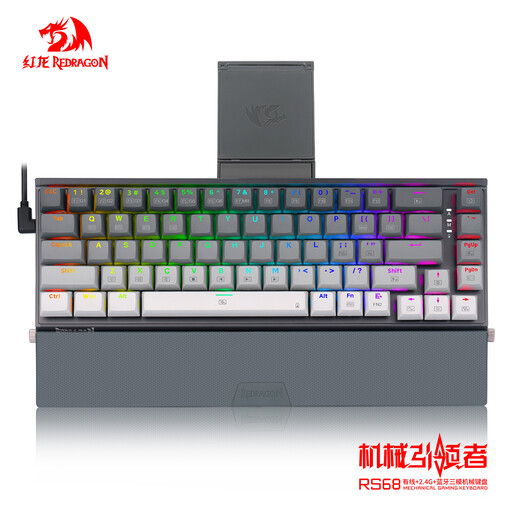
Why it suits this profile: The tri-mode connection and hot-swappable PCB are appealing if you regularly customise your keyboard for gaming or office work.
Rather than just mentioning RGB lighting, the product information also specifies an aluminium casing, hot-swappable PCB, tri-mode connection and detachable wrist rest.
Wired, wireless and Bluetooth connectivity, interchangeable switches, RGB lighting and a removable wrist rest.
Start with your monitors. Position the main screen directly in front of you, and use a monitor stand or arm to adjust its height and viewing angle. With multiple screens, cable management is useful, but leave enough slack for when you turn them.
Next, place the keyboard directly in front of you. A compact TKL set leaves more room for your mouse; a full-size model is more convenient if you work with numbers a lot. An ergonomic keyboard stand can be particularly useful at reception desks or shared workstations, helping to keep the keyboard and mouse in a fixed position. If you’re using a VESA model, check the mounting holes and maximum load.
An ergonomic seat cushion may change how your sitting position feels, but the right fit is personal. Check its dimensions, material, ventilation and whether the cover is removable. Don’t expect it to provide medical treatment: an accessory may support comfort, but it isn’t a substitute for professional advice if you have persistent problems.
We’ve put together a complete, up-to-date list of products that meet these strict selection criteria and the applicable European safety regulations.
Start with a keyboard and mouse that suit your layout and how you use your hands. Then add a monitor stand or arm if your screen is too low. A seat cushion or keyboard stand is an extra, depending on your desk and sitting position.
Bluetooth is handy for laptops, tablets and multiple devices. A USB receiver is often straightforward to use with desktops and can provide a stable connection without extra pairing steps. A set with both options offers more flexibility, but check which devices it actually supports.
Lifespan depends on the rechargeable battery or batteries, charging cycles, usage and maintenance. Check the stated battery life, warranty and whether the battery can be replaced. Clean the keys and mouse with a soft, dry cloth, and keep small USB receivers out of children’s reach.
