
Vandaag of morgen in huis

Kwaliteit gegarandeerd

Welkomstaanbiedingen ontgrendelen: GRATIS bezorging | Tot 80% korting | Gratis 30 dagen JoyPlus-proefperiode
Download de app
An ergonomic mouse can be a sensible choice if you spend a lot of time working at a computer, gaming or regularly switching between multiple devices. However, the term itself does not tell you much. A large body may look comfortable, for example, but still fail to fit your hand properly. Similarly, high DPI values are not automatically useful for office work.
Pay particular attention to the shape, connectivity options and adjustable features. Below, we cover the key points to consider, common buying pitfalls and several popular choices for different types of user.
A vertical mouse positions the hand more like a handshake. This can feel comfortable, but getting used to the new position takes time. What is more, many vertical models are designed exclusively for right-handed use. Always check the hand orientation, dimensions and position of the thumb buttons.
An ergonomic mouse is not a medical treatment for wrist problems. If symptoms persist, your working posture, regular breaks and professional advice are more important than simply buying a new accessory.
DPI indicates how sensitively the cursor responds to movement. An adjustable-DPI mouse offers flexibility, but an extremely high value is mainly relevant for specific gaming or graphics applications. For spreadsheets, word processing and browsing, control, tracking and a suitable sensitivity are usually more important.
Also pay attention to the difference between maximum DPI and the levels that can actually be selected. A mouse with several practical settings may be more useful than a model that only highlights a high maximum value.
A wireless mouse can help keep your desk tidy, but check the type of connection before buying. Bluetooth works without a USB receiver, while a 2.4GHz dongle often requires a spare USB port. Some models support both options.
You should also check the power source. A built-in battery needs charging, while a model powered by AA or AAA batteries requires periodic replacements. For multi-device use, it is important to check how many devices can actually be paired.
Measure or compare the length and width of the mouse with your hand. A model that is too small can leave your fingers hanging over the edge, while a mouse that is too large may create additional strain. Look out for:
A lightweight gaming mouse can feel comfortable during fast movements, while a heavier office model may feel more stable.
Optical sensors are common and work on many desk surfaces. Some models use a laser sensor or are described in the product information as suitable for glass. Check the specifications for the surface you intend to use rather than assuming that every sensor performs equally well everywhere.
For everyday use, an adjustable range such as 800 to 2400 DPI is often practical. Gaming models generally offer higher values, but their usefulness depends on your game, screen resolution and personal preference.
A Bluetooth mouse is convenient for laptops and tablets, while a USB cable provides a direct connection without the need to manage battery life. Models with multiple connection methods are flexible, but may rely on software to configure buttons, lighting or macros.
Also check the software limitations. On some models, programmable functions or macros are only available in Windows or only when the mouse is connected by cable. This is not always made clear in a short product title.
The selection below is based on verifiable product specifications, such as shape, connectivity, DPI, button layout and power source.
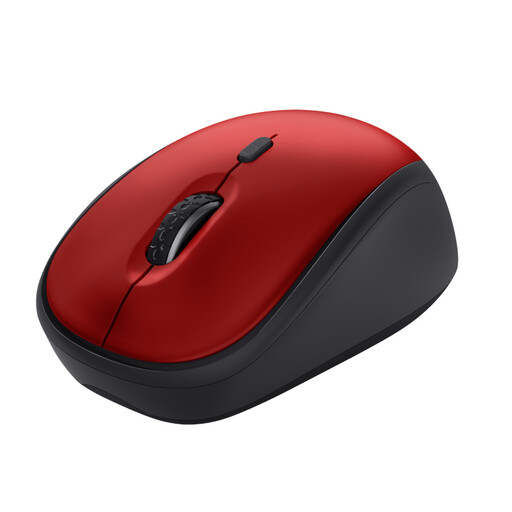
Why it suits this profile: This compact office mouse uses a 2.4GHz USB receiver, has quiet buttons and offers adjustable DPI from 800 to 1600.
The product information clearly states the connection method, DPI levels and symmetrical design for left- and right-handed users.
Quiet clicking, an optical sensor, wireless range of up to 8 metres and battery power.

Why it suits this profile: The 57-degree vertical design, Bluetooth and 2.4GHz connectivity and rechargeable battery are well suited to intensive office and home use.
The shape, right-handed orientation, DPI switch and maximum sensor resolution of 4000 DPI are listed separately.
Rechargeable battery, support for multiple connection methods and a range of up to 10 metres.

Why it suits this profile: This model combines a vertical design with gaming features, lighting, six buttons and a sensor resolution of up to 30,000 DPI.
The mouse supports both Razer HyperSpeed and Bluetooth and can be connected via USB-C; however, check that the right-handed design suits you.
Up to five devices according to the product information, programmable buttons and a rechargeable battery with a stated usage time of up to six months.
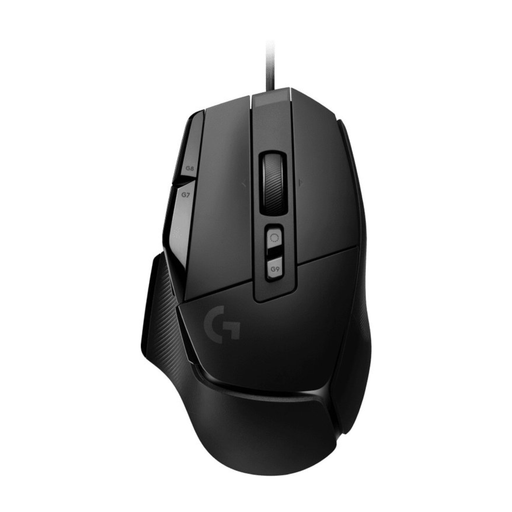
Why it suits this profile: A wired gaming mouse eliminates the need to manage batteries and, according to the product specifications, offers 13 buttons and a sensor of up to 25,600 DPI.
The wired connection makes the power supply clear, while the extra buttons are useful for users who want to assign specific functions.
USB Type-A connection, optical sensor, programmable functions and a polling rate of up to 1000 Hz.
Electronic mice sold in the Netherlands are covered by statutory conformity rules. The product specifications for several models state a minimum statutory warranty of two years; additional terms may vary by product. Keep your purchase details and check the information on the product page.
Use a mouse on a suitable, flat surface and keep the sensor and body clean. Charge built-in batteries using the recommended cable, and keep USB dongles clean and dry. If you notice unusual heat, an odour or a malfunction, stop using the mouse.
A vertical design can make your hand position feel different, but the effect varies from person to person. A mouse designed for wrist problems is not a substitute for an ergonomic workstation or professional advice. Choose a model that suits your hand and take regular breaks.
Neither is better in every situation. Bluetooth saves a USB port and is convenient for laptops. A 2.4GHz receiver can be practical for desktops or devices without reliable Bluetooth support. Check the range, compatibility and number of devices supported.
Battery life depends on the battery, batteries, connection mode and lighting. Manufacturers provide different figures for this. According to the product information, the models mentioned range from several months on a rechargeable battery to up to 24 months on a single AA battery. Switch off the lighting if you want longer battery life.
We have put together a complete, up-to-date list of products that fully meet these strict selection criteria and the applicable European safety regulations.
