
Vandaag of morgen in huis

Kwaliteit gegarandeerd

Welkomstaanbiedingen ontgrendelen: GRATIS bezorging | Tot 80% korting | Gratis 30 dagen JoyPlus-proefperiode
Download de app
An ergonomic mouse can be a sensible choice if you spend hours working at a computer every day. However, an unusual shape or high DPI setting does not automatically mean greater comfort. The right choice depends on your hand size, grip, how long you use it and how you connect the mouse.
Home workers, office professionals and gamers mainly encounter these three pitfalls:
If you are looking for a mouse for wrist pain or a mouse for RSI, it is best not to focus solely on the product name. A mouse may help you adopt a different working posture, but it does not prevent or treat medical conditions. If you experience persistent pain, tingling or numbness, stop using it and seek professional advice.
A vertical mouse keeps your hand more upright than a standard model. The Trust Bayo II, for example, has an angle of 57 degrees and is designed for right-handed use. This design may suit users who want to position their wrist and forearm differently.
When comparing models, pay attention to:
A lightweight model is not automatically more comfortable. Gamers who make large movements may benefit from a low weight. For office work, a slightly heavier model may feel more stable.
DPI indicates how sensitively the mouse responds to movement. A mouse with adjustable DPI offers flexibility: a lower setting can be useful for precise selections, while a higher setting allows faster navigation.
Examples from the range:
For normal office work, an extremely high DPI setting is usually unnecessary. For gaming, the sensor, tracking, polling rate and software settings are also important. A higher polling rate can transmit input more frequently, but the practical effect depends on your computer, game and monitor.
A wired mouse does not have a battery and generally works immediately via USB. This is convenient at a fixed workstation and avoids interruptions for charging. A wireless mouse offers greater freedom of movement, but requires you to consider battery life, charging method and connection type.
For wireless models, check:
A model with programmable mouse buttons is useful for shortcuts in office applications or games. However, check whether macros and button assignments only work in wired mode. According to the product information, this applies to the software for the ET wireless gaming mouse, for example.
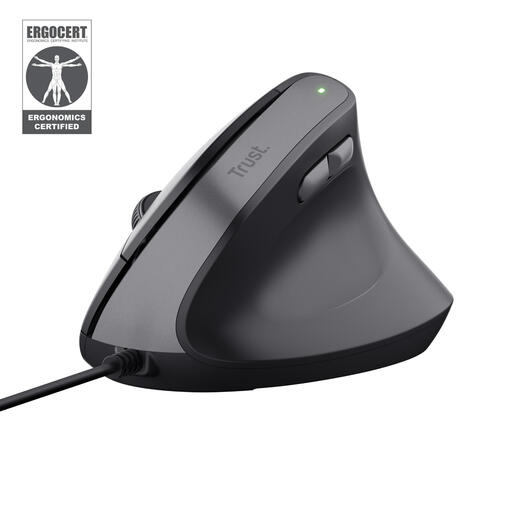
Why it suits this profile: This right-handed model connects via USB and is ready to use without a battery or complicated installation. That makes it suitable for a fixed home workstation or office desk.
The key specifications are clear: a 57-degree vertical angle, a USB cable and adjustable DPI from 800 to 2400. You therefore do not pay for features you will not use.
Vertical shape, five buttons, DPI switch and a 1.5-metre cable. The product information also states an ErgoCert rating of three stars.

Why it suits this profile: This wireless vertical mouse combines a work-focused shape with features for users who switch between devices and also game occasionally.
The product details explicitly state the right-handed design, dimensions of 111 × 88 × 79 mm and a weight of 150 grams. Check these measurements before ordering.
Bluetooth and Razer HyperSpeed, six programmable buttons and a sensor of up to 30,000 DPI. According to the product information, the battery lasts for up to six months.
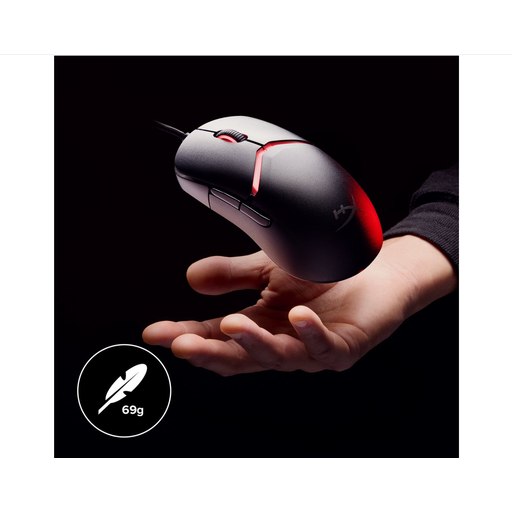
Why it suits this profile: This wired gaming mouse is designed for players who value low weight, a high polling rate and an adjustable grip.
The cable prevents charging issues during long sessions. However, bear in mind that the connection is fixed and check whether your system and game support 8,000 Hz.
Weighing 69 grams, adjustable DPI up to 26,000, RGB lighting and a polling rate of up to 8,000 Hz according to the product specifications. The housing is suitable for left- and right-handed use.
A suitable model only works well if your desk set-up is right:
For a mouse for office work and gaming, a model with several connection options can be practical. For office work only, a wired mouse with adjustable DPI and a simple shape is often sufficient. RGB is mainly a visual feature and has no direct effect on tracking or hand position.
We have compiled a complete, up-to-date list of products that fully meet these strict selection criteria and the applicable European safety regulations.
It can be, particularly if you would consciously like to try a different hand position. Allow yourself time to adjust: a vertical mouse feels different from a traditional model at first. Choose a size that suits your hand and adjust the cursor speed gradually.
This depends on the battery, how you use it and the charging method. Manufacturers often state an estimated battery life under specific conditions. For example, Razer gives the Pro Click V2 - Vertical Edition a battery life of up to six months, while HP states up to sixteen weeks for the HP 925. Treat this as a product specification rather than a guaranteed usage period.
Not always. A high DPI setting gives you more adjustment options, but the right setting depends on your game, screen resolution and personal preference. Also consider sensor tracking, polling rate, weight and grip. For office work, settings between 1,600 and 4,000 DPI are already sufficient for many users.
