
Vandaag of morgen in huis

Kwaliteit gegarandeerd

Welkomstaanbiedingen ontgrendelen: GRATIS bezorging | Tot 80% korting | Gratis 30 dagen JoyPlus-proefperiode
Download de app
An ergonomic mouse can make things more comfortable when you work at a screen for long periods every day. However, not every mouse with a curved shape is automatically suitable for your hand, desk or working environment. A vertical mouse, for example, may take up more space than expected, while a wireless mouse without Bluetooth support will not connect directly to every laptop.
So do not just look for words such as “comfortable” or “ergonomic”. Focus on verifiable specifications, such as hand orientation, dimensions, connection method, DPI range and number of buttons.
An ergonomic vertical mouse keeps your hand in more of a handshake-like position. This can feel different from using a standard mouse, particularly during the first few days. So check the dimensions and see whether the model is designed exclusively for right-handed use.
A compact mouse can be useful when travelling, but may offer less support for a larger hand. Conversely, a large model may be impractical for smaller hands or a narrow desk.
DPI indicates how sensitively the cursor responds to movement. A setting between 1,000 and 1,600 DPI is sufficient for many office tasks. For graphic design or gaming, a higher, adjustable range may be useful. However, an extremely high maximum does not automatically mean that the mouse is more accurate in everyday use.
Also consider how you adjust the DPI. A physical button is handy when you want to switch quickly between a precise setting and a higher cursor speed.
A wireless mouse can work via a 2.4GHz USB receiver, Bluetooth or both. A USB receiver is usually easy to connect, but takes up a USB port. Bluetooth is useful for laptops and tablets without any spare USB ports. Check in advance that your computer supports the connection you want to use.
For a battery-powered model, check the battery life and battery type. A rechargeable mouse requires a USB cable, and it is important to check whether you can continue using the mouse while it is charging.
A vertical mouse often gives your wrist and hand a more defined position than a traditional model. The Trust Bayo II, for example, uses an angle of 57 degrees, while the Logitech MX Vertical also has a vertical shape with an angle of 57 degrees. These are product specifications; how comfortable the position feels varies from one user to another.
Also check:
If you experience persistent pain or discomfort, a mouse is not a medical treatment. Also adjust your desk height, sitting position and breaks, and seek advice from a healthcare professional if symptoms are serious or persistent.
For an office mouse, plug-and-play via USB is often sufficient. A wired mouse does not require batteries and remains available throughout the working day. A wireless model keeps your desk tidier, but requires you to keep an eye on batteries, charging and range.
A few examples:
Battery life depends on usage, settings and conditions. Treat the periods quoted as the manufacturer’s product specifications, rather than as a guaranteed operating time for every situation.
A quiet mouse is particularly useful in a shared office, library or home office. Check whether “quiet” refers to the buttons and not just the overall design. Extra buttons are useful for browser navigation, shortcuts or gaming, but can make the mouse larger and more complex.
For an RSI mouse, many users look for a vertical shape, light operation and a natural hand position. Product information from some brands refers to use in cases of wrist complaints or RSI. This is not a medical guarantee. So focus mainly on comparing the shape, operation and adjustment options with your own preferences.
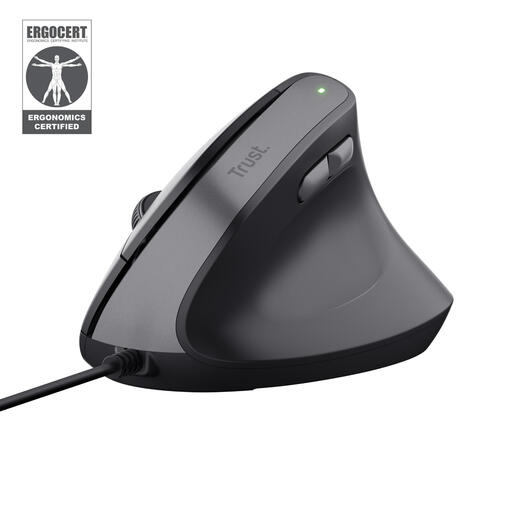
Why it suits this profile: The wired connection keeps things simple: connect via USB and start working straight away without charging.
The fixed 57-degree shape and stated dimensions make the ergonomic design clear. However, the model is right-handed and not wireless.
Adjustable DPI from 800 to 2,400, two thumb buttons and a 1.5-metre cable. The product information states that it has a 3-star ErgoCert classification.
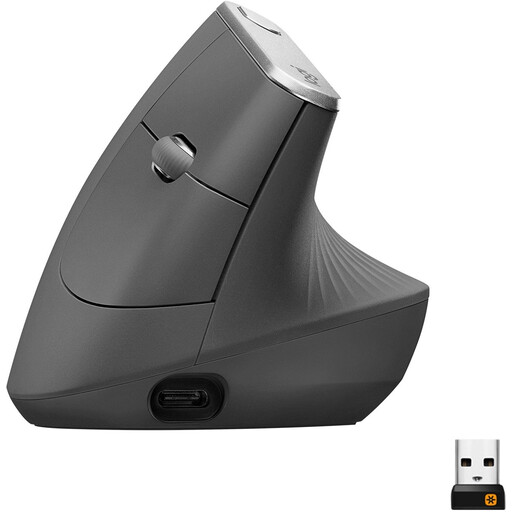
Why it suits this profile: Ideal for home workers and office professionals who want to choose between Bluetooth and a USB receiver.
The product specifications state the 57-degree shape, right-handed operation, dimensions and 4,000-DPI sensor range.
Rechargeable battery, Bluetooth, USB receiver, adjustable DPI and a stated operating time of up to four months per charge.
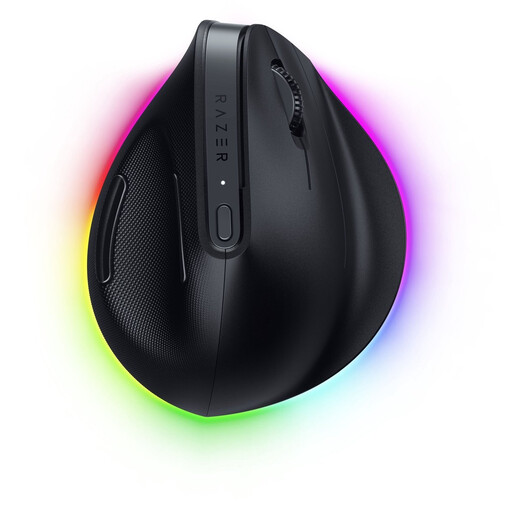
Why it suits this profile: Designed for users who combine work and gaming and need plenty of customisation options.
Alongside the vertical shape, the dimensions, weight of 150 grams, six buttons and connection options are clearly specified.
Bluetooth and 2.4GHz connectivity, programmable buttons, an optical sensor up to 30,000 DPI and support for Razer Synapse 4.

Why it suits this profile: A practical choice for right-handed gamers who prefer a wired connection and plenty of programmable features.
The model uses a USB cable, so you do not need to plan around battery life. Bear in mind, however, that it has a standard, non-vertical shape.
Optical sensor up to 25,600 DPI, 13 stated buttons and a polling rate of up to 1,000 Hz according to the product specifications.
We have put together a complete, up-to-date list of products that fully meet these strict selection criteria and the applicable European safety regulations.
A vertical mouse changes the position of your hand, but is not a medical solution. Its suitability depends on your hand, working posture and the nature of the problem. Choose a model based on its shape, dimensions and operation, and seek professional advice if symptoms persist.
Not necessarily. A wireless mouse gives you greater freedom of movement and keeps your desk tidy. A wired mouse does not require batteries and can keep working continuously. Choose Bluetooth if you want to keep your USB ports free; choose a USB receiver if plug-and-play is more important to you.
Its lifespan depends on the switches, cable or battery, intensity of use and maintenance. Check the warranty terms and battery information for each product. Clean the mouse with a dry cloth, avoid liquids and, with a wired model, do not pull on the cable.
