
Vandaag of morgen in huis

Kwaliteit gegarandeerd

Welkomstaanbiedingen ontgrendelen: GRATIS bezorging | Tot 80% korting | Gratis 30 dagen JoyPlus-proefperiode
Download de app
A long day at the computer can take its toll. A nagging pain in your wrist, a stiff arm, or sore shoulders are signals you shouldn't ignore. A standard mouse often forces your hand and wrist into an unnatural position. An ergonomic mouse is designed to change this by promoting a more neutral posture.
The search for a good mouse for wrist relief can be overwhelming due to the sheer number of models and specifications. As a Joybuy Product Recommendation Officer, I'm here to help you cut through the marketing jargon. This article provides practical tips and a selection of popular models, so you can make an informed choice that suits your workday.
Before we dive into the products, here are a few key points to guide your decision.
The most common type of ergonomic mouse is the vertical mouse. It keeps your hand in a "handshake" position, which can reduce strain on your wrist and forearm. The angle of the mouse is crucial here; a steeper angle promotes a more vertical posture. Also, pay attention to the size. A mouse that is too large or too small for your hand will negate the ergonomic benefits. Measure the width of your palm to find a suitable size.
A wireless ergonomic mouse offers maximum freedom of movement and a clutter-free desk. Most models connect via Bluetooth or a small USB receiver. The downside is that you need to keep an eye on the battery. A wired model, on the other hand, is always ready to use and often more affordable. The choice depends on your personal preference and your workspace setup.
An ergonomic office mouse can boost your productivity with extra, programmable buttons. These allow you to assign common actions like copy, paste, or navigating back to a previous page to a single click. Also, consider the DPI (Dots Per Inch). A higher DPI value means the cursor moves faster across the screen with a small mouse movement. Adjustable DPI is useful for tailoring the sensitivity to your specific tasks.
Based on specifications and features, we've compiled a list of compelling options for you.
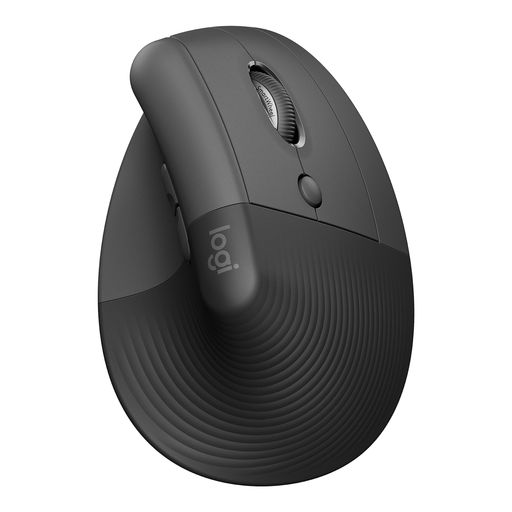
Why It Stands Out The Logitech Lift is a vertical mouse with a distinctive 57-degree angle. This posture is designed to alleviate wrist pressure and promote a more natural forearm position. According to Logitech, the mouse is Ergo-certified and specifically designed for small to medium-sized hands.
Pros
Who Is It For? This mouse is an excellent choice for right-handed users with small to medium-sized hands who are looking for a wireless solution for daily office work.
View the Logitech Lift Vertical Ergonomic Mouse
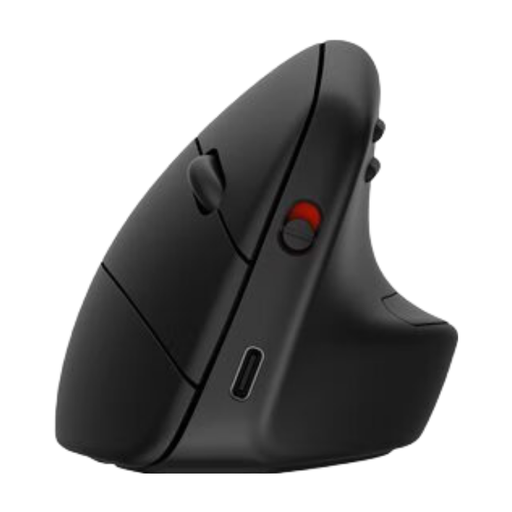
Why It Stands Out The HP 925 distinguishes itself with a detachable wrist rest. This provides extra support and can be used as desired. HP claims the design reduces muscle activity by 12%. The mouse is designed for versatility, with the ability to connect to three different devices.
Pros
Who Is It For? Users who frequently switch between devices and appreciate the flexibility of a detachable wrist rest will find this an interesting model. Suitable for right-handed users with medium to large hands.
View the HP 925 Ergonomic Vertical Mouse
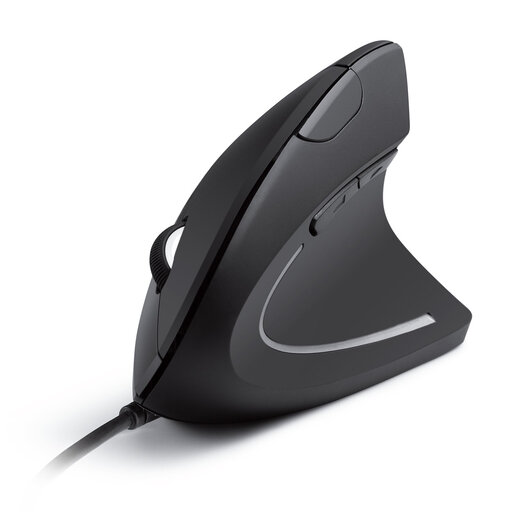
Why It Stands Out The Anker CE100 is a no-nonsense wired RSI-prevention mouse. It offers the ergonomic benefits of a vertical "handshake" grip in a simple and affordable package. With no bells and whistles, this is a plug-and-play solution that works right out of the box.
Pros
Who Is It For? Ideal for anyone looking for a reliable and affordable ergonomic mouse who prefers a wired connection. A great entry-level model to see if a vertical mouse is right for you.
View the Anker CE100 USB Wired Vertical Mouse
This selection is just a starting point. The right ergonomic mouse is a personal choice that depends on your hand size, tasks, and budget.
Curious about other models? Check out our full range and discover more options in the vertical mouse category.
A vertical mouse promotes a neutral, "handshake" position for your wrist and forearm. This can reduce the muscle tension that occurs when you lay your hand flat on a traditional mouse, which often leads to inward rotation of the forearm.
Most users need an adjustment period of a few days to a week. The new posture may feel a bit awkward at first, especially since you're using different muscles in your arm and hand. Start slowly and, if necessary, alternate with your old mouse to make the transition smoother.
