
Vandaag of morgen in huis

Kwaliteit gegarandeerd

Welkomstaanbiedingen ontgrendelen: GRATIS bezorging | Tot 80% korting | Gratis 30 dagen JoyPlus-proefperiode
Download de app
If you spend hours at a computer every day, you’ll soon notice when a mouse doesn’t suit your hand or workspace. An ergonomic mouse can support the way you position your hand and forearm, but a model labelled “ergonomic” isn’t automatically right for you. Its shape, connection, hand orientation and controls matter far more than the wording on the packaging.
In this buying guide, you’ll find out what to look for and which models suit different working situations.
A vertical mouse can position your hand more upright. Some people find this comfortable, but a model that’s too big or too small can feel awkward. Always check the dimensions and whether the mouse is designed for right-handed users.
An angle of, say, 57 degrees tells you something about the design, but it doesn’t mean the mouse will automatically fit every hand.
A wireless ergonomic mouse doesn’t always connect via Bluetooth. Some models use a 2.4 GHz USB receiver. This can be handy with a desktop computer, but less so if your laptop has few USB ports.
So check whether you need a Bluetooth mouse, a mouse with a USB receiver or both connection options. Also check which port is available: a USB-C receiver won’t fit straight into a traditional USB-A port.
A high dpi value may sound appealing, but for office work, adjustable sensitivity matters more than an exceptionally high maximum. A dpi button lets you adjust the pointer for a large screen, photo editing or precise work in spreadsheets, for example.
The number of buttons is worth considering too. Programmable buttons can save time, but only if you actually use them.
A vertical mouse supports what’s known as a handshake position. The Logitech MX Vertical and Logitech Lift, for example, have a 57-degree angle. According to the manufacturers’ product information, this shape is designed to support hand and forearm positioning during extended use. It doesn’t guarantee that symptoms will disappear or be prevented.
If you’re looking for a mouse for RSI or an ergonomic mouse for wrist problems, it’s a good idea to make the switch gradually. Alternate between mice, take breaks, and make sure your office chair, keyboard and screen height are properly adjusted too. If symptoms persist, seek professional advice; a mouse is not a medical device.
Choose according to the way you work each day:
For a wireless model, check the stated battery life too. Manufacturers usually quote a maximum; actual battery life can vary depending on the settings and how intensively you use the mouse.
For office work, quiet clicks, a smooth scroll wheel and easy-to-reach thumb buttons are often more useful than gaming features. A quiet mouse is well suited to a shared workspace or home office. If you work with wide spreadsheets, horizontal scrolling can be a useful extra.
Also check compatibility with Windows, macOS or ChromeOS. You may need the manufacturer’s software to access extra features, such as configuring the buttons.
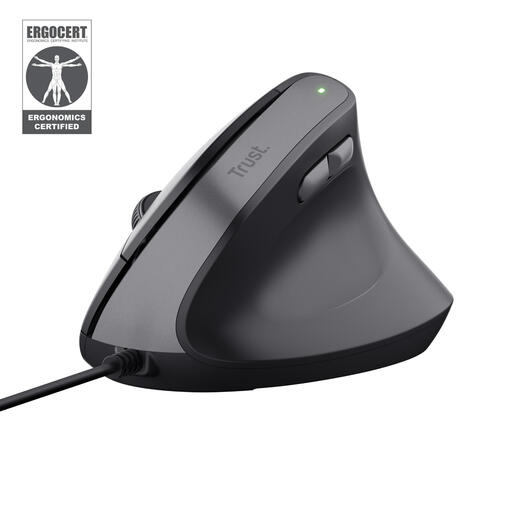
Why it suits this user: A straightforward choice for a fixed workspace where a cable isn’t a problem. The mouse connects directly via USB and doesn’t need charging.
The wired USB connection avoids battery changes and connection issues. The right-handed vertical design and 57-degree angle are clearly stated in the product specifications.
Adjustable dpi from 800 to 2400, five buttons and two thumb buttons for browser navigation.
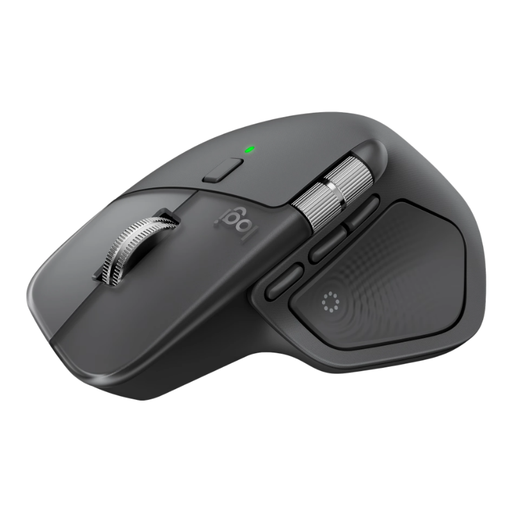
Why it suits this user: For professionals who regularly switch between documents, programmes and devices, and value extra controls.
The specifications list both Bluetooth 5.1 and a USB-C nano receiver, so you’re not tied to just one connection type.
Eight programmable buttons, adjustable dpi up to 8000, horizontal scrolling and a built-in rechargeable battery.

Why it suits this user: Designed for right-handed users who want a vertical mouse with Bluetooth, a USB receiver and rechargeable power.
You’re not limited to one connection option: this model supports Bluetooth and a Unifying receiver. Its rechargeable battery means you don’t need to rely on disposable batteries.
57-degree vertical design, adjustable 4000 dpi and a stated battery life of up to four months.
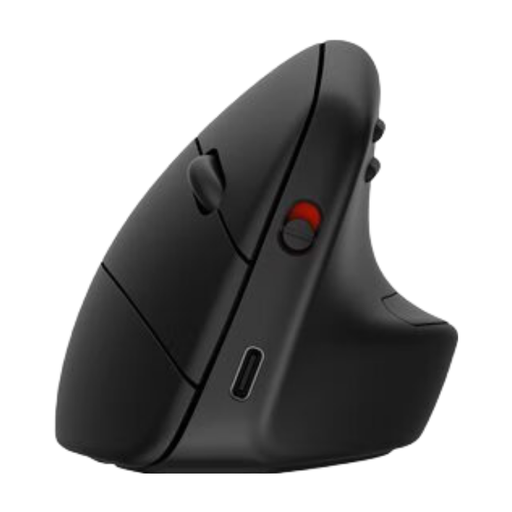
Why it suits this user: A versatile choice if you switch between Windows, Mac and ChromeOS, and work in more than one location.
The mouse offers both Bluetooth and an RF receiver. According to HP’s own information, it supports up to three devices and offers a battery life of up to sixteen weeks.
4000 dpi, six buttons, USB-C charging and a detachable wrist rest, according to the product information.
We’ve put together a complete, up-to-date list of products that meet these strict selection criteria and the applicable European safety regulations.
A vertical mouse can encourage a different hand and forearm position, but the effect varies from person to person. Brands may claim ergonomic benefits based on their own research or certification; don’t treat these claims as a medical guarantee. Choose the right size, get used to it gradually and take breaks.
Bluetooth is handy if you want to keep your USB ports free or work with several laptops. A USB receiver can be a simple option for a desktop PC. Check which ports your computer has beforehand, and make sure the mouse works with your operating system.
Battery life between charges varies by model. Product information may state anything from a few weeks to several months. The overall lifespan depends on how the mouse is used, charged and stored. Use the supplied or a suitable charging cable, and don’t charge a built-in battery if the casing becomes unusually warm.
