
Vandaag of morgen in huis

Kwaliteit gegarandeerd

Welkomstaanbiedingen ontgrendelen: GRATIS bezorging | Tot 80% korting | Gratis 30 dagen JoyPlus-proefperiode
Download de app
Long days at the computer can take their toll. A nagging ache in your wrist, a stiff arm, or shoulder pain are signals you shouldn't ignore. One of the best adjustments you can make to your workspace is choosing the right mouse. An ergonomic mouse is designed to keep your hand, wrist, and arm in a more natural position, which can reduce muscle strain.
In this article, we'll help you make the right choice. We'll discuss what to look for and highlight several popular models that are worth considering.
The search for the right mouse is a personal one. What works for one person may not be suitable for another. Here are three key points to get you started.
The most striking ergonomic mice are the vertical models. A vertical mouse places your hand in a "handshake" position. This prevents the bones in your forearm from crossing, which manufacturers claim can reduce muscle tension. This type is often recommended as a mouse for RSI-related issues. There are also ergonomically shaped mice with a more traditional, horizontal design. These often provide extra support for your thumb and palm, which also significantly increases comfort.
A wireless ergonomic mouse gives you a clutter-free desk and complete freedom of movement. Most modern wireless mice have a long battery life and a stable connection via Bluetooth or a USB receiver. A wired model has the advantage of never running out of battery and always providing a reliable connection. The choice depends on your personal preference and your workspace setup.
Mice come in various sizes. A mouse that is too large or too small for your hand can actually cause extra strain. Manufacturers often indicate which hand size (small, medium, or large) a mouse is suitable for. Also, pay attention to whether the model is designed for left- or right-handed use. Most models are right-handed ergonomic mice, but left-handed and ambidextrous options are also available.
Based on specifications and features, we have selected a few models that stand out in the market.
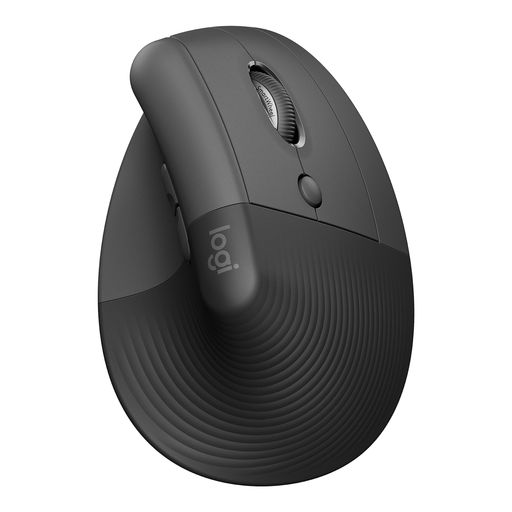
Why It Stands Out: The Logitech Lift is a vertical mouse with a unique 57-degree angle. This position is designed to reduce wrist pressure and promote a more natural forearm posture. According to Logitech, this provides comfort for the forearm and upper body. The mouse is wireless and made from 70% recycled plastic.
Pros
Who Is It For? This mouse is specifically designed for people with small to medium-sized right hands who are looking for a vertical mouse to encourage better posture.
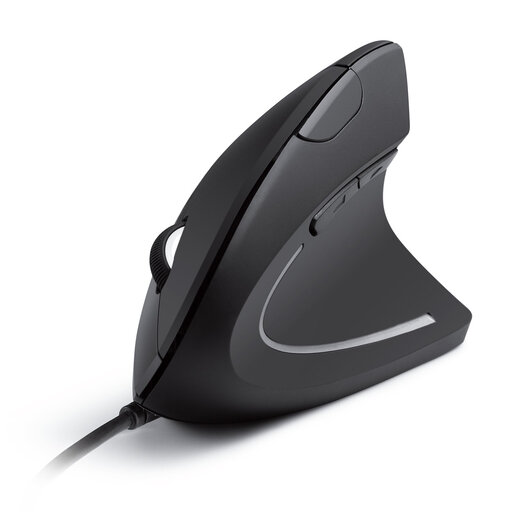
Why It Stands Out: The Anker CE100 is a no-frills, wired vertical mouse. It offers the ergonomic benefits of the "handshake" position in a simple and affordable package. You plug it in via USB and can get started immediately, without any software installation.
Pros
Who Is It For? Ideal for users seeking a simple and effective wrist-friendly mouse for a fixed workstation. It's an excellent choice if you want to try a vertical mouse for the first time without making a large investment.

Why It Stands Out: The MX Master 4 is not a vertical mouse, but a powerhouse of traditional ergonomics and productivity. Its shape is meticulously sculpted to support the hand, including a comfortable thumb rest. It's packed with advanced features, like an 8K DPI sensor that works even on glass and the MagSpeed scroll wheel that lets you blaze through documents.
Pros
Who Is It For? For professionals and power users who demand the highest standards of precision, functionality, and comfort. If you frequently switch between tasks and devices, this is a model that can accelerate your workflow.
These recommendations represent just a small fraction of the available options. Every hand and work style is different, and the perfect mouse for you depends on your personal needs.
Are you looking for a different type, such as a left-handed model, a compact mouse for travel, or a specific wired model? Browse our full range and find the perfect match for your workspace. Discover more options in our USB mouse category.
An ergonomic mouse is designed to follow the natural shape and movement of your hand and wrist. This can help reduce muscle strain in your forearm, wrist, and shoulder, leading to greater comfort during long workdays. For example, a vertical mouse places your hand in a 'handshake' position, which prevents your forearm bones from twisting.
The adjustment period varies from person to person. Most users feel comfortable within a few days to a week. It's a matter of letting your muscles adapt to the new, more natural posture. Start by using it for a few hours a day and gradually increase the duration.
An ergonomic mouse is designed to reduce the load on muscles and tendons, a common factor in the development of conditions like RSI (Repetitive Strain Injury). By promoting a more natural posture, its use can help prevent discomfort or alleviate existing tension. However, it is not a medical device. For persistent pain, it is always advisable to consult a doctor or physical therapist.
