Which features matter most?
When writing radio scripts at a shared desk, your choice mainly comes down to hand position, mouse space, typing noise and how easy the keyboard is to move.
Compact, non-split keyboard
Choose this style if: your main priority is freeing up space for your mouse and you don’t need separately adjustable halves.
Bear in mind: some compact models don’t have a dedicated number pad. Also check how much space the rest of your setup takes up.
Wave-shaped or fixed split keyboard
Choose this style if: you want to try a different hand position but would rather use a single keyboard.
Bear in mind: you can’t adjust the angle between your hands independently. Also allow space for a wrist rest, if you plan to use one.
Two separately positioned halves
Choose this style if: you want to set the distance and angle between your hands yourself.
Bear in mind: setting it up and putting it away takes a little more effort at a shared desk. Check the exact version and connection options.
| Factor to consider |
What should you check? |
Who might find this more important? |
| Hand and wrist position |
Compare a fixed wave shape, a fixed split frame and separate halves. Try out whether your preferred position works at your desk. |
When I’m typing long scripts, I want to be able to adjust the distance and angle between my hands. Around 33% of consumers prioritise an adjustable hand position. |
| Space for your mouse and script materials |
Measure your desk and consider whether you need a number pad. Allow for the space taken up by a wrist rest or separate halves. |
At a shared desk, I want to keep my mouse close and have enough room for my script. Around 25% of consumers prioritise desk space above all else. |
| A quieter typing experience |
If possible, try the keyboard in a similar setting. A description such as “quiet” isn’t the same as a comparative noise measurement. |
When colleagues are sitting next to me, I want to know whether the keyboard will be distracting. Around 25% of consumers prioritise keeping things quiet for colleagues. |
| Connecting and moving your keyboard |
Check the exact model, key layout, available USB port or Bluetooth connection, and whether you’re allowed to install any software on your work computer. |
When I move between shared workstations, I want to be able to connect and carry my keyboard easily. Around 17% of consumers prioritise being able to switch workspaces quickly. |
Joybuy keyboards for a shared workspace
This selection includes keyboards you can compare for a shared workspace. When choosing, consider the layout, connection and how much space the keyboard takes up.
 No image available
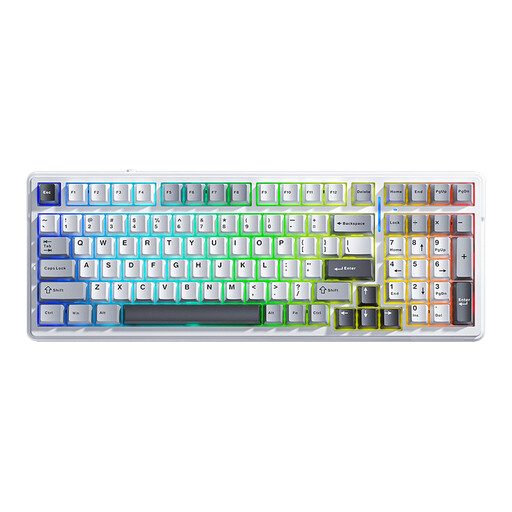
AULA F99 Wireless Mechanical Keyboard, Tri-Mode, 99 Keys
An option if you want to be able to use different connection types at a shared desk.
Bluetooth, 2.4G or wired; 99 keys; US QWERTY layout. The product description mentions hot-swappable keys and a detachable wrist rest.
View at Joybuy
 No image available
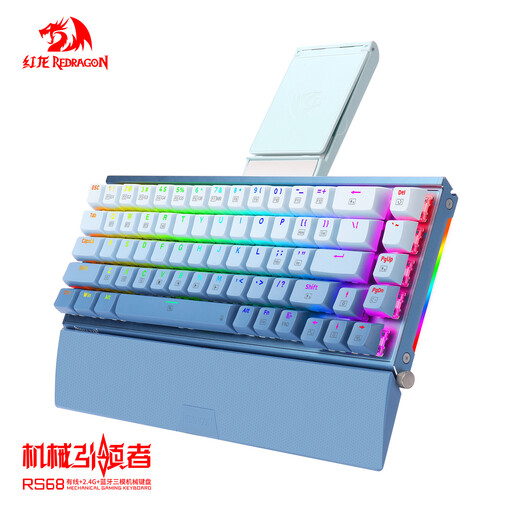
RS68 The Third Mock Examination Wireless Aluminum Alloy Mechanical Keyboard
An option if you’re looking for a compact keyboard layout with a choice of connections.
65% layout; wired, Bluetooth or 2.4 GHz. The product description mentions an aluminium case and detachable wrist rest.
View at Joybuy
 No image available
Razer Huntsman Mini Keyboard, Purple Switch, US QWERTY
A compact option if you want to save space on a shared desk.
60% size; optical switches; USB connection and detachable USB-C cable. The layout is US International QWERTY.
View at Joybuy
 No image available
Apple Magic Keyboard with Touch ID and Numeric Keypad, Dutch, White Keys
An option if you need a number pad and use a Mac with Apple silicon.
Dutch layout with number pad and Touch ID; Bluetooth and rechargeable battery. The stated compatibility is with Mac models featuring Apple silicon.
View at Joybuy
 No image available
Voxis B033 Tri-Fold Bluetooth Keyboard with Touchpad
An option if you want a foldable keyboard that also works with mobile devices.
63 keys; Bluetooth; integrated touchpad. The product name states that it can be used with tablets, smartphones and computers.
View at Joybuy
Frequently asked questions
Do I need a split keyboard if I write a lot of scripts?
No, not necessarily. Choose separate halves if your main priority is adjusting the distance and angle between your hands; a compact model may suit you better if you’re mainly looking for more space for your mouse. Also consider the rest of your workspace and vary your screen-based tasks.
How should I set up my keyboard at a shared desk?
Adjust your workstation to suit your body and check the setup each time you move to a different workspace. Position your keyboard and mouse so you can work comfortably. The Arboportaal also recommends varying your tasks and taking short breaks.
What can I do if discomfort persists despite switching keyboards?
Don’t treat a keyboard as a form of treatment. The Arboportaal recommends contacting your occupational health doctor if symptoms start to appear and, if needed, arranging a workplace assessment.
What rules apply to employees who work on a laptop every day?
According to the Arboportaal, if an employee spends more than 2 hours a day working with a screen, the screen and keyboard must not be attached to each other. A laptop must therefore be used with a separate screen or keyboard. Under the Working Conditions Decree, screen work must be regularly alternated with other work or a break. These requirements apply to the relevant work situation; they don’t mean you have to buy a particular ergonomic model.
What should I check about my rights when buying online?
For many standard online purchases from a business, you have a 14-day cooling-off period. Check the seller’s information and whether return costs apply. If a product is faulty, the seller is responsible for providing a solution free of charge, such as a repair or replacement, according to the Rijksoverheid.


