For writing a short bio in a shared office, first decide how much keyboard noise and desk space you can accommodate. Then choose between a fixed shape, separate halves or a compact model. A compact keyboard leaves room beside it, while two separate halves give you more flexibility over their placement. Trust and Kensington describe the keys on specific models as quiet, but these are manufacturers’ claims, not comparative noise measurements, and they do not prove that a model will prevent complaints.
Who is this relevant to?
Editor working alongside colleagues
You want to edit text without distracting keystrokes and are looking for a shape that feels comfortable to type on. Trust and Kensington describe the keys on specific models as quiet; this is not a comparative noise measurement.
Typist looking to adjust hand position
You want to position your hands further apart and have room for a split keyboard. Arboportaal also recommends paying attention to your workstation set-up and varying your tasks.
Hot-desk user
You want room for a mouse and documents, or you switch between computers. A compact size and the connections available on a particular model meet different practical needs.
What should you look for when choosing?
Fixed, curved or split model
When to choose: if colleagues sit nearby and you want to compare a fixed shape with keys the manufacturer describes as quiet, take a look at the Trust Keyra and Kensington Pro Fit Ergo Wireless.
Trade-off: the shape is fixed. Check the physical layout and, if possible, try the keyboard out at your workplace to assess its noise.
Two separate halves
When to choose: if you mainly want to decide for yourself how far apart the keyboard halves sit and at what angle, the R-Go Split Break is one option to compare.
Trade-off: the halves need space and take some getting used to. The version reviewed is wired and has a US-QWERTY layout.
Compact keyboard
When to choose: if there is limited room for your mouse or documents, compare a compact model such as the BakkerElkhuizen S-board 840.
Trade-off: the S-board 840 has no dedicated numeric keypad. Compact does not automatically mean split or quiet.
Fixed split design with palm rest
When to choose: if you want a fixed split design with an integrated palm rest, compare the Logitech ERGO K860.
Trade-off: check the layout and available desk space. The manufacturer’s product page does not provide a comparative noise measurement.
| What to consider |
What should you check? |
Who is this important for? |
| Keyboard noise around colleagues |
Check the exact model and, if possible, try it in the office environment where you plan to use it. |
If I work alongside colleagues, I want to know whether my keystrokes will disturb them. Around 40% of consumers say keyboard noise is their top priority. |
| Adjustable hand position |
Check that you can position the halves and mouse comfortably, and that the physical layout suits your typing habits. |
If I want to position my hands further apart, I look for the freedom to place the keyboard where I want it. Around 30% of consumers say hand position is their top priority. |
| Room for a mouse and documents |
Check the overall dimensions, whether there is a numeric keypad and how much desk space the keyboard takes up. |
At a small or shared desk, I want to leave room for my mouse and documents. Around 20% of consumers put having clear desk space first. |
| Connection and keyboard layout |
Compare the physical layout and check that the model works with your computer and preferred connection. |
If I work at a hot desk, I want to make sure the layout and connection are compatible with my computer. Around 10% of consumers make compatibility their top priority. |
Points to watch out for when buying
-
‘Ergonomic’ does not guarantee you will avoid discomfort
A keyboard’s shape is no substitute for setting up your workstation properly or varying your tasks.
Choose a shape that fits your workspace, adjust your chair, screen and mouse properly too, and discuss any early signs of discomfort with your occupational health doctor.
-
A manufacturer’s claim that a keyboard is quiet is not a noise measurement
Trust and Kensington’s descriptions do not provide noise levels that can be compared directly.
If possible, try typing on the keyboard in the office environment where you plan to use it.
-
QWERTY does not always mean the same physical layout
The R-Go Split Break version reviewed has a US-QWERTY layout. Check which version you are choosing with other models too.
Before ordering, check the full product variant and physical key layout, not just the product family.
Brands to consider
Trust
The Keyra is a wireless keyboard with a fixed shape. Compare it if you want a choice of connection options and are looking at keys the manufacturer describes as quiet.
- Trust lists a palm rest, two Bluetooth connections and a USB receiver for the Keyra.
- The description of the keys as quiet is a manufacturer’s claim. Check the physical layout and how noisy it is in use.
Kensington
The Pro Fit Ergo Wireless has a fixed split design, while the KB675 EQ TKL is a more compact model with no dedicated numeric keypad.
- Kensington describes the keys on the Pro Fit Ergo Wireless as silent and says the model is suited to people with medium to large hands.
- The description of the keys as quiet applies to this specific model, not the entire range. With the KB675 EQ TKL, check whether not having a numeric keypad suits your work.
R-Go Tools
The Split Break is an option if you want to position the two keyboard halves separately.
- The version reviewed is wired, black and has a US-QWERTY layout with a break indicator.
- The product information provides no comparative noise level or independent evidence that it prevents discomfort.
BakkerElkhuizen
The S-board 840 is a compact, wired model to compare if having space beside your keyboard is important.
- The model reviewed has a scissor mechanism and no dedicated numeric keypad.
- Its compact size is no proof that it is quieter than other keyboards.
Logitech
The ERGO K860 has a fixed split design with an integrated palm rest.
- Logitech presents the shape and support as design features of this model.
- The product information consulted provides no comparative noise measurement. Check the keyboard layout and the space available too.
Keyboards at Joybuy
These keyboard options suit practical needs such as a compact size, a wired set-up or a wireless connection. Check the full version and physical key layout for each model.
 No image available
GXTrust Thado Wired Gaming Keyboard, TKL
A wired TKL version to compare if you want to leave space beside your keyboard.
Wired; TKL; QWERTY; for PC and PS5.
Joybuy
 No image available
AULA WIN60HE 60% Wired Keyboard
The 60% size is an option to compare if you want to free up desk space.
60%; wired.
Joybuy
 No image available
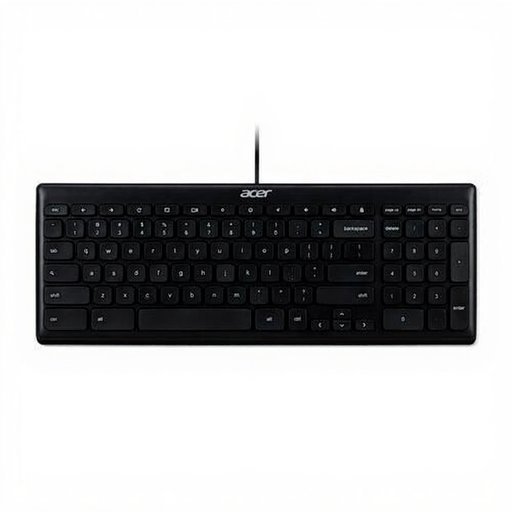
Acer GP.KBD11.00S Office Keyboard
A wired office model to compare if you are looking for a USB connection.
USB; QWERTY US International; black.
Joybuy
 No image available
Kensington KB150 EQ Wireless Keyboard
A wireless model to compare if you are looking for a keyboard without a wired connection.
Wireless.
Joybuy
 No image available
Trust Lyra Keyboard and Mouse Set
A keyboard and mouse set to compare if you are looking for both input devices together.
Wireless and Bluetooth; QWERTY US English; blue; mouse included.
Joybuy
Frequently asked questions
Are you legally required to use a separate keyboard for a short piece of editorial work?
Not just because you are writing a bio. Arboportaal explains that employees who work at a screen for more than 2 hours a day must be able to use a screen and keyboard that are not attached to each other. With a laptop, this means it must be possible to use a separate screen or keyboard. The total daily time spent working at a screen is what matters, not the length of a single document.
How should you set up a keyboard for a comfortable working posture?
Position your keyboard and mouse so that your shoulders, forearms and wrists can stay relaxed. Adjust a shared workstation when you sit down, and break up your screen work with other tasks. If you start to experience discomfort, Arboportaal recommends contacting your occupational health doctor or arranging a workstation assessment.
What if you are unhappy with the layout or key action after buying online?
For a standard online consumer purchase in the Netherlands, you will generally have up to 14 days after delivery to change your mind. Check the relevant terms and any exceptions in advance. If a product does not meet reasonable expectations under normal use, the seller is responsible for the statutory guarantee. This is separate from any additional manufacturer’s warranty, as ACM ConsuWijzer explains.
Are a split keyboard or break software required by law?
Arboportaal’s guidance in the Netherlands does not require a specific split keyboard or break software. However, employers must ensure that screen work is regularly alternated with other work or a break. Arboportaal mentions break software as a tool in its guidance, not as a required product.


