
Editor with limited desk space
You move between workspaces and want to keep room for your mouse while editing. Afterwards, you want to be able to move the keyboard easily. BakkerElkhuizen describes compact models without a separate number pad.


Choose based on how much room you have for your keyboard and mouse, how much noise the keys make, and the shared computer’s connections and layout. A compact model frees up desk space but doesn’t let you position each half independently. A split model gives you more freedom to position the halves, but needs more room and may take some getting used to. An ergonomic shape alone doesn’t guarantee that it will prevent discomfort.
You move between workspaces and want to keep room for your mouse while editing. Afterwards, you want to be able to move the keyboard easily. BakkerElkhuizen describes compact models without a separate number pad.
You type longer passages and want to adjust the distance or angle between your hands yourself. Bear in mind that a split layout takes up space and may take some getting used to. R-Go Tools and Kinesis describe models with independently positioned halves.
You share your workspace with others and want to check how loud the keys are before buying. Perixx describes both switches marketed as quiet and clicky switch options for the PERIBOARD-535, so your choice of version makes a difference.
Choose this if: you have limited desk space, want to keep your mouse close and need to move the keyboard after editing.
The trade-off: you can’t adjust the distance between two keyboard halves independently; also check whether you need a number pad.
Choose this if: you want a contoured layout without two separate halves on your desk. Logitech says the Wave Keys supports Bluetooth and comes with a Logi Bolt receiver.
The trade-off: you can’t adjust the wave shape to your shoulder width; check which connection the shared computer supports.
Choose this if: you want to decide where to position the two separate halves. The R-Go Tools manual explains that the sections of the Split Break v2 can be positioned independently.
The trade-off: you’ll need room for both sections and should check the connection and version. The cable version of the Kinesis Freestyle2 International also affects how far apart the halves can be positioned.
Choose this if: you want separate key zones without two independently positioned halves. Perixx describes different switch options for the PERIBOARD-535, including versions marketed as quiet.
The trade-off: the halves can’t be positioned independently; check the exact switch option, layout and USB-A connection.
| What to consider | What to look for | Who is this important for? |
|---|---|---|
| Desk space and mouse reach | Measure the space for your keyboard and mouse; check whether you need a separate number pad. | If I often switch between typing and using the mouse, I want enough room and need to keep my mouse close. Around 29% of consumers rank desk space as their top purchasing priority. |
| Adjustable hand position | Check whether the shape is fixed or whether you can position two halves independently; measure how much room you’ll need. | When typing longer passages, I want to choose the distance between my hands and have room for both halves. Around 29% of consumers prioritise an adjustable hand position. |
| Typing noise | Check the switch option; if possible, try out the sound in a similar space. | If colleagues work nearby, I want to take the sound of my typing into account. Around 21% of consumers put quiet typing at the top of their list. |
| Connection and layout | Check which USB port or Bluetooth connection is available, as well as the exact key layout and shortcuts. | On a shared computer, I want to get straight to work with the right connection and a familiar layout. Around 21% of consumers name compatibility as their top purchasing priority. |
Manufacturer terms such as ‘quiet’ aren’t based on a standardised noise measurement. Also check that the key layout on offer suits the computer you use.
A compact model can free up space for your mouse, but it doesn’t automatically offer the independent positioning you get with a truly split keyboard.
Before buying, decide whether you mainly need room for your mouse or want to adjust the distance between your hands.
Perixx describes both switches marketed as quiet and clicky switch options for the PERIBOARD-535. The model name alone therefore doesn’t tell you how the keys will sound.
Check the switch option on the exact product and, if possible, compare the sound for yourself.
Cochrane notes that there is uncertainty about how effective different ergonomic interventions are for office workers. A keyboard’s shape alone doesn’t prove that it will prevent discomfort.
Assess the keyboard alongside your workstation set-up and how comfortable you find it to use.
Models and versions can differ in their connections, cable options and country-specific key layouts. The wrong connection or layout can make a keyboard harder to use with a shared computer.
Compare the version on offer with the available ports and the key layout you’re used to.
The UltraBoard 950 range includes compact keyboards without a separate number pad; the wired V2 and wireless 950 are different versions.
Wave Keys is a compact, one-piece wave keyboard; the ERGO K860 is larger, has a fixed split shape and includes an integrated number pad.
The Split Break v2 is designed for those who want to position two halves separately; the Compact Break has a different shape for a smaller workspace.
The Freestyle2 International is a split keyboard range for those who want to adjust the position of the two halves.
The PERIBOARD-535 has a fixed split mechanical design and is available with different switch options.
This selection features compact, non-split keyboards for anyone who wants to save desk space. Check each model’s connection and compatibility with the shared computer.
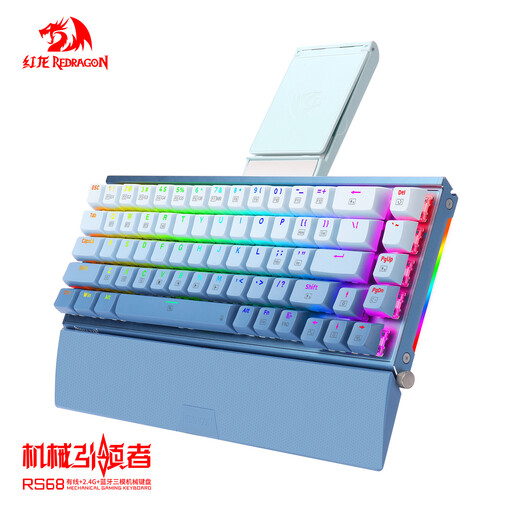 No image available
A compact option if you want to save desk space and need several connection options.
The product description lists 68 keys, an aluminium casing, and wired, Bluetooth and 2.4GHz connections. It also mentions a detachable wrist rest.
 No image available
A compact, wired option if you don’t want to use a wireless connection with a shared computer.
The product description lists 82 keys and a USB-C connection.
 No image available
A compact, wired option if the US QWERTY layout suits the computer and you’re used to mechanical keys.
The product title lists a 75% layout, 83 keys, swappable linear switches and a Type-C connection. The stated layout is US QWERTY.
 No image available
A foldable option if you want to store the keyboard compactly after use and the computer supports Bluetooth.
The product description lists a touchpad, a Bluetooth connection, 63 keys and a weight of 0.3 kg.
 No image available
A compact wireless option if your shared computer falls within the stated Mac compatibility.
The product information lists a Dutch QWERTY layout and a rechargeable battery. The stated compatibility is limited to Mac models with Apple silicon and macOS 11.4 or later.
The Arboportaal guidance described doesn’t require you to buy a specifically ergonomic model. However, for employees who work with screens for more than two hours a day, Arboportaal states that the screen and keyboard must not be attached to each other. This requirement applies to the work situation described and not automatically to every buyer.
Adjust the workspace to suit your body measurements and keep your mouse within reach. Arboportaal recommends alternating screen-based tasks and taking regular short breaks. If you start to feel discomfort, you can ask the occupational health doctor or prevention officer for help. This advice doesn’t guarantee that a keyboard will prevent discomfort.
Check which ports or wireless connections are available, as well as the computer’s key layout. R-Go Tools describes a wired USB version and a separate wireless Bluetooth version of the Split Break v2, so make sure you check which one you’re looking at.
For online consumer purchases, you generally have a 14-day cooling-off period, although the Dutch government explains that the terms can vary depending on the circumstances. If a product doesn’t perform as you could reasonably expect under normal use, the seller must resolve the issue under the legal guarantee, according to ACM ConsuWijzer. An additional manufacturer’s guarantee doesn’t replace this right.