
Writers of long-form text
If you write at length, the shape of your keyboard can influence how you position your hands. It’s also worth adjusting your workstation and changing your posture as you write, as advised by Arboportaal.


Start with your biggest concern: a compact keyboard frees up more space, the right switch type helps you work around others, and an adjustable split model gives you more freedom to position each half. Then check the exact layout and connection. A different keyboard won’t replace adjusting your workstation or changing your posture regularly.
If you write at length, the shape of your keyboard can influence how you position your hands. It’s also worth adjusting your workstation and changing your posture as you write, as advised by Arboportaal.
If you want to clear space after writing or move your keyboard easily, consider its size and connection. Arboportaal advises reviewing your workstation when you sit somewhere else.
If other people work nearby, check the switch type on the specific version. For example, Perixx offers the PERIBOARD-335 with different switch options.
First decide whether hand position, desk space, key noise or connectivity matters most to you. This table links each priority to specific checks for a keyboard at a shared desk.
| What to consider | What to check before buying | Who is this important for? |
|---|---|---|
| Hand and wrist position | Compare a fixed curved model with a split design that has two separately positionable halves. Check what distance or angle you can adjust on the version you’re considering. | If hand position is my main concern during long writing sessions, I compare how much room the keyboard’s shape gives me to position my hands. Around 40% of consumers put hand position first. |
| Free desk space | Check the dimensions, whether it has a number pad, and how you can move or store the keyboard after use. | When I share a desk, I want enough room to work and to be able to move the keyboard afterwards. Around 23% of consumers give desk space top priority. |
| Key noise | Check the switch type on the exact model. A product range can include both quiet and clicky switches. | If other people work beside me, I want to know how the version I choose sounds rather than rely on the general product name. Around 22% of consumers base their choice mainly on keeping things quiet for those around them. |
| Layout and connection | Check the physical keyboard layout, connection or receiver, compatibility with your device and what’s included. | When I write essays using the punctuation I’m used to, I want a layout I can use comfortably and a connection that works with my device. Around 15% of consumers prioritise layout and device connectivity. |
Your workstation setup and how long you stay in the same position also matter when working at a screen.
Review both your keyboard and desk setup, and change your posture as you write.
The Perixx PERIBOARD-335 is available with both quiet and clicky switches, so the product family name alone won’t tell you how the version you choose will feel to type on.
Check the version name and specified switch type on the product page.
If the switches aren’t suitable for a shared desk, returning the keyboard can be an extra hassle.
The model name alone doesn’t always tell you which layout the version on offer has. This can affect how you type punctuation.
Before buying, check the keys shown in the product image and the listed layout for that exact version.
The Wave Keys and ERGO K860 offer different fixed shapes for anyone looking for a compact wave-shaped model or a split frame.
The UltraBoard 950 V2 is a compact, wired alternative to consider if desk space and portability matter to you.
The Freestyle2 is designed for anyone who wants to adjust the distance between two separately positionable keyboard halves to suit their setup.
The PERIBOARD-335 is a compact mechanical keyboard available with different switch and layout options.
The KC 4500 ERGO is a wired, curved full-size model to consider if you want a fixed setup and a number pad.
These keyboards are options to compare for writing at a shared desk, with size, connectivity and features that may be relevant during longer writing sessions in mind. Check that the layout and version of each model suit the way you use it.
 No image available
A wired option to consider if you want a fixed connection and use a wrist rest as part of your writing setup.
The product information lists 94 keys, a metal case, mechanical keys, a detachable wrist rest and a phone stand. It also mentions a hot-swappable PCB.
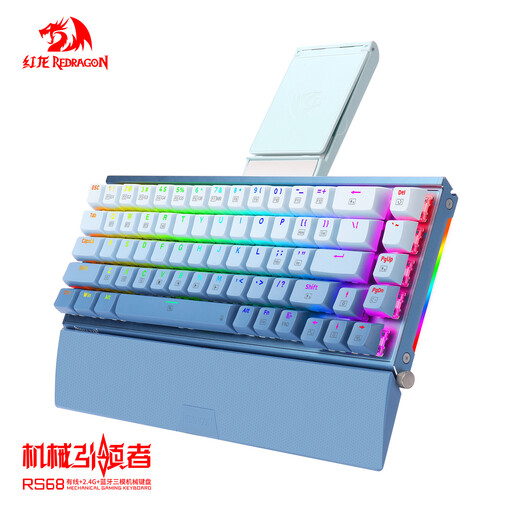 No image available
An option to compare if you want to be able to move a wrist rest and need multiple connection options.
The product information lists an aluminium case, a detachable wrist rest and a hot-swappable PCB. The description mentions tri-mode connectivity; check the version and connection on offer.
 No image available
Worth comparing if you want to switch between several devices during a shared working day.
The product information lists Bluetooth, a 2.4 GHz receiver and a key for switching between connected devices. It also mentions USB-C charging while in use.
 No image available
An option to consider if you’re looking for a numeric keypad and a Dutch keyboard layout.
The product name lists compatibility with Mac models featuring Apple silicon. The description mentions Bluetooth; check that this connection and version suit your device.
 No image available
Worth comparing if you’re looking for a Dutch keyboard layout and a wireless connection.
The product name lists compatibility with Mac models featuring Apple silicon. The description mentions Bluetooth, a rechargeable battery and a USB-C cable for pairing and charging.
Adjust your workstation when you sit down. Aim for a relaxed position for your shoulders, forearms and wrists, and change your posture as you write. A different keyboard shape won’t take the place of these steps.
That depends on the switch type and how much key noise the people around you find acceptable. The Perixx PERIBOARD-335 is available with both quiet and clicky switches, so check the specific version rather than relying on the product family name alone.
For online consumer purchases in the Netherlands, you generally have a 14-day cooling-off period; check the seller’s terms and any exceptions. Your statutory guarantee that a product is of satisfactory quality is separate from any additional manufacturer’s warranty.
According to the official guidance on display screen work, if an employee works at a screen for more than 2 hours a day, the screen and keyboard must not be attached to each other; laptop users must therefore be able to use a separate screen or keyboard. This conditional workplace rule does not mean you generally have to buy an ergonomic keyboard for writing essays at home.