What should you look for when buying?
Start with the space you need for your keyboard and mouse, then compare the hand position, noise level and connection with your everyday writing needs.
| What to consider |
What to look for |
Who is this important for? |
| Hand and wrist position |
Compare a fixed curved keyboard with one that has separately positionable halves. See whether you can keep your shoulders and wrists relaxed while typing. |
When I’m writing my synopsis for a long time, I want to find a hand position that feels comfortable, without relying on claims about preventing discomfort. Around 31% of consumers prioritise hand position when writing for long periods. |
| Space for your mouse and keyboard |
Measure the space available and check that the keys you use for writing and editing are within easy reach. |
When I often switch between text and mouse at a shared desk, I want to have enough room to work. Around 31% of consumers prioritise a compact work area and space for the mouse. |
| Typing noise |
Check the exact version and, if possible, try out its sound and key feel. The word ‘quiet’ isn’t an independent measurement of noise in your workspace. |
When colleagues are working nearby, I want to know what the keyboard sounds like before using it for long periods. Around 23% of consumers prioritise being considerate of others while typing. |
| Connection and layout |
Check that you’re getting the QWERTY layout you want, and that the connection is compatible with your computer and available ports. |
When I switch between devices at a shared workstation, I want to make sure the version I choose works with my computer and has the right keyboard layout. Around 15% of consumers make compatibility their top purchasing priority. |
Keyboards at Joybuy
This selection focuses on compact keyboards for a shared desk, with an emphasis on workspace, layout and connection.
 No image available
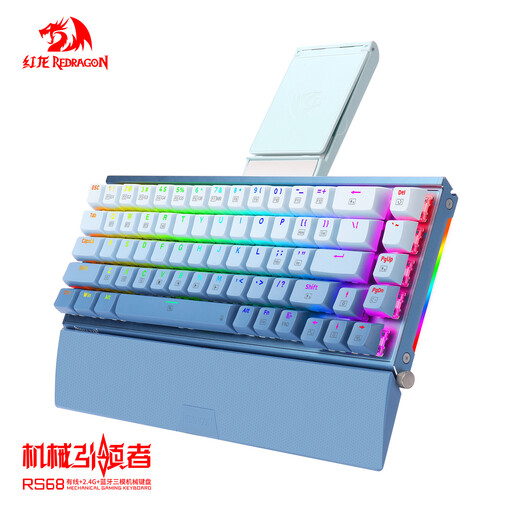
RS68 The Third Mock Examination mechanical keyboard
Worth considering if a compact set-up and detachable wrist rest suit your workspace.
The product name describes a mechanical keyboard with Bluetooth and a detachable wrist rest.
View at Joybuy
 No image available
Razer Huntsman Mini, Purple Switch, US QWERTY
An option if you’re looking for a Mini model for a shared desk; check first that the US QWERTY layout suits your writing.
The product name specifies Purple Switch and a US QWERTY layout.
View at Joybuy
 No image available
Apple Magic Keyboard with Touch ID, Dutch
Suitable if you’re looking for a Dutch layout for a Mac model with Apple Silicon.
The product name mentions Touch ID and specifies that this version is for Mac models with Apple Silicon; check that your Mac meets this requirement.
View at Joybuy
 No image available
Voxis B033 foldable Bluetooth keyboard with touchpad
A foldable model could be a good fit if you want to clear the shared desk after use.
The product name specifies Bluetooth and a touchpad.
View at Joybuy
 No image available
MageGee TS91 60%, wired, white, US QWERTY
A compact version to consider if desk space is limited and you’re looking for a wired connection.
The product name specifies 61 keys and a US QWERTY layout; check that this layout suits your work.
View at Joybuy
Frequently asked questions
Should I use a separate keyboard when writing on a work laptop?
For employees who spend more than two hours a day working with screens, Arboportaal describes a workstation where the screen and keyboard aren’t attached to one another. With a laptop, you should be able to use a separate screen or keyboard. This isn’t a general requirement for everyone writing a synopsis in their personal time.
How do I set up a keyboard at a shared workstation?
Set up your workstation again whenever you move to another spot, and make sure you can work comfortably. Arboportaal also advises alternating your working posture and screen-based tasks; changing your keyboard’s shape doesn’t replace these adjustments.
Can I try out a keyboard bought online and return it?
For a standard online consumer purchase, there is generally a statutory cooling-off period which, according to ACM ConsuWijzer, ends 14 days after delivery. Before ordering, check how you can try out and return the product; any additional returns promise from the seller is separate from the statutory cooling-off period.
Who should I contact about a faulty keyboard?
For a consumer purchase in the Netherlands, the seller is responsible for providing a remedy under the statutory guarantee. According to the Dutch government, there’s no fixed statutory guarantee period: what matters is what you could reasonably expect from the product. A manufacturer’s guarantee may also apply.
What safety information applies to electric keyboards?
For devices covered by the relevant rules, the Dutch government’s Ondernemersplein explains the EU requirements and the use of a CE mark and EU declaration of conformity. A statement on a product page alone doesn’t confirm that a specific version meets the requirements; if in doubt, check the product and seller information.


