Who is this relevant to?

Writers working on a pitch for long periods

If you spend a long time writing and editing, look for a position that lets your hands and forearms stay relaxed. The right keyboard won’t automatically prevent discomfort; Arboportaal also recommends paying attention to how your workstation is set up.

Laptop users at a shared desk

If you set up your workspace from scratch each time, the keyboard’s size and connection to your work laptop are important considerations. Arboportaal recommends reassessing your workstation when you move to a different place.

Editors in a shared workspace

If other people are working beside you, key noise may influence your choice. BakkerElkhuizen describes the UltraBoard 950 V2’s key action as quiet; this is not an independent noise measurement.

What should you look for when choosing?

Compact keyboard

Suitable for: writing and editing at a desk where you want to keep your mouse close by or have limited space.

Bear in mind: there’s no dedicated number pad, and wired and wireless models differ in how they connect.

Compact, curved model

Suitable for: anyone looking for a less radical change to their typing position who switches between compatible devices.

Bear in mind: the shape is fixed and doesn’t offer the separately adjustable halves of a split keyboard.

Split keyboard

Suitable for: anyone who wants to adjust the distance between their hands during long writing sessions or prefers a fixed split design.

Bear in mind: the setup may need more desk space. If the halves are adjustable, check the specific version and whether any accessories are needed.

Wired model with number pad

Suitable for: anyone who regularly enters numbers as well as text and prefers a wired connection.

Bear in mind: check that you have enough space and that the connection is compatible with your laptop.

What to consider What to look for when buying Who should pay particular attention?
Space for your keyboard and mouse Measure the available desk space and consider whether you need a number pad. If I often switch between my keyboard and mouse while writing, I want to keep them close together. Around 31% of consumers prioritise desk space and the distance to their mouse.
Typing position during long sessions Consider whether a fixed curved or split design suits your posture, and whether you have room to move the halves apart. During long writing sessions, I want a position for my hands and forearms that feels comfortable for me. A keyboard doesn’t replace setting up a shared workstation properly. Around 31% of consumers prioritise their typing position.
Moving and connecting Check which USB-A or USB-C ports are available, whether you can use Bluetooth, and which keyboard layout you need. If I set up my workspace from scratch each time, I want to know whether I can connect the keyboard to my work laptop. Around 23% of consumers prioritise moving and connecting their keyboard.
Typing noise in a shared space Try the key action yourself if possible; don’t compare models based on unverified claims about noise levels. When other people are working beside me, I want to consider how much noise the keyboard makes. Around 15% of consumers make quiet key action their top priority.

Common mistakes when choosing

  • Assuming ‘ergonomic’ means your discomfort will go away

    A manufacturer can describe the features of a particular design, but that doesn’t prove it will prevent discomfort for every user. Arboportaal also stresses the importance of a properly set-up workstation and varying your activities.

    Choose a design that suits your posture and workspace. Adjust the shared desk when you sit down, and vary your tasks.

  • Treating compact, curved and split models as though they’re the same

    A compact model can leave room for your mouse, a curved model has a fixed shape, and some split models let you position the halves apart.

    First decide whether you’re mainly looking for space for your mouse, a fixed curved shape or an adjustable distance between your hands.

  • Choosing based on the model name alone

    Models and versions differ in whether they use USB-A, USB-C or Bluetooth. The keyboard layout may also vary between versions.

    Before buying, check the full model specification, the ports on your work laptop and the keyboard layout you need.

    You may need a suitable adapter if the keyboard’s connection isn’t compatible with your work laptop. Also choose the version with the keyboard layout you need.

Brands to consider

Logitech

The models reviewed include the compact, curved Wave Keys and the split ERGO K860.

  • The different shapes and layouts offer several options for a shared workspace.
  • Check the keyboard layout and connection for each version. Logitech’s claims about posture and comfort aren’t independent evidence that a product reduces discomfort.

BakkerElkhuizen

The UltraBoard 950 V2 is a compact wired model; the UltraBoard 950 Wireless is a separate wireless version.

  • Without a dedicated number pad, there’s more room for your mouse.
  • The description of the V2 as quiet comes from the manufacturer; there is no comparative noise measurement.

Kinesis

The Freestyle2 range includes split keyboards with an adjustable distance between the two halves.

  • The movable halves let you choose how far apart they are.
  • Check whether you need the PC or Mac version, and confirm the connection, cable and any accessories for tenting.

CHERRY

The KC 4500 ERGO is a full-size, curved wired keyboard with a number pad.

  • According to CHERRY, the model has a palm rest and a USB-A connection.
  • The stated length is 456 mm; check that the keyboard and mouse will fit on your shared desk. Claims about reducing strain come from the manufacturer.

Keyboards at Joybuy

This selection includes keyboards with different layouts and connections. Focus on how much space you have, how you’ll connect the keyboard and which layout suits your work.
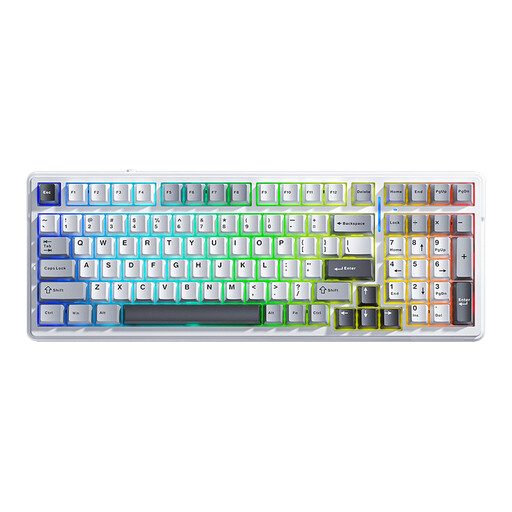
AULA F99 wireless mechanical keyboard with tri-mode connection

AULA F99 Wireless Mechanical Keyboard, Tri-Mode

Worth considering if you want to switch between different connection methods.

The product name lists Bluetooth, 2.4 G and wired use, a 99-key layout and a US QWERTY layout.

The product information mentions a detachable wrist rest.

View at Joybuy
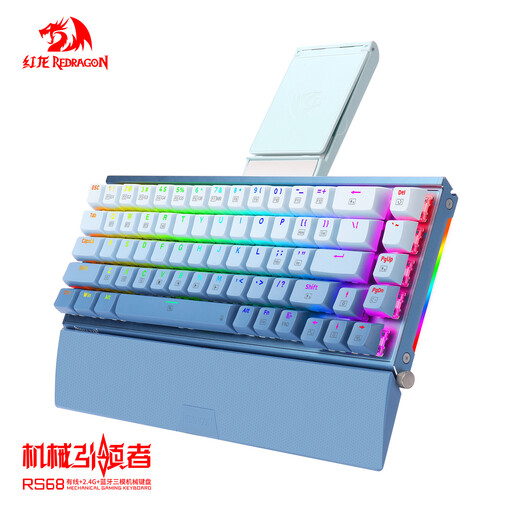
RS68 The Third Mock Examination wireless mechanical keyboard

RS68 The Third Mock Examination Wireless

Worth considering if you want to choose a connection that suits your workspace.

The product information lists wireless, Bluetooth and wired use, as well as a detachable wrist rest.

View at Joybuy

AJAZZ AK820 MAX wired mechanical keyboard with 82 keys

AJAZZ AK820 MAX Wired

Worth considering if you’re looking for a compact layout and a wired connection.

The product information lists a 75% layout with 82 keys, a USB-C connection and adjustable actuation points.

View at Joybuy

AJAZZ AK820 75 per cent wired mechanical keyboard with 83 keys

AJAZZ AK820 75% Wired Mechanical Keyboard

Worth considering if desk space and a wired connection are important to you.

The product name lists 83 keys, wired USB-C use and a US QWERTY layout; the product information states that it is compatible with PC, Windows and Mac.

Check that the US QWERTY layout suits your needs.

View at Joybuy

HP 725 wireless keyboard for multiple devices

HP 725 Multi-Device Rechargeable Wireless Keyboard

Worth considering if you want to switch between devices and have enough room for a full-size keyboard.

The product information lists connections to three devices via Bluetooth and a dongle, with a dedicated switching key. It also states that the keyboard charges via USB-C.

The stated size is full-size (100%) and the width is 420,5 mm; bear this in mind when using a shared desk.

View at Joybuy

Frequently asked questions

Is an ergonomic keyboard a legal requirement when I’m working on my magazine pitch?

The Dutch regulations referred to do not specify a particular ergonomic keyboard design. Arboportaal states that for employees who work at a screen for more than two hours a day, the screen and keyboard must not be attached to each other; laptop users must be able to use a separate screen or keyboard. Whether this requirement applies to your working day depends on your situation.

How should I use a desk that someone else has worked at?

Adjust the workstation when you sit down, and check that you can keep your shoulders, wrists and forearms relaxed. Arboportaal also recommends regularly changing your posture and activities. Simply using a different keyboard won’t fix an unsuitable workstation setup.

Can I easily switch a wireless keyboard between my laptop and another device?

That depends on the model and the connections your workspace allows. Logitech lists Bluetooth, a Logi Bolt receiver included in the box and Easy-Switch keys for Wave Keys. BakkerElkhuizen says the UltraBoard 950 Wireless can pair with up to five devices via Bluetooth. Check the version and whether your work devices allow those connections.

What if I’m not happy with the keyboard layout or key feel after buying online?

For an online consumer purchase, ACM ConsuWijzer says you usually have a statutory 14-day cooling-off period from delivery, with some exceptions. Check the version and the seller’s returns information before ordering. If a product breaks down too soon through no fault of your own, you may also have statutory warranty rights.
