What should you look for when choosing?
Start with your main concern—wrist position, room for your mouse or familiar input—then check the layout, connection and settings of your sit-stand desk.
| What to consider |
What should you check? |
Who might find this more important? |
| Wrist position during long typing sessions |
Try out the key shape and any palm rest in your own desk setup. |
If I write scripts for long periods, I want to see whether a split design lets me type with my wrists in a relaxed position. Around 29% of consumers prioritise wrist position. |
| Room for your mouse while editing |
Check the keyboard’s width, the space available for your mouse and how you enter numbers. |
If I often switch between text and using a mouse, and rarely enter numbers, I want to keep my mouse close at hand. Around 24% of consumers prioritise mouse reach. |
| Typing text smoothly |
Try out punctuation, Enter, Backspace and keyboard shortcuts in your writing software. |
When writing scripts, I want to keep typing without having to search for keys, using a layout that feels familiar. Around 18% of consumers prioritise smooth text entry. |
| Key layout and connection |
Check the physical QWERTY variant, punctuation, the required port or wireless connection, and the cable route when standing. |
If you use several devices or type a lot of punctuation, you’ll want the keys in the right places and a connection that works for you. Around 17% of consumers consider layout and connection decisive factors. |
| Adjusting your setup for sitting and standing |
Check the height of your desk and screen in both positions, and vary your posture and tasks. |
If I adjust my desk during the day, I want to be able to readjust my posture for each position. Around 12% of consumers prioritise workstation setup. |
Keyboards at Joybuy
The Joybuy products below are keyboards or keyboard sets. For your scriptwriting workstation, compare them mainly by layout, size and connection.
 No image available
Corsair K70 PRO TKL Magnetic-Mechanical, US QWERTY, MGX v2, black
The TKL layout could suit you if you don’t need a separate number pad; check that the US QWERTY layout works for you.
Layout: TKL. Key layout: US QWERTY.
Joybuy
 No image available
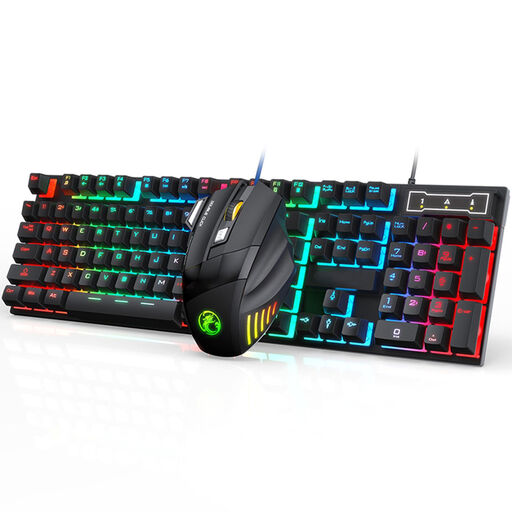
Wired gaming keyboard and mouse set, 2400 DPI, RGB
A keyboard and mouse set could be a good choice if you’re looking for both; check that the connection and layout work with your computer.
Set: keyboard and mouse. The product name lists 7-colour RGB lighting and a mouse specification of 2400 DPI.
Joybuy
 No image available
AULA WIN60HE 60% wired gaming keyboard
The compact 60% layout could suit you if desk space is limited; check that its more limited layout includes the keys you use when writing.
Size: 60%. Connection: wired. The product name lists Hall Effect switches.
Joybuy
 No image available
REDRAGON wired mechanical keyboard, 94 keys
With 94 keys, this model is worth comparing if you’re looking for a mid-sized keyboard; check that its layout includes the shortcuts and punctuation you usually use.
The product name lists a metal case, phone holder and wrist rest.
Joybuy
 No image available
Trust Lyra wireless keyboard with mouse, US English QWERTY, blue
The keyboard and mouse combination could suit you if you’re looking for both; check that the US key layout works for your writing.
Connection: wireless and Bluetooth. Key layout: US English QWERTY.
Joybuy
Frequently asked questions
Should you choose a split keyboard for writing a radio script?
No, it isn’t essential. Research by Richard W. Marklin, Guy G. Simoneau and John F. Monroe examined measured wrist position when using correctly adjusted split keyboards; it does not prove that every model will feel more comfortable to type on or prevent discomfort. Try the layout and assess your workstation as a whole, too.
How should you set up your keyboard when you stand?
Readjust your workstation so that your shoulders, forearms and wrists can stay relaxed, and check the position of your screen as well. Arboportaal recommends varying your posture and avoiding staying in the same position for too long; there is no prescribed setup for one specific keyboard.
Do you need a separate keyboard when working on a laptop?
For employees who work with a screen for more than two hours a day, Arboportaal states that the screen and keyboard must not be attached to each other; with a laptop, it must therefore be possible to use a separate screen or keyboard. Whether this workplace rule applies to you depends, among other things, on your work and how you use your equipment. It is not a general purchase requirement for every personal user who writes.
What warranty and cooling-off period apply to online purchases in the Netherlands?
For a consumer purchase, the seller must offer a solution if the product is faulty; according to the Dutch government, there is no fixed general warranty period in the Netherlands. When you buy online from a business, you generally have a 14-day cooling-off period, subject to exceptions. Check the terms and conditions for your order.


