Joybuy products
These products are keyboards or keyboard and mouse sets for writing, with wired and wireless options and different key layouts. Before buying, check that the layout suits the way you write, especially for versions with a US QWERTY layout.
 No image available
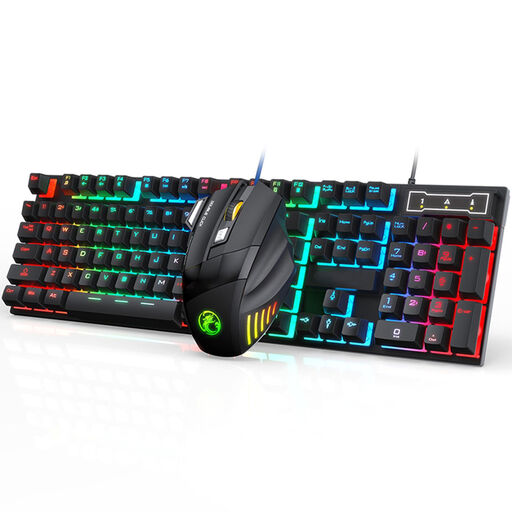
Wired gaming keyboard and mouse set
A wired set for a fixed workstation where you also need a mouse. The product name mentions an ergonomic design, water resistance and 7-colour RGB lighting; this design description does not prove that it prevents discomfort.
View at Joybuy
 No image available
Redragon 94-key mechanical keyboard with wrist rest
A wired option for a fixed writing setup. The product name mentions 94 keys, a metal design and a wrist rest; check that the layout and rest suit the way you work.
View at Joybuy
 No image available
ET wireless keyboard and mouse set, US QWERTY
A wireless keyboard and mouse set for home or office. The product name mentions a full-size design, US QWERTY and a 2.4GHz connection; check that this layout suits the way you usually write.
View at Joybuy
 No image available
Trust Trezo Comfort wireless set, US QWERTY
A wireless keyboard and mouse set for a workstation where you use both. The product name mentions quiet keys, a wrist rest and a US QWERTY layout; check that the layout suits the way you write.
View at Joybuy
 No image available
MageGee TS91 60% keyboard, US QWERTY
A compact, wired option if you want to free up desk space. The product name mentions 61 keys, a US QWERTY layout and a water-resistant design; the compact layout has no number pad.
View at Joybuy
Frequently asked questions
Is it proven that an ergonomic keyboard prevents RSI?
No, you can’t draw that conclusion about an individual keyboard. Cochrane describes the effectiveness of various ergonomic interventions for office work as uncertain. Choose a setup that suits your work, and also consider your mouse position and posture.
How should I position my keyboard while writing?
Position the keyboard directly in front of where you work, leaving room for your mouse. With a model that has separate halves, you can set the distance between them yourself; check the adjustment options for your version and make sure your chair and screen are also set up to suit your workstation.
What can I do if the key layout doesn’t feel comfortable to type on after purchase?
For a typical online consumer purchase in the Netherlands, you generally have a statutory 14-day cooling-off period after delivery, with some exceptions. Check the returns policy and the layout of the exact version before buying. The cooling-off period for an online purchase is separate from your rights if a product is faulty, damaged or misleadingly described.
Who is responsible if the keyboard develops a fault during normal use?
The seller is responsible for the statutory guarantee if a product doesn’t meet what you could reasonably expect. ACM ConsuWijzer distinguishes between the statutory guarantee and the manufacturer’s guarantee. Keep your proof of purchase and report the problem to the seller.
Is an ergonomic keyboard required in a Dutch home office?
Dutch regulations don’t generally require one specific ergonomic keyboard model. Arboportaal outlines requirements for employees who use display screen equipment for more than 2 hours a day, including the use of a keyboard that can be used separately from the screen. Which rules apply depends on the working situation.


