Which keyboard is right for you?

Writing long-form content

You spend a long time working on a funding application or research summary and want to try different hand positions. A different keyboard is no substitute for changing your position and taking microbreaks; Arboportaal recommends these for screen-based work too.

Writing at a small desk

You need space on the same desk for your laptop, keyboard and mouse. Compare compact designs with larger or split models; Logitech, Kinesis and Trust offer a range of shapes and sizes.

Writing in a shared room

You want to be considerate of others in the room, so you’re looking at the specific switch or key variant. Perixx lists both quiet and clicky options for the PERIBOARD-335, while Trust describes the Keyra’s keys as quiet.

What should you look for in an ergonomic keyboard?

Compact and curved

Suitable for: a small desk and a connected layout that feels familiar.

Keep in mind: unlike a keyboard with two separate halves, you can’t position each hand group independently. Check that the keyboard, wrist rest and mouse will all fit.

Fixed split frame

Suitable for: anyone who wants a split layout without having to position two separate halves, such as with the Logitech ERGO K860 or Trust Keyra.

Keep in mind: a full-size keyboard can take up a lot of desk space. According to a Dutch product listing, the Trust Keyra is 455 mm wide.

Two separate halves

Suitable for: anyone who wants to choose the distance between and position of the keyboard halves. The R-Go Split Break comes in two separate parts.

Keep in mind: the halves need enough desk space. The specified tilt angles for the Kinesis Freestyle2 require compatible accessories or configurations.

Compact mechanical

Suitable for: anyone comparing compact mechanical keyboards, such as the wired Perixx PERIBOARD-335.

Keep in mind: Perixx offers both quiet and clicky switch options. Check the version and USB-A connection.

What to consider What should you check? Who is it most important for?
Hand position Compare a curved, fixed-split or fully split frame, and see whether you can type comfortably. If you work on a piece of writing for a long time, you’ll want to find a hand position that suits you and that you can vary. Around 36% of consumers give hand position while typing top priority.
Desk space Measure the space for your keyboard and mouse, and allow room in front of the screen too. At a small desk, you’ll want to leave enough room to use your mouse comfortably. Around 29% of consumers put available desk space first.
Typing noise Check the switch variant. A description such as ‘quiet’ is not a comparable noise measurement. In a shared room, you’ll want to minimise the noise you make while typing. Around 21% of consumers say low typing noise is their main consideration.
Connection and layout Check the exact keyboard layout and whether your laptop has Bluetooth or the USB connection you need. If you write on your laptop, you’ll want a layout and connection that work with your device. Around 14% of consumers give this combination top priority.

Common mistakes when choosing a keyboard

  • Assuming ‘ergonomic’ means your aches and pains will disappear

    A keyboard’s shape and wrist rest are product features. They don’t replace changing your position and taking breaks, as Arboportaal points out.

    Choose a layout and set-up you want to try, rather than relying on a promise that it will prevent discomfort.

  • Choosing a split keyboard without measuring your desk

    Two separate halves need space to be positioned, and a fixed, full-size keyboard can also be wide.

    Measure the usable desk space and make sure you leave room for your mouse.

  • Assuming ‘mechanical’ means ‘quiet’

    Perixx offers quiet and clicky switch options for the PERIBOARD-335. So the word ‘mechanical’ alone doesn’t tell you which variant you’re choosing.

    If you work in a shared room, check the switch on the exact version you’re considering.

  • Assuming a similar keyboard is the same model

    A shared brand name or similar connection doesn’t prove that two keyboards are the same version.

    Compare the full model name, keyboard layout and variant before deciding that one product is an alternative to another.

Brands to compare

Logitech

The Wave Keys has a compact, wave-shaped design, while the ERGO K860 has a larger, fixed-split frame with a wrist rest. Compare the specific models rather than the brand as a whole.

  • Logitech lists Bluetooth and an included Logi Bolt receiver for the Wave Keys.
  • The frame shape affects how you can position the keyboard halves. A brand’s ergonomic claim doesn’t prove which shape will feel more comfortable for you.

R-Go Tools

The Split Break comes in two separate parts. The wired version described on the Dutch product page has a QWERTY – US layout.

  • R-Go describes halves that you can position yourself and join back together with a magnet.
  • The version listed needs enough space and has a US layout. Check that it suits your typing preferences.

Trust

The Keyra is a fixed-split keyboard with several wireless connection options.

  • Trust lists two Bluetooth connections and a 2.4GHz receiver for the Keyra.
  • A Dutch product listing gives model 25459 a width of 455 mm. Check how much desk space you have available.

Kinesis

The Freestyle2 has a tenkeyless layout and separate, repositionable halves.

  • Kinesis lists accessories for tilt angles of 5°, 10° and 15°.
  • Connection, keyboard layout and the tilt accessories you need vary by version. Check what’s included with the configuration.

Perixx

The PERIBOARD-335 is a compact, wired keyboard with a fixed-split frame and mechanical switch variants.

  • The European product page lists quiet and clicky switch options and a USB-A cable.
  • The switch variant affects the feel and sound of the keys. ‘Mechanical’ alone isn’t enough to help you choose.

Keyboards at Joybuy

These Joybuy products offer keyboard options for writing in a student room, from compact models to a wireless keyboard and mouse set. Check the exact layout and connection for each model.
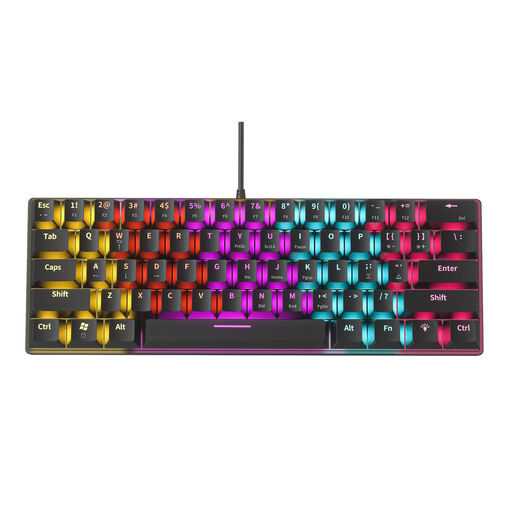
NAXSIR Mini Mechanical Keyboard, 61 keys

NAXSIR Mini Mechanical Keyboard, 61 Keys

The mini version may be worth considering if desk space is limited. Check that a 61-key layout suits the way you write.

View at Joybuy

ET Silent Wireless Keyboard and Mouse Combo, US QWERTY

ET Silent Wireless Keyboard and Mouse Combo, US QWERTY

This set may suit you if you’re looking for a keyboard and mouse together. The product name specifies a wireless connection and a US QWERTY layout. Check that the layout works with your laptop and preferences.

View at Joybuy

Razer Huntsman V3 Pro Mini Keyboard, white, US QWERTY

Razer Huntsman V3 Pro Mini Keyboard, White, US QWERTY

This mini model is worth comparing if you’re looking for a compact keyboard. Check beforehand that the US QWERTY layout suits the way you use it.

View at Joybuy

Razer Huntsman Mini, Linear Optical Switch, US, Mercury

Razer Huntsman Mini, Linear Optical Switch, US, Mercury

According to the product name, this compact model has a linear optical switch. Check that the US version and specified switch variant suit your preferences.

View at Joybuy

Frequently asked questions

Is an ergonomic keyboard enough for long days of writing?

No, a keyboard alone isn’t enough. For screen-based work, Arboportaal recommends changing position, looking away regularly and taking microbreaks. Think of your keyboard choice as one part of your work set-up, not a guarantee that it will prevent discomfort.

How do I connect a keyboard if my laptop has few ports?

Check the connection on the exact version and compare it with your laptop. Logitech lists Bluetooth and an included Logi Bolt receiver for the Wave Keys; according to the European product page, the Perixx PERIBOARD-335 has a USB-A cable.

Can I try the layout after buying online to see if it suits me?

For online consumer purchases in the Netherlands, you generally have a statutory cooling-off period of up to 14 days after delivery, with some exceptions. ACM ConsuWijzer explains how this period works; check the seller’s returns information too.

What if the keyboard breaks too soon during normal use?

Contact the seller. According to ACM ConsuWijzer, you have a statutory guarantee in addition to any manufacturer’s warranty. The product must meet what you could reasonably expect from it; in the Netherlands, there isn’t one fixed statutory guarantee period for every keyboard.

Does a student writing in their room have to use a separate keyboard under Dutch health and safety law?

Not just because a student is writing privately in their room. The workplace requirement described by Arboportaal applies to employees: if they spend more than 2 hours a day working with a screen, the screen and keyboard must not be attached to each other, and laptop users must be able to use a separate screen or keyboard. This means that this workplace guidance isn’t automatically a legal requirement for a student writing at home.
