
Vandaag of morgen in huis

Kwaliteit gegarandeerd

Welkomstaanbiedingen ontgrendelen: GRATIS bezorging | Tot 80% korting | Gratis 30 dagen JoyPlus-proefperiode
Download de app
If you run your own business or work from home frequently, you'll recognise the frustration: expensive ink cartridges that always seem to run out just when you need to print an important document. An Epson EcoTank printer tackles this problem with its refillable ink tanks. Instead of replacing cartridges, you simply top up the tanks with ink from bottles. This can significantly reduce your printing costs.
But which model is right for your situation? The range of options is vast. In this article, we'll guide you with practical tips and highlight several popular choices for 2026, helping you find a model that perfectly matches your professional needs.
Before making a decision, it's wise to think about what you truly need. Here are a few key points to help you.
Besides printing, do you also need to scan, copy, or even fax? An all-in-one printer combines these functions into a single device. This is ideal for a home office printer, as it saves both space and money. If you primarily print documents and don't need the extra features, a print-only model can be a more efficient and economical choice.
How much do you print per month? And in what size? For standard documents, reports, and invoices, A4 size is usually sufficient. However, if you work with larger documents like architectural drawings, marketing posters, or extensive spreadsheets, an A3 printer is worth considering. Also, pay attention to the paper tray capacity. A larger tray means refilling paper less often, which is a convenient feature for a busy business printer.
Do you mainly print text, such as invoices or contracts? A monochrome (black-and-white) printer is often faster and cheaper to run. The cost per page is lower, and the print speed is typically higher. For printing presentations, charts, or marketing materials, a colour printer is essential. The Epson printer with refillable ink is available in both variants.
Based on specifications and functionality, we have selected three Epson EcoTank models suitable for different professional users.
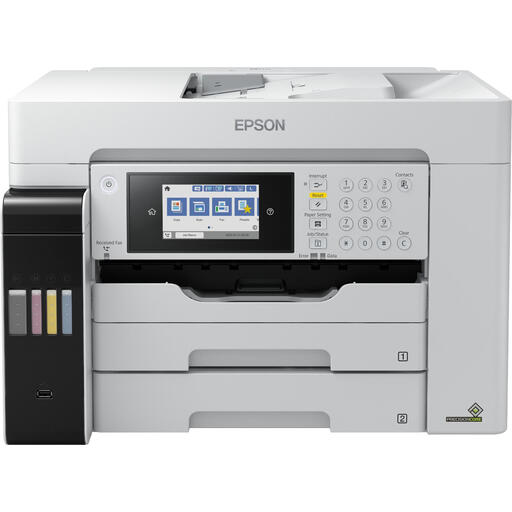
Why This Model Stands Out The ET-16685 is a powerful all-in-one printer that not only prints, scans, and copies, but can do so in A3 format. With a print speed of 25 pages per minute in colour and multiple paper trays, this model is built for productivity.
Pros
Who is this model for? Ideal for small businesses (SMEs) or freelancers in creative or technical fields who regularly need to print in large format, such as architects, designers, or marketers.
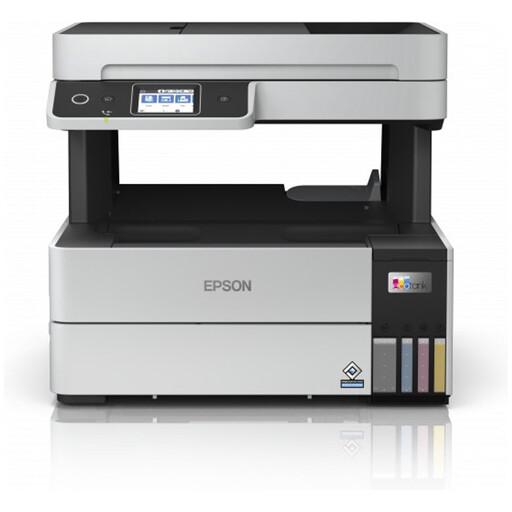
Why This Model Stands Out The ET-5185 is a compact and complete all-in-one printer for A4 documents. It offers a great balance of functionality, speed, and ease of use, making it a popular choice for professionals working from home.
Pros
Who is this model for? Perfect for freelancers and remote workers who need a reliable all-in-one printer for daily tasks like printing reports, scanning receipts, and copying documents.
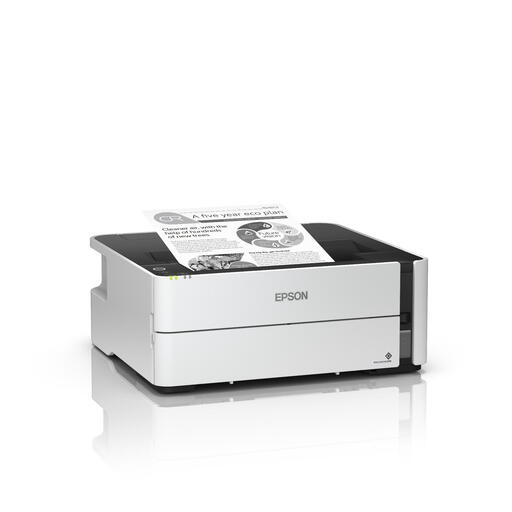
Why This Model Stands Out This model focuses on one thing and does it exceptionally well: fast and affordable black-and-white printing. According to Epson, you can print up to 11,000 pages with the included ink. The ET-M1180 is designed for efficiency and low running costs.
Pros
Who is this model for? Excellent for businesses and professionals who print high volumes of text documents, such as accounting firms, lawyers, or consultants. If you rarely print in colour, this is a highly cost-effective choice.
If the model you're looking for isn't listed here, or if you're specifically searching for refill ink for your current printer, check out our full range to discover more printers and eco printer ink.
An Epson EcoTank printer often has a higher purchase price than a traditional cartridge printer. The savings are found in the running costs. The ink bottles are relatively inexpensive and last for thousands of pages. If you print regularly, you can recoup the higher initial investment in the long run through the very low cost per page.
The number of pages varies by model and the type of document you print. Epson often provides an estimate based on the included ink. For example, Epson claims a yield of up to 11,000 pages for the ET-M1180 with the included black ink. This is significantly more than what you can print with standard cartridges.
To maintain print quality and the printer's lifespan, it is recommended to use official Epson ink bottles. They are specially formulated for the EcoTank technology and prevent issues such as clogged print heads.
