Who is this buying guide for?

Photographing stitch details

You want to show individual stitches and thread texture in close-up. Compare the magnification of the exact lens and how much room remains for lighting at your chosen framing. Canon Netherlands and Nikon Netherlands list magnification as a specification for their individual lenses.

Creating consistent photos of your work

You photograph several pieces of embroidery against the same dark background and want to keep sharpness and thread colours consistent. A fixed setup, controllable lighting and white balance matter more to you than the camera model alone. Canon Netherlands explains white balance and indoor lighting.

A beginner looking for one camera

You want to photograph a complete piece of embroidery as well as a few close-ups, without having to choose several lenses straight away. See what the built-in close-up mode or supplied zoom can actually capture on your table. OM SYSTEM Netherlands describes a Microscope macro mode for the TG-7; Canon Netherlands provides specifications for the EOS R50 kit zoom.

What should you look for when choosing?

Compact camera with close-up mode

A good fit if: you want to photograph both the whole piece and its details with one camera, and a test shot confirms you can get the framing you want. OM SYSTEM lists a Microscope macro mode for the TG-7.

Bear in mind: the lens is fixed, so check that there is still room to light your work at your chosen framing.

Mirrorless camera with standard zoom

A good fit if: you mainly photograph complete pieces of embroidery and the supplied lens offers enough magnification for your close-ups. According to Canon Netherlands, the Canon EOS R50 kit comes with an RF-S 18-45mm zoom lens.

Bear in mind: the zoom’s magnification varies with focal length and focusing mode. Specifications for a separate macro lens do not automatically apply to the kit zoom.

Mirrorless camera with a separate macro lens

A good fit if: you want to show tiny individual stitches at a larger size and assess the camera, compatible lens and lighting as one complete setup.

Bear in mind: Canon Netherlands lists a maximum magnification of 1:2 for the RF 35mm F1.8 MACRO IS STM; Nikon Netherlands and Sony Netherlands list 1:1 for the NIKKOR Z MC 50mm f/2.8 and SEL30M35 respectively. These figures apply to those specific lenses.

What to consider What to look for Who it matters to
Magnifying small stitches Check the maximum magnification of the exact lens and the focusing mode you’ll use; test whether the stitches you want to photograph fit in the frame. If I want to photograph stitches up close, I need to know how much detail the lens can actually capture. Around 33% of consumers prioritise stitch magnification.
Lighting and thread colour Check the lighting and white balance options; take test shots with the background and light source you plan to use. Against a dark background, I want the thread to show clearly without the light changing its colour. Around 27% of consumers give lighting and thread colour top priority.
Showing texture sharply Check the focusing controls available on the exact model and whether you can set up the work and camera securely. If stitches sit at different distances, I want to see whether they can all be sharp enough at once. Around 20% of consumers prioritise sharpness across the texture.
Choosing a complete setup Check everything included in the kit, the lens mount and the magnification of the supplied lens. I want to get started without choosing an extra lens unnecessarily, while still knowing what the kit can do for close-ups. Around 20% of consumers prefer simple, complete equipment.

Common buying mistakes

  • Assuming a standard zoom is the same as a macro lens

    The magnification of the Canon RF-S 18-45mm zoom varies with focal length and focusing mode. Its specifications are not the same as those of the separate RF 35mm F1.8 MACRO IS STM.

    Before buying, check exactly which lens is included in the kit and look at its magnification specification at the setting you plan to use.

    If you need more magnification than the kit zoom offers, you may need to add a separate lens to your setup.

  • Confusing the focusing distance with the working distance in front of the lens

    According to Sony Netherlands, the Sony SEL30M35 has a minimum focusing distance of 9.5 cm, measured from the image sensor. This is not the distance between the front of the lens and the embroidery.

    Test the magnification you want on your table and check that there is still room to light your work.

  • Trying to fix a dark photo with a faster lens alone

    When you shoot close-up, the area in focus becomes smaller. You may also need a fixed camera position and extra lighting to illuminate the stitches evenly.

    Test the lighting, support and depth of field with the embroidery kept still before choosing an extra lens as the solution.

Brands to compare

Canon

Canon offers two different options here: the EOS R50 kit with a standard zoom, and the separate RF 35mm F1.8 MACRO IS STM.

  • Canon Netherlands lists support for RF and RF-S lenses for the EOS R50.
  • The kit zoom and separate RF 35mm have different magnification specifications; the lens included in the kit determines what you can photograph straight away.

Nikon

The Nikon Z50II is a Z-system camera; the NIKKOR Z MC 50mm f/2.8 is a separate lens for capturing small details.

  • Nikon Netherlands lists 1:1 magnification for the NIKKOR Z MC 50mm f/2.8.
  • This specification applies to the lens, not the camera body or automatically to every Z50II kit. Also check that you have room for lighting.

Sony

The Sony E 30mm F3.5 Macro SEL30M35 is an APS-C lens with an E-mount, designed for a compatible Sony camera.

  • Sony Netherlands specifies 1:1 magnification and a minimum focusing distance of 9.5 cm, measured from the sensor.
  • That distance is not the working space in front of the lens; the short working distance may affect where you can position your lighting.

OM SYSTEM

The Tough TG-7 is a compact camera with a fixed lens. OM SYSTEM Netherlands lists a built-in Microscope macro mode.

  • You don’t need a separate macro lens for this mode.
  • The lens is fixed. Test whether the framing, sharpness and room for lighting suit your embroidery.

Joybuy product selection

Assess this Joybuy camera against your requirements for photographing embroidery, particularly the framing you want and the focusing distance.
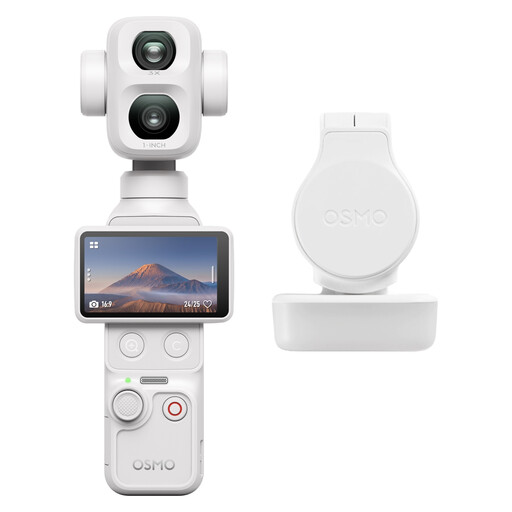
DJI Osmo Pocket 4P Standard Combo (White)

DJI Osmo Pocket 4P Standard Combo (White)

This camera is a suitable choice for embroidery details only if its focusing distance and framing show your stitches clearly enough. Check this before making your decision.

View at Joybuy

Frequently asked questions

Do I need a 1:1 macro lens for every embroidery stitch?

No, it depends on how large you want the stitches to appear. A supplied zoom may be enough for a whole piece of embroidery, while tiny individual stitches may need more magnification. Magnification depends on the exact lens and focusing method, not just the camera body.

How do I set up a camera with a dark background?

Lay the embroidery flat and keep the camera in a fixed position. Take test shots with lighting that reaches the stitches without casting unwanted shadows. If thread colours matter, check the white balance when shooting indoors.

What can I check if my photos aren’t sharp enough?

First, check that you’re using the lens within its focusing range and see which parts of the stitches are sharp. The area in focus becomes smaller in close-up shots. If needed, adjust your setup or focus, and check whether your exact camera model supports a suitable focus-stacking mode.

What can I do if a camera I bought online is faulty?

For a consumer purchase in the Netherlands, the seller must offer a solution; a manufacturer’s guarantee is in addition to your statutory rights. According to the Dutch government, there is no fixed statutory guarantee period that applies to every camera.

Do I have a cooling-off period when buying online in the Netherlands?

For distance purchases from a business, a 14-day cooling-off period applies in many cases. The Dutch government distinguishes between buying online from a business and buying from a private seller, so check which situation applies to your purchase.
