
Listeners who value bass
If you play electronic music in a spacious living room, you’ll want to compare the bass capabilities of larger speakers without treating a manufacturer’s claim as a guarantee of how it will sound in your room.


For electronic music in a large living room, a larger all-in-one speaker suits a single listening spot; a stereo pair gives you more freedom to position speakers around a wide seating area. Before choosing, check that your music service, phone and preferred controls work with the model, and don’t treat claims about room-filling sound as measurements of how it will perform in your living room.
If you play electronic music in a spacious living room, you’ll want to compare the bass capabilities of larger speakers without treating a manufacturer’s claim as a guarantee of how it will sound in your room.
If you sit in different parts of the room, you can consider whether two speakers that pair together would suit your layout better than a single speaker.
If you want to control music using your existing devices or a voice assistant, check which services and setup requirements apply to the model you choose.
First decide where you want to listen and which setup will suit your living room. Then check the music service, devices and controls you want to use.
| What to consider | What to look for when buying | Who is this most relevant to? |
|---|---|---|
| Bass performance | Compare the specified bass components of the exact model; where possible, assess the sound from your usual listening spots. | When I play electronic music, I want to take bass into account without treating specifications as proof of how it will sound in my room. Around 33% of consumers put bass performance first. |
| Stereo spread | Check whether two of the model can be used as a stereo pair and whether you have suitable places to position them. | With a wide seating area, I want to place speakers on the left and right so the setup works for several listening spots. Around 27% of consumers give stereo spread top priority. |
| Music service and devices | Check your music service, phone and preferred playback method; don’t assume Dolby Atmos is available for every playlist. | If I listen using a particular app or phone, I want to know in advance whether it works with the model and the feature I want. Around 20% of consumers prioritise compatibility above all else. |
| Complete setup | Work out whether you need one speaker, two speakers or a separate adapter for the setup you want. | I want to know what I need for my complete setup, not just which components come with one speaker. Around 13% of consumers give the complete setup top priority. |
| Voice control and privacy | Check which assistant the exact model supports, how to control its microphone and which privacy and update settings are available. | If I want to use voice control, I also want to find out how to manage the microphone. Around 7% of consumers prioritise voice control or privacy above all else. |
Spatial audio depends on the music service, the content available and the playback method. So, a feature on the speaker doesn’t automatically mean you can use it to play your favourite music.
Check your music service and specific playlists before making spatial audio a deciding factor.
The music stereo pairs described by Sonos and Apple consist of two speakers. You’ll also need suitable space to position both.
Check what the setup requires and make sure both spots in your room are suitable.
A second speaker needs extra space in the room.
Sonos says a separate adapter is required for line-in audio through the USB-C port.
Check which adapter you need if you want to connect an external audio source.
Line-in audio requires a separate Sonos adapter.
The Era 300 is an option to consider if you’re weighing up Wi-Fi, Bluetooth, a possible stereo pair and spatial audio.
The Authentics 500 is an all-in-one option for anyone looking for built-in bass and a choice between Google Assistant and Alexa.
Denon positions the Home 600 as a standalone stereo speaker with HEOS, built-in subwoofers and Dolby Atmos Music.
The second-generation HomePod may suit buyers who use Apple devices and might want to pair two speakers for music.
This selection includes a Wi-Fi and Bluetooth speaker and Bose soundbars for streaming music in the living room. A soundbar isn’t a standalone smart music speaker, so check whether a TV-based setup suits how you’ll use it.
 No image available
Could suit you if you want to listen at home using Wi-Fi, Bluetooth or AirPlay 2 and are looking for a speaker with specified bass components.
Listed connections and features: Wi-Fi, Bluetooth, AirPlay 2, USB, AUX and multi-room audio. The product information mentions a 4-inch mid-low driver, bass reflex ports and battery life of up to 12 hours.
The product name lists Hi-Res Audio, LDAC and a power output of 60 W. These are stated features, not measurements of bass performance in your living room.
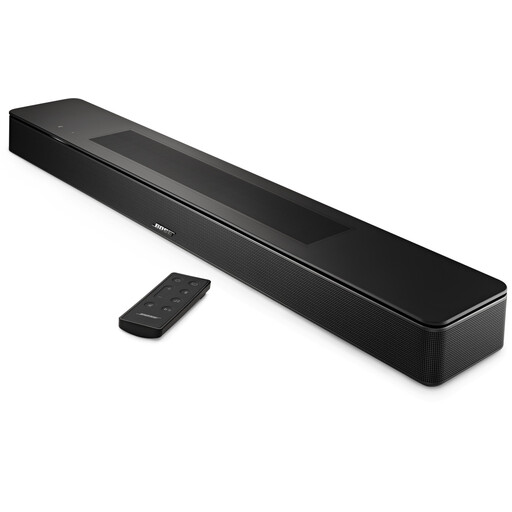 No image available
Could suit you if you’re looking for a soundbar for streaming music and its placement by a TV unit or on a wall works for your living room.
The product information lists five drivers, including two upward-firing drivers, TrueSpace and Dolby Atmos. Streaming options listed are Bluetooth, AirPlay 2, Spotify Connect and Chromecast.
The wall bracket is sold separately. The listed features don’t prove how powerful the bass will sound in your room.
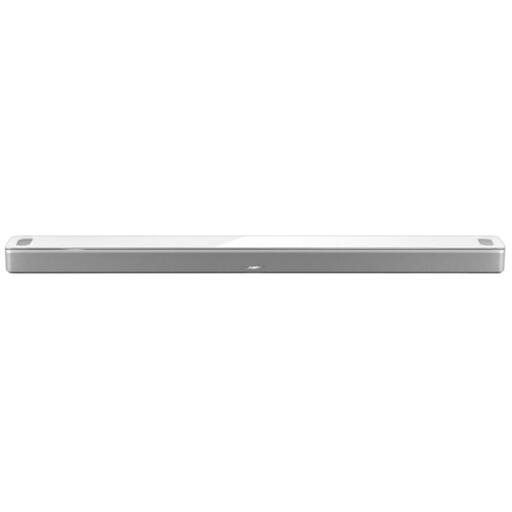 No image available
Could suit you if you’re considering a soundbar with music streaming and voice control; bear in mind that this is a soundbar, not a standalone smart music speaker.
The product information lists six full-range transducers, including two upward-firing speakers, Dolby Atmos and a wireless subwoofer. Streaming options listed are Wi-Fi, Bluetooth, AirPlay 2, Spotify Connect and Chromecast.
Alexa and Google Assistant are listed as control options. The product claims aren’t measurements of how it will perform in your living room.
No. For spatial audio on supported Sonos speakers, Sonos specifies a supported music service added to the system and a Wi-Fi connection. Check that your service, playlist and playback method are compatible.
Check that you have an iPhone or iPad meeting Apple’s stated system requirements, as well as suitable Wi-Fi and internet access. These requirements apply to HomePod and aren’t general requirements for all smart speakers.
The Dutch government recommends reading the privacy policy, using a strong password and updating the software and apps. Also check how to control your model’s microphone.
For online distance purchases from a business, the Dutch government says you generally have a 14-day cooling-off period, with some exceptions. You’re entitled to receive a product that is in good working order; there’s no fixed statutory guarantee period in the Netherlands. The seller is your point of contact if there’s a problem.
Don’t assume there’s a generally permitted volume or time. The Dutch government advises talking to your neighbours first if music is causing a noise nuisance. This information doesn’t set a national decibel limit for your living room.