
Livraison le jour même et le lendemain

Qualité garantie

Débloquez vos offres de bienvenue: Livraison GRATUITE | Jusqu'à -80 % | 30 jours d'essai gratuits à JoyPlus
Téléchargez l'application
An electrically height-adjustable desk measuring 120x60 cm fits into many Dutch home offices, student rooms and bedrooms. The size provides room for a laptop, monitor, keyboard and a few documents without taking over the entire room. However, desks with the same dimensions can differ considerably in height range, controls, load capacity and stability.
If you only consider the price or appearance, you may run into practical problems later. For example, the desk may not rise high enough, the desktop may barely accommodate your cables and equipment, or the motor may struggle with a heavy monitor setup. Below, you’ll find the key points to consider, along with some suitable product options.
120 x 60 cm sounds spacious, but the available workspace depends on your equipment. A large 32-inch screen, laptop, speakers and documents can quickly take up much of the desktop. Measure your monitor stand, keyboard and any docking station beforehand.
For a straightforward home-working setup, this size is often practical. Gamers with multiple monitors or lots of peripherals should check carefully whether a depth of 60 cm will be sufficient. A monitor arm can free up space, but make sure the desktop is suitable for one.
The term height-adjustable desk does not say much on its own. Always check the lowest and highest positions. The JoySelect models mentioned here, for example, move from 72 to 118 cm. This allows you to work both sitting and standing, but the correct setting depends on your height, chair and monitor position.
A standing desk for home working should not just feel comfortable at its highest setting; your shoulders should remain relaxed and your forearms should lie approximately horizontally. A footrest, monitor riser or adjustable monitor arm can help you fine-tune your workstation further.
Features such as “quiet”, “stable” or “ergonomic” are only useful when you check the underlying specifications. Look at:
According to JoySelect’s own product description, the electric desk has quiet, smooth operation, a digital panel and two memory settings. Treat this as the supplier’s product specification, rather than a guaranteed experience in every situation.
For alternating between sitting and standing, a useful height range matters more than a large number of settings. The JoySelect models have a height range of 72 to 118 cm. The digital control panel displays the height and has buttons for moving the desk up and down. According to the product description, the two memory settings allow you to save two preferred heights.
An electric sit-stand desk is particularly practical when you change position regularly. Before assembly, check where the control panel will be positioned and whether the mains cable is long enough to reach your socket. Keep cables clear of moving parts.
A desk with a 70 kg load capacity can, according to the stated specification, support a monitor, laptop, books and other office essentials. Add up the weight of your complete setup. A heavy desktop PC, several screens and a monitor arm put different demands on the frame than a laptop alone.
According to the product information, the JoySelect frame consists of a reinforced cold-rolled steel plate, an aluminium lifting rod and two-part legs. These are verifiable material descriptions, but they do not replace assessing the desk’s stability on your own floor. Place the desk on a level surface and tighten all fixings securely after assembly.
A walnut or oak desk may complement your interior better than an entirely black gaming desk. The JoySelect walnut version has a walnut-coloured top with a black frame. The oak version combines a white oak-coloured top with a white frame.
According to the brand’s own product description, both versions use a P2 board with lower formaldehyde emissions. This information should be read as a product claim made by the brand. The desktop is designed to be cleaned easily with a soft, damp cloth. Avoid abrasive products and excessive moisture.
Also check the certifications. The product pages list CE and certification in accordance with European standards. CE marking generally refers to applicable EU conformity requirements; it is not an overall quality ranking or a guarantee of a particular working experience.

Why it suits this profile: A compact choice for home workers and students looking for an electric desk for a study, with a neutral walnut colour.
The height range of 72–118 cm, digital panel and two memory settings are clearly specified, rather than being described only through a general claim about adjustability.
120 x 60 cm, stated load capacity of 70 kg, two hooks and a black steel frame.

Why it suits this profile: Suitable for anyone looking for the same electric features but wanting to pair a white oak-coloured top and white frame with their interior.
The product information lists the height range, memory settings and load capacity separately, allowing you to assess the choice against your workstation setup.
72–118 cm adjustment range, digital control panel, stated load capacity of 70 kg and CE listing.
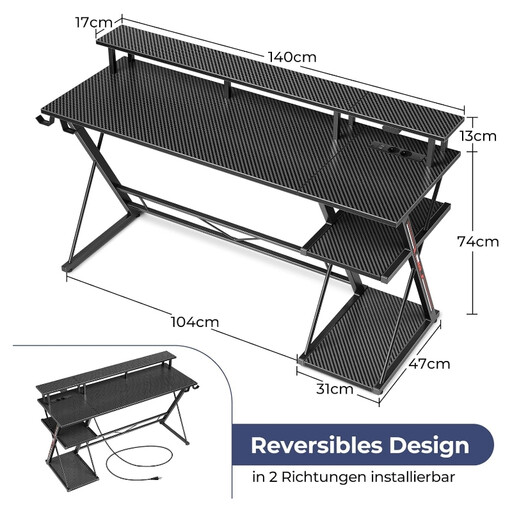
Why it suits this profile: For gamers and intensive users who need more desktop space than 120 x 60 cm and value integrated accessories.
The size is clearly 140 cm and therefore not the same as 120 x 60 cm. It is also stated that the top is not solid wood, but is made from particle board and metal.
Monitor stand, headphone hook, CPU stand, RGB lighting, two sockets and two USB ports.
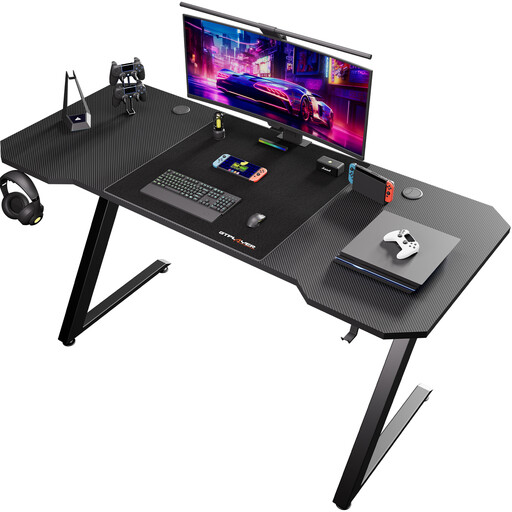
Why it suits this profile: An option for anyone mainly looking for a fixed 120x60 cm gaming desk with a carbon-fibre look and headphone hook, without electric height adjustment.
The product name makes the size and function clear. No unsubstantiated claims are made about electric height adjustment or load capacity.
120 x 60 cm, carbon-fibre look and a supplied headphone hook.
We’ve put together a complete, up-to-date list of products that fully meet these strict selection criteria and the applicable European safety regulations.
An electric desk is generally supplied as a flat-pack kit. Follow the instructions step by step and check that all cable connections are securely fastened. Place the frame on a level floor before permanently attaching the desktop. For electrical components, the product information recommends professional installation; if you assemble it yourself, pay extra attention to cable routing and moving parts.
Keep the following points in mind:
For a laptop, one monitor, a keyboard and documents, 120 x 60 cm is often sufficient. With two monitors, large speakers or lots of accessories, it may feel cramped. Measure your equipment beforehand and leave room for mouse movements and cables.
Adjust the sitting height so that your shoulders are relaxed and your forearms are approximately horizontal. When standing, your feet should be firmly on the floor and you should not have to work with raised shoulders. The range of 72 to 118 cm offers various adjustment options, but the ideal position differs from one user to another.
Power is mainly consumed while the desk is being adjusted; when stationary, the electronics generally use considerably less than during movement. Unplug the desk when it will not be used for an extended period, such as during a holiday. For exact figures, check the technical details for the specific model.
