
Vandaag of morgen in huis

Kwaliteit gegarandeerd

Welkomstaanbiedingen ontgrendelen: GRATIS bezorging | Tot 80% korting | Gratis 30 dagen JoyPlus-proefperiode
Download de app
An electrically adjustable desk can be useful if you work from home, study or game and want to switch regularly between sitting and standing. However, an electric motor alone tells you little about how practical a desk will be. A desk may look feature-packed on paper, yet offer too little space in a small room, feel less stable at its maximum height or lack enough connections for your equipment.
As a Joybuy Product Recommendation Officer, I filter product information for details you can check. Here’s what to look for in a height-adjustable desk, sit-stand desk or electric desk for your home office.
A wide height range sounds appealing, but check the lowest and highest settings in centimetres too. A desk that adjusts from 72 to 118 cm won’t suit every user in the same way. Your chair, height, arm position and monitor height all play a part.
Also check whether the desktop stays stable at its highest setting. A desk with a sturdy steel frame and suitable load capacity will generally provide more room for monitors and accessories than a lightweight model. However, stability also depends on having a level floor and assembling the desk correctly.
The stated load capacity is a product specification, not a recommendation to keep the desk loaded to its maximum all the time. Add up the weight of your monitors, laptop, speakers, lamp, books and any gaming equipment. Leave some capacity spare to allow for movement while the desk adjusts.
Also check the difference between static load capacity and the load the desk can handle while moving up or down. The product description should make clear which figure it refers to.
A memory function, USB-C port or storage hook can be useful, but none of these replaces suitable dimensions and safe assembly. A compact 120 x 60 cm desk has room for a laptop, monitor and keyboard, but may feel cramped with two screens or large speakers.
Check any usage restrictions too. According to the product descriptions for some models, the overheat protection may kick in after around two minutes of continuous adjustment. You’ll then need to wait before changing the height again. This is worth bearing in mind if you plan to use the desk intensively.
An electric adjustment system is handy for everyday use, as you won’t need to turn a handle each time. A digital control panel displays the selected height. Memory settings let you save, for example, a sitting and a standing working height.
Check how many settings are available:
Use memory settings as convenient shortcuts, not as a guarantee of an ideal working posture. Adjust your chair, monitor and keyboard individually.
A 120 x 60 cm desktop is suitable for a laptop, one monitor, keyboard and documents. A 160 x 70 cm desktop can give you more room to move around if you have a more extensive home office or gaming setup.
Measure the following in advance:
The desk should not scrape against a wall or fixed object when you adjust its height. According to the product information for several models, you should leave enough space between the desk and the wall.
A steel frame can help provide a sturdy base, but always check the stated specifications and assembly instructions. The JoySelect models in this selection list a load capacity of 70 kg, a steel frame and a P2 board desktop.
The product pages also list CE certification and certification to a European standard. CE marking is not an independent quality mark; it is the manufacturer’s declaration that the product complies with relevant EU requirements. So make sure to check the manual, warranty terms, manufacturer details and safety instructions too.
For claims such as “quiet”, “durable” or “ergonomic”, bear in mind that the brand’s product description uses these terms to refer to the specified motor, materials or adjustment options. No specific noise level or guaranteed service life is stated.

Why it suits this profile: This compact electric sit-stand desk has a 120 x 60 cm desktop, a height range of 72–118 cm and two memory settings. It’s a good choice for a first desk for working from home, studying or casual gaming.
The dimensions, height range and maximum load capacity of 70 kg are clearly stated, so you can check in advance whether your equipment will fit.
Digital control panel, two memory settings, two hooks and an oak-effect desktop. CE certification and certification to a European standard are listed in the product description.
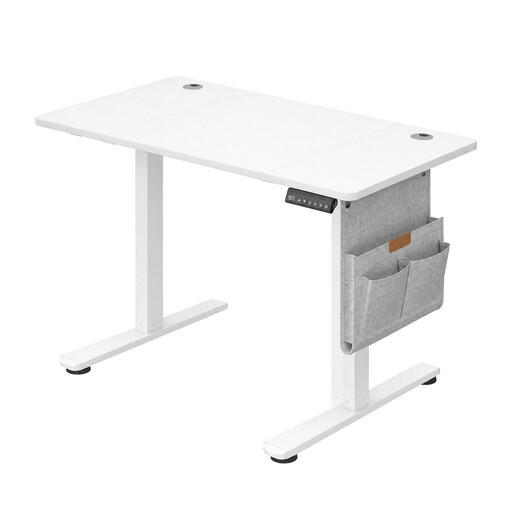
Why it suits this profile: This white desk combines a compact desktop with four memory height settings, cable holes, a storage compartment and a hook. It’s a good fit for an organised home office or shared workspace.
The product information lists a maximum static load capacity of 70 kg and warns that you may need to pause after adjusting the desk continuously for an extended period. This makes the usage limits clear.
Four memory height settings, cable management, a fabric storage pouch and a height range of 72–120 cm, according to the product description.

Why it suits this profile: The wider 160 x 70 cm desktop gives you more room for multiple screens, peripherals or documents. The USB-C port and storage accessories are handy for a more extensive home office or gaming setup.
The product description lists a maximum static load capacity of 70 kg, cable management and an obstacle detection sensor. Before buying, check that the USB-C function is compatible with your devices.
Spacious 160 x 70 cm desktop, memory function, USB-C port, two cable holes and three hooks, according to the product details.
We’ve put together a complete, up-to-date list of products that meet these strict selection criteria and the applicable European safety regulations.
It mainly depends on the desk’s dimensions and the space needed for cables. A 120 x 60 cm model takes up relatively little floor space, but needs room around it when you adjust the height. Allow space for your chair too, and check that the desktop won’t hit a wall, window sill or cupboard.
You can’t work out a set lifespan from the product description alone. How long the desk lasts depends on factors such as the load, assembly, how often you adjust it and how well it’s maintained. Place the desk on a level surface, don’t exceed the stated load capacity and keep electrical components dry. If the desk has overheat protection, follow the waiting period in the manual.
The motor mainly uses electricity while the desk is adjusting. Exact power consumption at rest and while moving varies by motor and controller, and isn’t listed for every model. If energy use is important to you, check the manual or technical specifications. A USB-C port can also charge devices, but check the charging capacity for the specific model.
