
Vandaag of morgen in huis

Kwaliteit gegarandeerd

Welkomstaanbiedingen ontgrendelen: GRATIS bezorging | Tot 80% korting | Gratis 30 dagen JoyPlus-proefperiode
Download de app
An electrically adjustable desk can make a fixed workspace more flexible. With the press of a button, you can switch between sitting and standing. But an attractive desktop or a promising product title doesn’t tell you everything. Stability, dimensions and controls are what really determine whether a desk is comfortable to use day to day.
Look out for these common pitfalls:
An height-adjustable desk should suit your height, chair and screen set-up. The models in this selection have an adjustment range of 72 to 120 cm. That gives you the option to work sitting or standing, but the ideal height varies from person to person.
A desk with a memory function is useful if several people share a workspace, or if you regularly switch between two preferred heights. On the selected JOYFURNOS models, you can save your preferred heights using the controls. Some versions also list a break reminder. Treat this as a practical prompt, not a guarantee of a particular health outcome.
Also check whether the control panel has a lock function. This can prevent unwanted movement, for example if children touch the buttons.
Choose a size that suits your equipment:
According to the product information, the electric models listed have a maximum static weight capacity of 70 kg. This is the total weight resting on the desk, not just the weight of the desktop. Remember to include monitor arms, screens, a computer, speakers and other accessories.
An adjustable desk measuring 120 x 60 cm takes up less space, while an adjustable desk measuring 160 x 70 cm gives you more room to work. Measure the available space beforehand and allow for the desktop to move.
A steel frame, adjustable feet and a sturdy desktop are features you can check that affect how practical a desk is to use. The product descriptions for the selected desks list a steel frame, adjustable feet and a motor for electric height adjustment.
The “quiet” claim comes from the manufacturer’s product information. Treat it as a product specification, not a universal guarantee of a particular noise level in every situation. The floor surface, load and assembly can also affect your experience.
A desk with a USB-C port can help keep your workspace tidy. On several models, the port is on the control panel and fast charging is listed as a feature. Before buying, check which devices you want to connect and whether the charging output is suitable. Cable ports, an organiser and hooks help keep cables and accessories off the desktop.
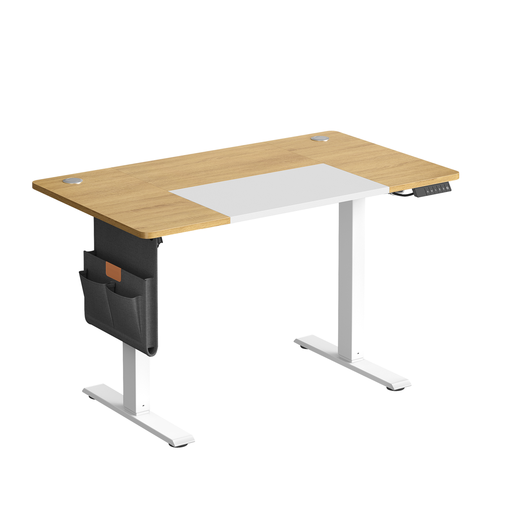
Why it suits this profile: Its compact size is ideal for a student room, bedroom or smaller home workspace. The memory function and USB-C port add practical features without the need for a large desk.
The dimensions and 70 kg weight capacity are clearly listed. This lets you check in advance whether your monitor and accessories will fit within the available space and weight limit.
120 x 60 cm, height range of 72–120 cm, memory function, USB-C port, cable management and three hooks.

Why it suits this profile: The generous workspace is ideal for professionals and people working from home who use multiple screens, documents or a laptop alongside a monitor.
The two cable ports, organiser and hook help keep loose cables under control. The adjustable feet help you position the desk on a slightly uneven floor.
160 x 70 cm, adjustable from 72–120 cm, memory function, USB-C port, lockable controls and 70 kg static weight capacity.

Why it suits this profile: This spacious model is well suited to intensive home working, gaming or studying with multiple devices and frequent daily switches between sitting and standing.
The product information lists a motor, steel frame, memory function and cable management. Do bear the overheating protection in mind: according to the description, after more than two minutes of continuous adjustment, the desk needs to rest for 18 minutes.
160 x 70 cm, USB-C port, memory function, three hooks, organiser and a maximum static load of 70 kg.
We’ve put together a complete, up-to-date list of products that meet these strict selection criteria and the applicable European safety regulations.
Adjust the desk so that your shoulders stay relaxed and your elbows are at roughly a right angle when you type. Position the screen directly in front of you, and make sure the desktop doesn’t hit a wall or another piece of furniture as it moves. Also check that the cables have enough slack.
Its lifespan depends on factors such as assembly, load, frequency of use and maintenance. Keep within the maximum static weight capacity, use the desk indoors and protect the electrical components from liquids. For the models listed, don’t adjust the height continuously for more than two minutes.
Power consumption varies depending on the motor, how long it’s used and its standby function. The product information for some models mentions an energy-saving mode. For an accurate comparison, check the technical label or specifications for the model in question. A USB-C port makes charging more convenient, but doesn’t automatically change the overall energy consumption of your workspace.
