
Vandaag of morgen in huis

Kwaliteit gegarandeerd

Welkomstaanbiedingen ontgrendelen: GRATIS bezorging | Tot 80% korting | Gratis 30 dagen JoyPlus-proefperiode
Download de app
Long gaming sessions or work-from-home days take their toll. A stiff back, a cluttered desk, and a tangle of cables are common frustrations. An electric standing gaming desk seems like the solution, but the market is flooded with models that overpromise and underdeliver. Before you invest in an upgrade, it's crucial to know what to look for.
Many desks are advertised with flashy features that fall flat in practice. We've outlined the most common pitfalls to help you make an informed decision.
To avoid these pitfalls, focus on a few key specifications. These determine the long-term quality and usability of your desk.
The motor is the heart of your desk. Models with a dual-motor system are typically quieter, faster, and can support more weight. They ensure a smooth and stable transition from sitting to standing. Always check the maximum load capacity and ensure it's more than enough for your monitor(s), PC, and other accessories. A steel frame provides the necessary sturdiness for a stable ergonomic gaming desk, even at its highest setting.
The right dimensions are a personal choice, but a 140 cm sit-stand desk is a popular width. This size offers enough space for two monitors and your peripherals without overwhelming the room. The desktop material also matters. Engineered wood is durable and easy to clean, while a carbon-fibre finish provides that classic gaming desk look. A built-in monitor stand can further contribute to better posture.
A modern height-adjustable desk with power outlets and USB ports is a necessity, not a luxury. It centralises power for all your devices, making extension cords obsolete. This is essential for a clean and safe setup. If you're considering a gaming desk with RGB, choose a model that allows you to customise the colours, brightness, and effects. This way, the lighting can match your mood and won't be a distraction during focused work or gaming.
Not all desks are created equal. We've highlighted some popular choices and matched them with different user profiles.
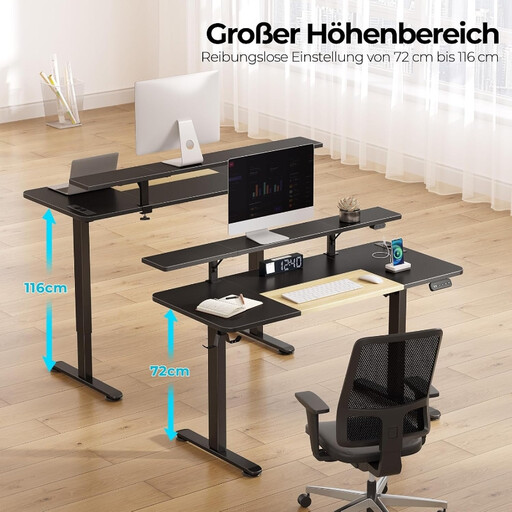
Why This Fits Their Persona: This desk is a complete solution for those who both game and work from home. It combines a spacious 140 cm desktop with all the essential features, without making any compromises.
The integrated power hub with outlets and USB ports tackles cable chaos head-on. The RGB lighting is fully customisable, making it a functional mood-setter rather than a distraction.
All-in-one: electric height adjustment, power supply, customisable RGB, and a monitor stand in a single package. The quiet motor ensures smooth operation.
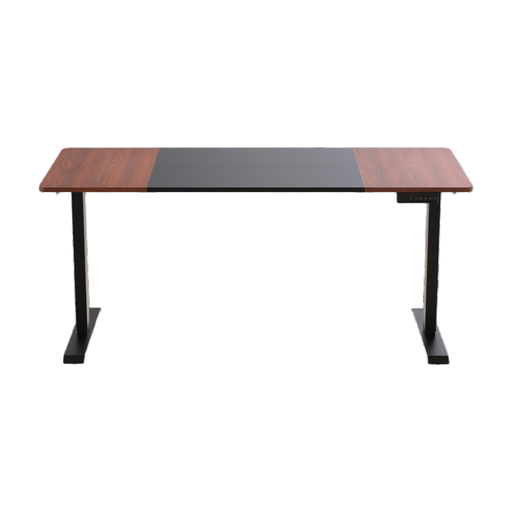
Why This Fits Their Persona: For the user who prioritises stability and reliability. It's ideal for a heavy setup with multiple monitors and professional equipment, where a wobbly desk is not an option.
This model tackles the number one pitfall: instability. The dual-motor system provides a rock-solid foundation, even at maximum height and under a heavy load. No wobble, no worries.
Superior stability and quiet, smooth operation thanks to the dual motor. The spacious 160x70 cm desktop and sturdy steel frame provide a solid foundation for any professional workspace.

Why This Fits Their Persona: Perfect for the user who values smart, practical features and a clean design. The focus is on efficiency and ease of use, not on unnecessary frills.
This desk avoids the pitfall of useless gimmicks. Instead, it offers smart features like memory presets for your favourite heights and a modern USB-C port that genuinely improve your workflow.
The memory function and movement reminders promote a healthy posture. Built-in cable management, an organiser, and a USB-C port ensure a tidy and efficient workspace.
A `black PC desk` is a timeless choice that fits into almost any interior. We've compiled a complete, up-to-date list of products that meet these strict selection criteria.
The load capacity varies by model, but most desks can support between 70 and 120 kg. This is typically more than enough for a standard setup with a PC, one or two monitors, and accessories. Always check the product specifications. For heavier setups, a dual-motor model like the Loctek is the recommended choice.
A dual-motor desk generally offers a better experience. The height adjustment is faster, quieter, and, most importantly, more stable—which is crucial when you have expensive equipment on your desk. A single motor may suffice for a light setup, but it has a higher chance of wobbling at standing height.
Electric standing desks require very little maintenance. The most important thing is to protect the electronic components from liquids. Clean the desk with a lightly damp cloth and avoid harsh cleaning agents. Some models, like the Ochama desk, have built-in overheating protection that safeguards the motor during intensive use. Always follow the manufacturer's maintenance instructions.
