
Vandaag of morgen in huis

Kwaliteit gegarandeerd

Welkomstaanbiedingen ontgrendelen: GRATIS bezorging | Tot 80% korting | Gratis 30 dagen JoyPlus-proefperiode
Download de app
An electric standing desk might seem straightforward at first: choose a size, plug it in and switch between sitting and standing. In practice, the motor, stability, dimensions and controls all affect how comfortable it is to use every day. A low price, meanwhile, says little about whether it’s right for your workspace.
Home workers, students, office workers and gamers often run into three common pitfalls:
A height-adjustable desk should suit your height, chair and equipment. For example, the models in this selection range from around 71 or 72 cm to 118 or 120 cm. That gives you flexibility to work in different positions, although the right setting is still a personal choice.
A 120 x 60 cm desk is a practical size for a laptop, one monitor and accessories. For two screens, a large keyboard or a gaming setup, 140 x 60 cm or 160 x 70 cm gives you more room. Measure your available space in advance, including the room needed for cables and the moving desk.
Don’t look only at the weight of the desktop. For these products, the stated capacity is the maximum static weight capacity. The JOYFURNOS and JoySelect models in this guide list a capacity of 70 kg.
Add up the weight of your monitor(s), computer, armrest, lamp and other accessories. Distribute heavy equipment as evenly as possible. A metal frame can help create a stable structure, but stability also depends on the legs, fixings, floor and assembly.
A desk with a memory function can save your preferred heights, so you don’t have to find the right position manually each time. Some models have two memory settings, while others have four. A digital display shows the selected height.
Also look out for:
A level surface is important for everyday use. Keep electrical components away from liquids, and don’t position an electric standing desk right up against a wall while it’s moving.
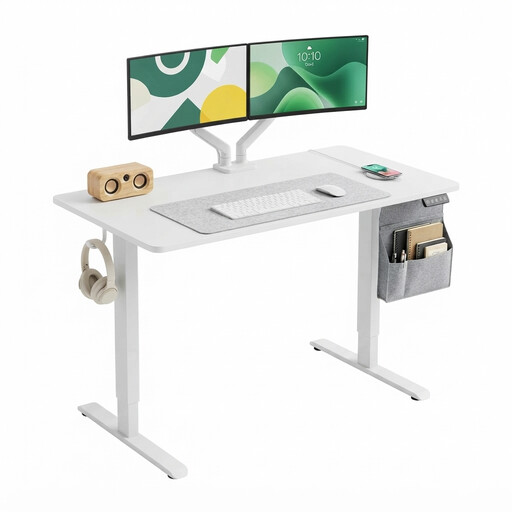
Why it suits this profile: At 120 x 60 cm, it takes up relatively little space and suits a laptop or monitor setup for studying, working from home or everyday office work.
The product listing gives an electric height range of 72 to 118 cm and a maximum static weight capacity of 70 kg.
Digital control panel, two memory settings, two hooks and a 120 x 60 cm desktop.

Why it suits this profile: The spacious desktop is ideal for intensive home working with multiple screens, documents and peripherals.
The specifications list a size of 160 x 70 cm, a height range of 72 to 120 cm and a static weight capacity of 70 kg.
Memory function, USB-C port, cable management, storage compartment and three hooks.

Why it suits this profile: Four memory settings are useful when several people share the desk or regularly switch between different work and gaming positions.
The product information specifies four memory settings, a height range of 71 to 120 cm and a weight capacity of 70 kg.
140 x 60 cm, USB-C port, cable management and storage for accessories.
We’ve put together a complete, up-to-date list of products that meet these strict selection criteria and the applicable European safety regulations.
Place the desk on a level surface and leave enough room for it to move up and down. Check that cables can’t get trapped, and don’t position the desktop directly against a wall. Keep the adapter and controls away from liquids. If your model has a collision sensor, set its sensitivity according to the product instructions.
Its lifespan depends on assembly, load, how often it’s used and maintenance. Don’t exceed the stated weight capacity, avoid adjusting it continuously for long periods and check regularly that all connections are still secure. The product page and warranty terms for your chosen model set out the service available.
Most of its electricity use comes from adjusting the height; the desk doesn’t continuously power the motor. Exact consumption depends on the motor, how often you adjust the desk and its standby power use. Unplug the adapter if you won’t be using the desk for an extended period, provided the instruction manual allows this.
