
Vandaag of morgen in huis

Kwaliteit gegarandeerd

Welkomstaanbiedingen ontgrendelen: GRATIS bezorging | Tot 80% korting | Gratis 30 dagen JoyPlus-proefperiode
Download de app
An electric standing desk might seem straightforward at first: choose a desktop, press a button and switch between sitting and standing. In practice, the dimensions, stability and controls make all the difference to how comfortable it is to use every day. That matters whether you work from home, study, game or work in an office with limited space.
Here are some common pitfalls to watch out for:
A height-adjustable desk should suit both your height and your chair. The compact models discussed here typically have a range of around 72 to 118 or 120 cm. That works for many seated workspaces and standing tasks, but check the working height you need beforehand.
A 120 x 60 cm adjustable desk is suitable for a home office, student room or bedroom where every centimetre counts. Measure the available space, and remember to allow room to move around the front and sides of the desk.
Check the stated maximum static load capacity. Several models in this selection have a capacity of 70 kg. This figure tells you the permitted load, but it doesn’t automatically indicate how stable each desk will feel at its highest setting.
Also check:
A thicker desktop and a heavy frame can help create a stable workspace, but always compare the specific product details rather than relying on marketing terms alone.
An electric sit-stand desk with a digital control panel makes it easier to set the height. Two memory settings are useful if, for example, you have one seated and one standing position. Other models offer four memory settings.
A memory function doesn’t guarantee that every saved height will suit every user. Set the positions to suit you, and check that there’s nothing underneath the desktop. Some models also list overheating protection: after around two minutes of continuous movement, the desk may need a break. Always consult the manual provided.
A CE mark refers to the manufacturer’s declaration of conformity under the applicable European regulations. It isn’t an independent quality rating. Also check the product information, supplied adapter and assembly instructions.

Why it suits this type of user: Its compact size, two memory settings and digital display make it easy to use as a first sit-stand setup in a student room or home office.
The product specifications state a load capacity of 70 kg, a height range of 72–118 cm and a 120 x 60 cm desktop. That means the key details are clear before you buy.
Two memory settings, digital display, black metal frame and two hooks. Available with a walnut-effect desktop.
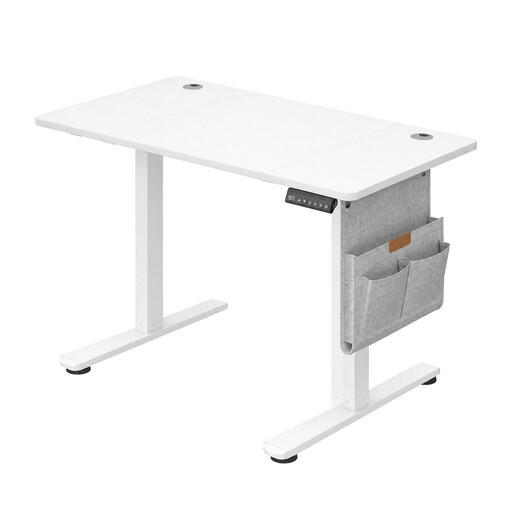
Why it suits this type of user: Four memory settings, cable holes and a storage compartment make this a practical choice if you use your desk extensively for work, study and peripherals.
The supplier lists an obstacle detection sensor, overheating protection and a 70 kg limit. Use these features as described in the manual and don’t exceed the limit.
Four saved heights, cable management, storage compartment, hook and a range of 72–120 cm. The maximum static load capacity is 70 kg.

Why it suits this type of user: The longer desktop offers more space for two screens, a gaming setup or extra study materials, while keeping the depth to 60 cm.
The dimensions, 72–120 cm height range and 70 kg static load capacity are clearly stated. This lets you check in advance whether the extra width will fit in your room.
140 x 60 cm desktop, four memory settings, USB-C port, cable management and hooks included. The motor is designed for electric height adjustment.
We’ve put together a complete, up-to-date list of products that meet these strict selection criteria and the applicable European safety regulations.
Before assembly, check that all the parts are included. Place the frame on a level floor and attach the desktop as instructed in the manual. Then keep these points in mind:
An electric desk is only as practical as the setup around it. A monitor arm, cable tray and compact office chair can help you make the most of the limited 60 cm depth.
Keep your feet flat on the floor and position your forearms so your shoulders stay relaxed. Set the seated and standing heights separately. Then use the memory settings, if your desk has them, so you don’t have to readjust the height manually each time.
Its lifespan depends on the load, frequency of use, assembly and maintenance. Don’t exceed the stated load capacity, keep electrical components dry and observe the recommended rest time if you raise and lower the desk for extended periods.
Energy use depends on the motor, how often you adjust the height and standby consumption. The motor usually only runs while the height is being adjusted. Check the adapter and product specifications for exact consumption, and disconnect the power if the desk won’t be used for a long time, provided the manual allows it.
