
Vandaag of morgen in huis

Kwaliteit gegarandeerd

Welkomstaanbiedingen ontgrendelen: GRATIS bezorging | Tot 80% korting | Gratis 30 dagen JoyPlus-proefperiode
Download de app
An electric sit-stand desk can be useful if you want to change position regularly while working, studying or gaming. But an attractive design or low price doesn’t tell the whole story. A desk may seem to offer plenty of features on paper, yet disappoint in everyday use because of limited stability, unclear dimensions or an impractical control panel.
In this buying guide, the Joybuy Product Recommendation Officer focuses on specifications you can check. This helps you compare a height-adjustable desk based on how you’ll use it, its dimensions, load capacity and practical details — rather than relying on marketing claims alone.
A load capacity of, say, 70 kg sounds generous, but this is the maximum static load. It usually refers to the combined weight of the desktop, monitors, laptop, speakers, lamp and other accessories. A heavy gaming desk with several screens therefore needs a sturdy set-up, with the weight distributed evenly.
Also check whether the stated load capacity applies to the entire desk, rather than just one individual component.
A 120 x 60 cm desk is often a good fit for a bedroom, student room or compact home office. However, 120 cm of width may feel cramped if you have two monitors, speakers and a large mouse mat. A 140 x 60 cm desk gives you more space without requiring a much deeper desktop.
Measure the available space beforehand. Leave room around the desk for height adjustments, and make sure the desktop won’t hit a wall or cupboard as it moves.
A desk with memory settings is handy if several people use it or you want to save your preferred sitting and standing heights. Check how many settings it offers. Two may be enough for one user, while four give you more flexibility in a home office or shared workspace.
A desk with cable management helps keep cables tidy, but cable holes and a storage compartment can’t replace good planning. Check that the cables are long enough and won’t become taut when the desk rises. If a model has a USB-C port, also check what it’s intended for — for example, charging a device or connecting to the controller.
The right working height depends on your height, chair and equipment. The selected models have an adjustment range of around 72 to 120 cm. This suits many sitting and standing positions, but if you’re unsure, measure the height of your current desk.
As well as the adjustment range, check:
According to the product information provided by the brands, several models have a sensor or anti-collision protection. Treat this as a useful feature, not a reason to leave the desk moving unattended.
A digital display shows the selected height. Memory settings let you save your preferred positions, so you don’t have to keep searching for the right height. Check whether the product offers two or four preset positions.
Some models also have a break reminder. According to the brands’ own product information, this is designed to remind users to change position regularly. It isn’t a medical feature and doesn’t replace personal advice about your working posture.
According to the product information, the desktops in this selection are made of particleboard and have steel frames. One JoySelect model is also described as having a P2-grade board and lower formaldehyde emissions. Always check the assembly instructions and make sure all the fittings are secure.
Most models are intended for indoor use. Keep electrical components away from liquids and leave space between the desk and the wall. Some models are reported to activate overheat protection after around two minutes of continuous adjustment. If this happens, you’ll need to wait before changing the height again.

Why it suits this profile: Its compact size and straightforward controls make it a good fit for people working from home, students and anyone trying an electric desk for the first time.
The product information lists a digital control panel, two memory settings, a 70 kg load capacity and an adjustment range of 72 to 118 cm.
A 120 x 60 cm desktop, two hooks and, according to the product description, CE and European standards certification.

Why it suits this profile: The wider work surface and four memory settings are handy for a dedicated home office with multiple screens or different users.
The 140 x 60 cm size gives you more room for a larger screen or office set-up. Cable management and a USB-C port are included, according to the product description.
Four memory settings, a height range of 72 to 120 cm, a USB-C port and a maximum static load of 70 kg, according to the product information.
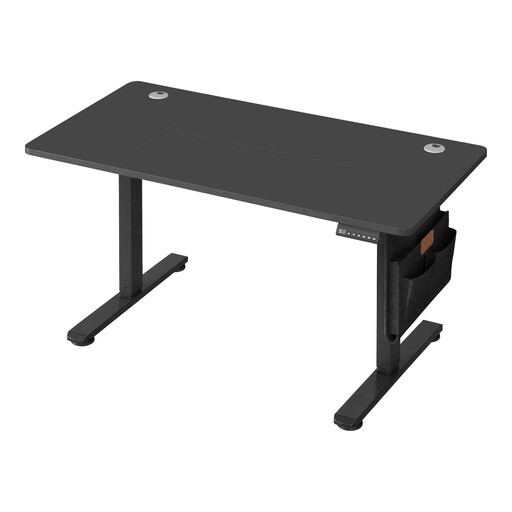
Why it suits this profile: This model is a good match for gamers and people working from home or in an office who need extra desktop space, cable openings and a charging function.
Two cable openings, an organiser and a hook help keep cables and accessories separate. According to the product information, the controller has a lock function.
140 x 60 cm desktop, USB-C port, memory function, adjustable feet and a maximum static load of 70 kg, according to the product specifications.
We’ve put together a complete, up-to-date list of products that meet these strict selection criteria and the applicable European safety regulations.
Adjust the desk so that your forearms are roughly horizontal when typing and your shoulders are relaxed. Check your posture both sitting and standing. Place the desk on a level surface and test it first without any heavy equipment. Keep clear of walls, cupboards and cables while adjusting the height.
Its lifespan depends on the motor, load, assembly and how often you adjust it. Don’t exceed the stated maximum load capacity, and follow the instructions for overheat protection. According to the product information, the models mentioned may need a cooling-off period after prolonged, continuous adjustment.
Most of the electricity is used when raising or lowering the desk. When idle, it generally uses much less, but the exact amount varies by motor and controller. Unplug the desk when it won’t be used for a long time, if the instructions allow this.
