
Vandaag of morgen in huis

Kwaliteit gegarandeerd

Welkomstaanbiedingen ontgrendelen: GRATIS bezorging | Tot 80% korting | Gratis 30 dagen JoyPlus-proefperiode
Download de app
An electric sit-stand desk can be useful for working from home, studying or gaming. With the press of a button, you can switch between sitting and standing. However, a low price or polished product photo says little about how practical it will be in the long term. Stability, adjustment range and controls in particular determine whether a desk is well suited to your everyday use.
A load capacity of 70 kg sounds generous, but this is usually the maximum static weight. This refers to the combined weight of the desktop, monitors, computer, books, speakers and accessories. A heavy gaming monitor or multiple monitor arms can quickly use up the available load capacity.
So do not just check the figure; also make sure the manufacturer clearly explains how this weight was calculated. Distribute heavy equipment as evenly as possible across the desktop.
A 120 x 60 cm desk provides space for a laptop, one monitor, keyboard and documents. This may be sufficient for a compact study or home office. If you work with two screens or want to place a desktop computer next to the monitor, a 140 x 60 cm desk will often be more suitable.
Also consider the depth. A 60 cm desktop leaves little room when you are using a large monitor, keyboard and desk lamp. Measure the available space at home beforehand and leave room for cables and for the desktop to move.
A desk with memory presets makes it easier to return to saved heights. However, the system does not automatically choose the right working position for you. The correct height depends on your chair, height, monitor position and keyboard.
Think of memory presets as a convenient control feature, not as a guarantee of a particular posture. Also check whether the control panel has a clear digital display and how many preferred positions are available.
An electric sit-stand desk needs to go low enough for comfortable sitting and high enough for standing. The models in this selection have adjustment ranges of approximately 72 to 120 cm. This is a useful starting point for different users, but always check the distance between the floor, chair and elbows.
Also look at the dimensions:
An height-adjustable desk consists of more than a desktop and motor. The legs, steel frame and mounting points also determine how stable the desk feels when raised. A thicker steel frame may be relevant for monitor arms or intensive use, but the construction must also be assembled correctly.
Place the desk on a level floor and tighten all connections according to the assembly instructions. After a few weeks, check whether any screws need tightening again. With models featuring an anti-collision or sensor function, you should also check the free space around the desktop.
A digital control panel, two or four memory presets and a quiet motor are practical features for everyday use. A desk with cable management prevents cables from becoming taut when the desktop is raised. Check that cable holes, a storage compartment or hooks are actually suitable for your equipment.
A desk with a USB-C port can be useful for charging or connecting compatible devices. Before buying, check which charging or connection function is specified. A USB-C port does not automatically mean that every device will charge at the same speed.

Why it suits this profile: This compact standing desk is suitable for a home worker, student or gamer with limited space. According to the product information, the desktop adjusts from 72 to 118 cm and two memory presets are available.
The dimensions and maximum static load capacity of 70 kg are clearly stated. This allows you to assess in advance whether the desktop is large enough for your equipment.
120 x 60 cm desktop, digital display, two memory presets, two hooks and a frame with a stated load capacity of 70 kg.
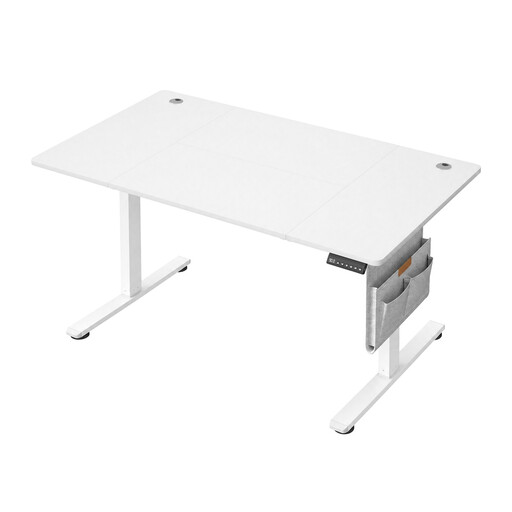
Why it suits this profile: The wider workspace is practical for office workers and home workers with multiple screens. The product information lists four memory heights, cable holes and a storage compartment.
The four memory presets mean you do not have to keep readjusting the desk. The instructions also mention a sensor function and a safety pause during prolonged continuous adjustment.
140,1 x 60,1 cm desktop, height range from 72 to 120 cm, four memory heights and a maximum static load of 70 kg.

Why it suits this profile: This desk is aimed at users who value extra connections and organisation. According to the product information, it has four memory presets, cable management, hooks and a USB-C port.
The product states both the dimensions and the maximum weight of 70 kg. The instructions also include information about liquids, clearance and the automatic overheating pause.
140 x 60 cm desktop, four memory presets, USB-C port, cable management, storage pouch and three hooks.
We have put together a complete, up-to-date list of products that fully meet these strict selection criteria and the applicable European safety regulations.
Start by sitting upright and adjust the desktop so that your shoulders remain relaxed and your forearms are roughly horizontal. Save this height as a memory preset. Then set a standing height at which you can work comfortably and stay relaxed. Check that the screen is at a comfortable viewing height and that the cables do not become taut while adjusting the desk.
Its lifespan depends on the motor, frame, assembly, load and usage. Use the desk within the specified limits, keep liquids away from electrical components and observe any overheating pause. Check the screws and electrical connections periodically. A manufacturer does not always specify a fixed lifespan, so also check the warranty and service conditions.
Power is mainly consumed while the desk is being adjusted; when stationary, consumption is generally limited to the connected control system. How often you switch positions and how long the motor runs determine the amount of electricity used. Unplug the adapter when the desk will not be used for an extended period, provided this is permitted by the manual. For an accurate calculation, refer to the power rating and usage time specified for the particular model.
