
Vandaag of morgen in huis

Kwaliteit gegarandeerd

Welkomstaanbiedingen ontgrendelen: GRATIS bezorging | Tot 80% korting | Gratis 30 dagen JoyPlus-proefperiode
Download de app
An electric sit-stand desk can be useful for working from home, studying, gaming or sharing a workspace. At the touch of a button, you can switch between sitting and standing. But a stylish desktop or a low price tells you little about how a desk will perform day to day. Stability, dimensions and controls are what really determine whether it will still be comfortable to use after a few months.
In this buying guide, you’ll find out what to look for in a height-adjustable desk, which marketing claims to treat with caution, and which models suit different needs.
The stated weight capacity is usually the maximum static load. This means the desk can support a certain weight while it’s stationary. A monitor arm can put extra force on the frame as you adjust the height, which may change things. So add up the weight of the desktop, monitors, computer, speakers and accessories.
The JOYFURNOS models mentioned here have a maximum static load of 70 kg. According to its product specifications, the FlexiSpot E6 frame has a weight capacity of up to 160 kg. If you’re buying a frame, check whether the desktop is included and which desktop dimensions are suitable.
Brands often describe a motor as quiet or smooth. JOYFURNOS’s own product description says that its motor and steel frame operate quietly and smoothly. That’s useful information, but it isn’t an independent decibel rating. In a bedroom, shared office or student room, the floor, walls and load can also affect how loud the desk seems.
Also look for adjustable feet, a sturdy base and well-built legs. A desk that wobbles at its highest setting is less suitable for a heavy monitor setup or intensive use.
A memory function is handy if you regularly switch between sitting and standing. Check how many positions you can actually save, though. A sit-stand desk with a memory function may have two, four or more preset positions.
A desk with USB-C is handy too, but the port isn’t a substitute for a full charging station. Check the product information to see whether it supports charging, what charging capacity is specified, and whether the cables can be neatly tucked away.
The space you have available will help determine which size makes sense:
Don’t just measure the wall. Remember to allow room to move behind your chair, for cables, and for the desktop to move up and down.
Most of the models mentioned move from around 72 to 120 cm. According to the product information, the JoySelect model has an adjustment range of 72 to 118 cm. The right setting depends on your height and chair. When sitting, your forearms should rest comfortably on the desktop; when standing, you shouldn’t have to reach for the keyboard.
An electric sit-stand desk is only practical if its adjustment range suits your working posture. Don’t just look at the maximum height.
An electric desk needs power and should be used indoors. Don’t place it right up against a wall while adjusting its height. Several JOYFURNOS models have an overheat protection feature that activates if the desk is moved continuously for more than two minutes. According to the product information, you should then wait 18 minutes before adjusting the height again.
Also check:

Why it suits this profile: Its compact size fits into smaller rooms and provides space for a laptop, monitor and study materials. Digital controls with two memory settings keep things simple.
The product information gives the specific adjustment range of 72 to 118 cm and a maximum static load of 70 kg, rather than relying on general claims.
120 x 60 cm, two memory settings, digital display and two accessory hooks.
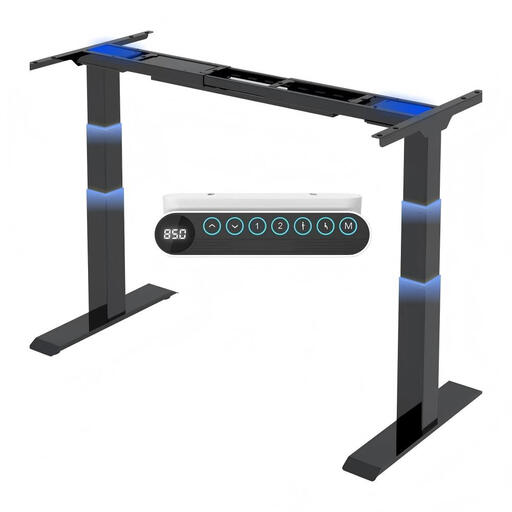
Why it suits this profile: This standalone desk frame is a good option if you want to choose a suitable desktop yourself or adapt an existing workspace.
The specifications list two motors, three-stage legs, four memory settings and a weight capacity of up to 160 kg. Be sure to check that it’s compatible with your desktop.
Two motors, four memory positions, USB and a high stated weight capacity.

Why it suits this profile: The spacious work surface is ideal for intensive home working, gaming or a dual-monitor setup. The USB-C port and storage features are handy for everyday use.
The specifications list its 160 x 70 cm size, 70 kg static load, cable grommets, a locking function and adjustable feet.
Spacious desktop, memory function, USB-C, cable management and a steel frame.

Why it suits this profile: This desk takes up little space but still includes a memory function, USB-C port, cable management and a storage pouch.
Its compact size means you won’t end up with a desktop that’s too large for a small room. The product specifications also state a weight limit of 70 kg.
120 x 60 cm, four memory heights, USB-C, plus included hooks and storage pouch.
We’ve put together a complete, up-to-date list of products that meet these strict selection criteria and the applicable European safety regulations.
Start with a low sitting position, with your feet flat on the floor and your shoulders relaxed. Then set the standing height so your elbows are at roughly a right angle when you type. Try both positions with your own chair, keyboard and monitor; the right height varies from person to person.
Its lifespan depends on the motor, frame, load, how often it’s used and how well it’s assembled. Use the desk within its stated limits and avoid raising and lowering it continuously. Check the screws, cables and adjustable feet from time to time. Always refer to the latest product terms for warranty and maintenance information.
The motor mainly uses electricity while the desk is moving. How often you adjust the height and how heavily the desk is loaded will affect its energy use. An energy-saving mode, as listed for several JOYFURNOS models, can help reduce standby power consumption. For a precise estimate, you’ll need the motor’s power rating and your local electricity rate.
