
Vandaag of morgen in huis

Kwaliteit gegarandeerd

Welkomstaanbiedingen ontgrendelen: GRATIS bezorging | Tot 80% korting | Gratis 30 dagen JoyPlus-proefperiode
Download de app
An electric sit-stand desk can be useful if you want to switch regularly between sitting and standing while working, studying or gaming. But an electric motor alone tells you little about how a desk will perform day to day. A desk may look appealing on paper, yet disappoint in practice because of limited workspace, a wobbly frame or a lack of cable management.
So focus on specifications you can check. Consider the height range, weight capacity, desktop dimensions and how the controls work.
A stated capacity of, say, 70 kg sounds generous, but check whether this refers to static weight capacity. This is the maximum weight the desk can support while stationary, according to the product specifications. A monitor arm that exerts extra force as you adjust the desk may place a different load on it from a laptop resting flat on the desktop.
Spread heavy equipment across the desktop and don’t exceed the stated capacity. Also check how stable the legs are at the highest setting: weight capacity and stability while moving are not the same thing.
A 120 x 60 cm desktop often fits well in a home office, student room or study. It may be enough space for a laptop, monitor, keyboard and documents. If you use two screens, speakers or a gaming PC on the desk, a depth of 60 cm may feel a little cramped.
If you need more room, consider a 160 x 70 cm desk. Also measure the available wall space beforehand and check that the desk can move freely as you adjust its height.
A memory function is handy if you often switch between set sitting and standing heights. However, a desk with a memory function isn’t automatically right for everyone. Check how many preferred positions you can save and whether the controls are easy to read.
A desk with a USB-C port can be handy for charging a phone or another device, but check exactly what charging function is specified. A USB-C port doesn’t necessarily replace a full laptop charger. Cable management also varies by model: some desks have cable grommets only, while others also include an organiser, storage pouch or hooks.
Compare the minimum and maximum heights with your chair, height and working posture. For example, the models in this selection have ranges of 72 to 118 cm or 72 to 120 cm. The stated measurement is the desk height, not the height of the desktop with equipment on it.
A digital control panel shows the current height. Some models let you save two or four positions. The product descriptions say that the motors operate smoothly and quietly. This is the manufacturer’s claim, and your experience may differ depending on the room, load and floor surface.
A steel frame provides a sturdy base, but also look at the leg construction, adjustable feet and floor surface. A desk on an uneven floor may move, even if the frame itself is stable.
Think of a stated capacity of 70 kg as a technical limit. Add up the weight of your monitors, laptop, lamp, books, arm supports and other accessories. Don’t place the desk right against a wall if it needs to move up or down. Electric models also need enough clear space around the mechanism.
A height-adjustable desk measuring 120 x 60 cm is suitable for compact workspaces. A larger desktop measuring 140.1 x 60.1 cm or 160 x 70 cm gives you more room for several devices. With a gaming desk, check where the PC, monitor arm and cables will go.
Cable grommets, a fabric organiser and hooks help keep cables and accessories clear of the height adjustment mechanism. Before assembly, check that the cables are long enough to accommodate the full height range.

Why it suits this profile: This compact electric standing desk provides a straightforward setup for working from home, studying or gaming, without extra features that not everyone needs.
The specifications list a height range of 72–118 cm, two memory settings, a digital display and a weight capacity of 70 kg. That means the key details are clear from the outset.
120 x 60 cm desktop, two memory presets, digital control panel and two accessory hooks.
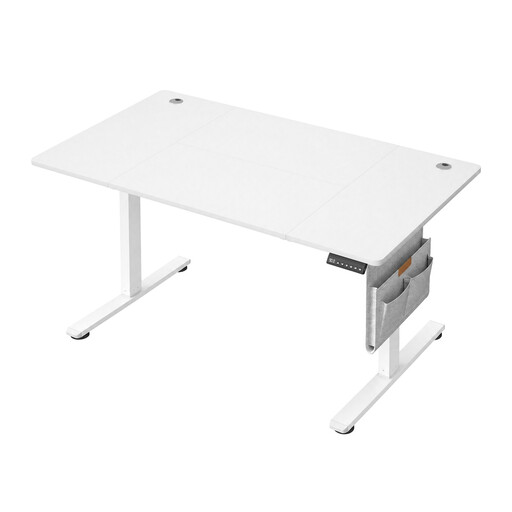
Why it suits this profile: The spacious desktop is a good fit for a dedicated home office or office setup with multiple screens and everyday accessories.
The product description lists two cable grommets, an organiser, a hook and adjustable feet. It also specifies a USB-C port and a lock function on the controls.
160 x 70 cm of workspace, a height range of 72–120 cm, memory function, USB-C port and a maximum static weight capacity of 70 kg.
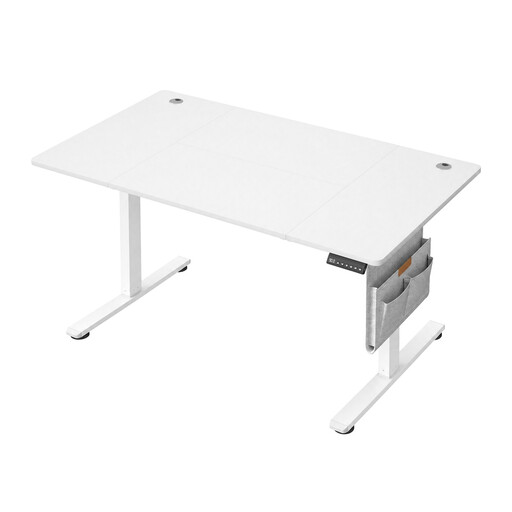
Why it suits this profile: Four saved heights are useful when several people share the desk or you use different work setups.
The specifications list cable holes, a storage compartment, a hook, obstacle detection and a height range of 72–120 cm. This means cable management and controls don’t depend on separate accessories.
Four saved height settings, steel frame, 140.1 x 60.1 cm desktop and a stated static weight capacity of 70 kg.
We’ve put together a complete, up-to-date list of products that meet these strict selection criteria and the applicable European safety requirements.
An electric desk is usually delivered flat-packed. Before assembly, check that all the parts, cables and fixings are included. Set the frame up on a flat surface and tighten the connections evenly. Don’t use the desk until all the electrical connections have been properly secured.
Keep these points in mind:
A CE mark and references to European standards are relevant conformity information, but they don’t guarantee that a desk will feel equally stable or quiet in every room. Always check the full product specifications and assembly instructions.
Start with a height that lets you keep your shoulders relaxed and your forearms roughly horizontal on the desktop. Then set a second position for standing. Treat saved memory settings as a starting point only: your chair, footwear, monitor height and personal preference all affect the right setup.
Its lifespan depends on motor load, assembly, how often it’s used and how well it’s maintained. There’s no universal lifespan that applies to every model. Keep within the stated weight capacity, avoid obstructions while adjusting the desk and follow the instructions on overheating protection.
Exact power consumption varies by motor and how long it’s used. The product information for the models in this selection doesn’t give a complete energy consumption profile for every desk. The motor only uses power while adjusting the desk; standby consumption may vary depending on the controls. If this matters to you, check the product information or use an energy meter before choosing.
