
当日/次日达

品质保障

开启新人专享福利: 全场免邮 | 低至 2 折 | 免费试用 30 天 JoyPlus 会员
下载 Joybuy
An electric sit-stand desk may seem straightforward at first glance: choose a desktop, set the height and you’re ready to go. In practice, the motor, stability, dimensions and controls largely determine how comfortable the desk is to use every day. Home workers, students, office professionals and gamers also have different requirements.
So before buying an electric height-adjustable desk, watch out for these common pitfalls.
A high load capacity sounds reassuring, but always check exactly what the manufacturer means. It often refers to static load: the weight the desk can support while stationary. A monitor arm, computer, speakers and accessories do not always distribute their weight evenly.
Also look at the frame, feet and adjustable legs. A steel frame with sturdy connections helps limit movement while typing or gaming. According to the product information, several JOYFURNOS models have a maximum static load of 70 kg.
A 120 x 60 cm desk is easier to fit into a compact room, but a large monitor, laptop and notepad can quickly take up a lot of space. If you work with two screens or regularly write by hand, a 160 x 70 cm work desk is usually a better choice.
A depth of 70 cm gives you enough room to position a monitor at a suitable distance without the desktop immediately feeling cluttered. Before buying, also measure the available space, including the clearance needed for height adjustment.
A memory function, USB-C port and cable management can be useful, but only if they suit the way you work. For example, check:
According to the JOYFURNOS desk product information, the overheating protection may be activated when the desk is adjusted continuously for more than two minutes. The instructions then say that you must wait 18 minutes.
A height-adjustable desk should suit both your seated and standing working positions. The JOYFURNOS models in this selection have an adjustment range of approximately 72 to 120 cm. This is a useful starting point, but your height and chair will determine whether the range is right for you.
A desk with a memory function is practical when several people use the same workstation or when you want to switch quickly between two preferred heights. With models offering four memory settings, for example, you can save separate positions for sitting, standing and different users.
Pay attention to the combination of a steel frame, desktop construction and adjustable feet. A chipboard desktop can be a practical choice for a home office, provided the connecting joints are sturdy and the desk stands on a level surface.
Adjustable feet are particularly useful on older floors or tiles that are not completely even. They help you level the desk and can reduce contact with the floor. Do not position an electric desk tightly against the wall: the desktop and frame need room to move.
A desk with cable management keeps cables away from your legs and makes your workstation look tidier. According to the product information, the JOYFURNOS desks measuring 160 x 70 cm include two cable holes, a fabric organiser and a hook.
A desk with a USB-C port can be useful for charging compatible devices. However, check the charging requirements of your laptop, tablet or phone. A USB-C port on a desk does not automatically replace a powerful laptop charger.
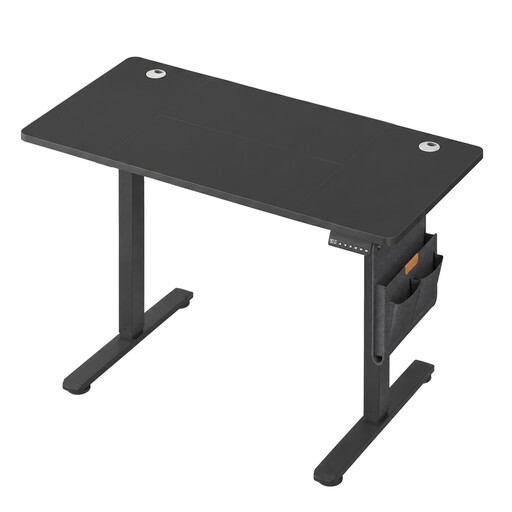
Why it suits this profile: The compact size is ideal for a student bedroom, bedroom or small home office where every centimetre counts. The four memory settings make it easy to switch between saved heights.
The dimensions and height range are clearly stated, so you can check in advance whether the desktop and adjustment range will suit your space.
120 x 60 cm, four memory settings, steel frame, cable holes and a specified static load of 70 kg.

Why it suits this profile: This spacious electric height-adjustable desk has room for several monitors, a laptop and accessories. The USB-C port and memory function are practical for a permanent home workstation.
The desktop size, 24.8 kg weight and maximum static load of 70 kg are specified. Cable holes and a controller lock are also listed.
160 x 70 cm, height from 72 to 120 cm, USB-C port, four memory settings and adjustable feet.
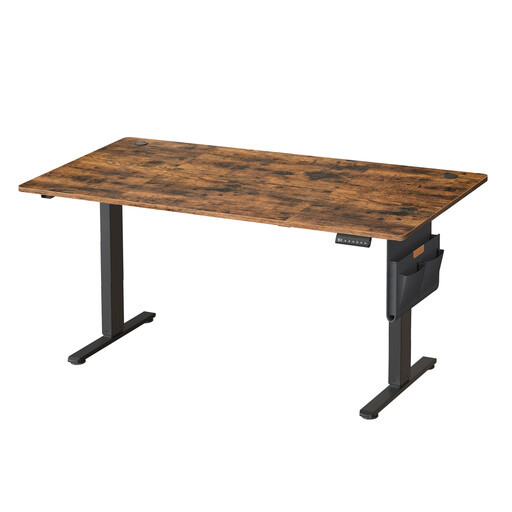
Why it suits this profile: The wide work surface is suitable for intensive computer use, multiple monitors or a combination of work and study. The rustic brown finish works well in a study featuring warm materials.
The product specifications state the dimensions, frame, height range and maximum static load. The warning about walls and overheating also helps ensure correct use.
160.1 x 70.1 cm, four height settings, steel frame, cable holes and a specified static load of 70 kg.
We’ve put together a complete, up-to-date list of products that fully meet these strict selection criteria and the applicable European safety regulations.
Use this short checklist before ordering an electric sit-stand desk:
Set the seated height so that your forearms rest comfortably on the desktop. For standing work, adjust the desktop again without hunching your shoulders. Then check that the cables are not pulled taut and that the desktop can move freely.
Its lifespan depends on how it is assembled, the load, frequency of use and maintenance. Stay within the maximum static load, use the desk indoors and follow the instructions for the overheating protection. A sturdy frame and correctly adjusted feet can help limit unnecessary movement.
Most of the electricity is used while the desk is being adjusted; consumption is generally limited when it is stationary. A control panel with an energy-saving mode can help reduce consumption when the desk is not in use. Before buying, check the technical specifications of the specific model if energy consumption is a decisive factor.
