
Livraison le jour même et le lendemain

Qualité garantie

Débloquez vos offres de bienvenue: Livraison GRATUITE | Jusqu'à -80 % | 30 jours d'essai gratuits à JoyPlus
Téléchargez l'application
The wrong desk can ruin a work-from-home day. Back pain, a stiff neck, and a lack of focus are often the result of a poorly configured workspace. An electric sit-stand desk is often seen as the solution, but the market is flooded with models that promise more than they can deliver.
As a Joybuy Product Recommendation Officer, I see the challenges consumers face every day. A lot of marketing jargon leads to disappointment and wasted money. Before you make a choice, it's crucial to recognise the most common pitfalls.
A good electric sit-stand desk doesn't have to be complicated. It should do what it promises: switch smoothly and stably between sitting and standing, year after year.
To see through the marketing hype, it's best to focus on a few concrete specifications. These determine the quality and usability of your future home office desk.
The foundation of any good standing desk is its frame. A frame made of thick-gauge steel provides the necessary rigidity to prevent wobbling at standing height. Pay attention to the leg construction. Models with dual motors (one in each leg) distribute the force more evenly, resulting in smoother movement and greater stability, especially with a heavier setup involving multiple monitors. A single-motor system may suffice for a light laptop setup, but for anything more, a dual motor is recommended.
The size of your desk is a personal choice, but a 140x60 cm sit-stand desk is a popular size that fits into most homes. It offers enough space for a monitor, laptop, and notebook without dominating the room. Need more space for multiple screens or creative work? Then consider a wider model of 160 cm or 180 cm. Measure your available space and think about what you want to place on your desk before making a decision.
An electric desk with a memory function is a worthwhile feature. It allows you to set your ideal sitting and standing heights with the press of a button. This small convenience significantly lowers the barrier to actually changing your posture. Check if the control panel is simple and intuitive. Extras like a built-in USB port to charge your phone are handy, but the core functionality remains the reliability of the height adjustment.
Based on these objective criteria, we have selected a number of models that suit different user profiles.
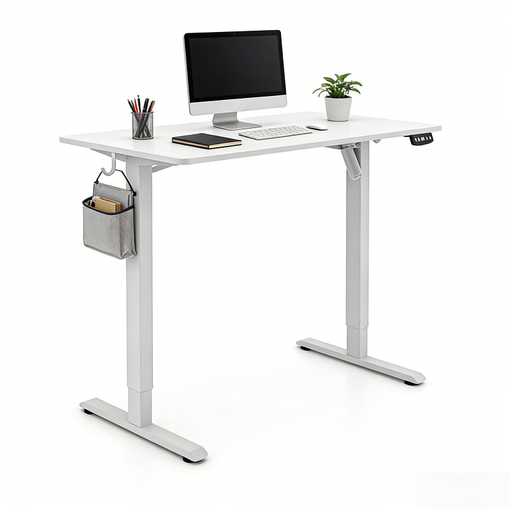
Why This Fits Their Persona: At 120x60 cm, this desk is compact enough for a smaller room or a corner of the living room, without sacrificing the ergonomic benefits of a full-fledged sit-stand desk.
The model focuses on the essentials: a stable steel frame and a quiet motor. It avoids the pitfall of a noisy motor, which is essential in a quiet home environment.
Compact size, ideal for home use. The manufacturer specifies a quiet and smooth lift, ensuring a pleasant user experience.
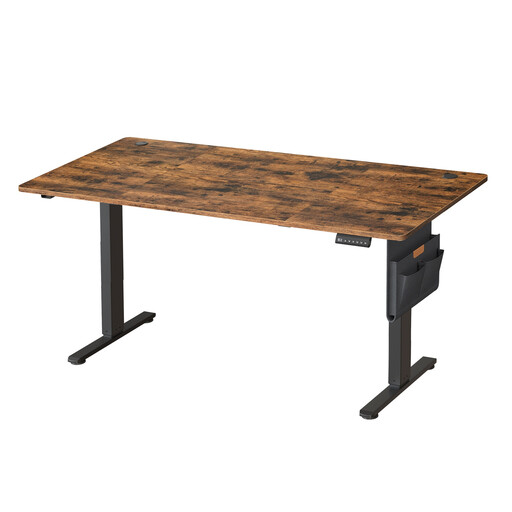
Why This Fits Their Persona: For professionals who need a large and reliable work surface for multiple monitors, documents, and equipment. This desk provides the space and stability required for a serious workstation.
The robust steel frame is designed to minimise wobble, even at maximum height and with a heavy load. This directly addresses the pitfall of instability.
Very spacious work surface (180x80 cm), 4 memory presets for quick height adjustment, and a convenient USB-C port. Includes cable grommets and an organiser for a tidy desk.
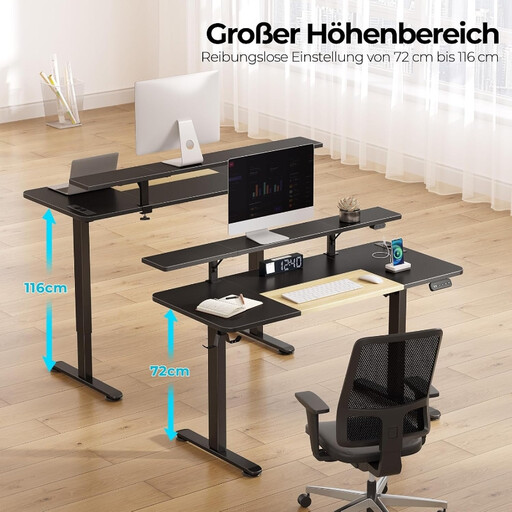
Why This Fits Their Persona: This desk combines an ergonomic design with features specifically aimed at gamers and tech users, such as a built-in power supply and ambient lighting for the perfect setup.
While extra features can often be gimmicky, the integrated power outlets and USB ports here are highly practical. It prevents a tangle of cables and extension cords, a common problem with complex setups.
Built-in power hub with 2 outlets and 2 USB ports. The monitor stand provides a better viewing height, and the RGB lighting is a nice touch for atmosphere.
We have compiled a complete, up-to-date list of products that fully meet these strict selection criteria and guidelines.
A good rule of thumb for sitting height is to be able to place your feet flat on the floor with your knees at an approximately 90-degree angle. Your elbows should rest on the desktop at the same angle. For standing height, the same applies to your elbows: a 90-degree angle with relaxed shoulders. Use the memory function to save these two heights so you can switch easily.
Power consumption is generally very low. The motor only uses energy while adjusting the height. In standby mode, the consumption is comparable to that of a phone charger plugged into the wall. Many modern desks also have a power-saving standby mode to further minimise consumption.
A dual-motor desk is typically the superior choice. They are more stable, can support more weight, and adjust height faster and more quietly than single-motor models. If you plan to place a heavy computer tower and multiple monitors on your desk, a dual-motor model is highly recommended to prevent overload and instability. For a simple setup with just a laptop, a single-motor desk may suffice.
