
Vandaag of morgen in huis

Kwaliteit gegarandeerd

Welkomstaanbiedingen ontgrendelen: GRATIS bezorging | Tot 80% korting | Gratis 30 dagen JoyPlus-proefperiode
Download de app
An electric sit-stand desk can be handy if you want to change your posture regularly while working, studying or gaming. However, not every height-adjustable desk is suitable for your space or equipment. A low price might look appealing, but a limited depth, unclear weight capacity or missing cable management only become apparent after assembly.
In this buying guide, you will discover what to check before you buy. Afterwards, you will find several electric height-adjustable desks that suit different usage scenarios.
A desk that adjusts from roughly 72 to 120 cm does not automatically suit every user. Also check the height of your chair, the thickness of the desktop and the position of your monitor. A screen or keyboard that is too high can still be uncomfortable.
Also pay attention to the space around the desk. Cables, a windowsill or a wall must not get in the way during adjustment. For the JOYFURNOS models listed, it is advised not to place the desk directly against the wall while adjusting.
A maximum static weight capacity of 70 kg does not mean you should load the desk with 70 kg while adjusting it. Monitor arms, speakers, a computer and other accessories all add up. Place heavy equipment as evenly as possible on the desktop.
A steel frame can contribute to stability, but the final experience also depends on the construction, the floor and the assembly. Check that all parts are securely fastened and use adjustable feet if the floor is not completely level.
A desk with a memory function makes it easier to recall saved heights, but it is no substitute for a good workstation setup. A USB-C port does not automatically deliver the same charging speed to every device. Check the product specifications and the requirements of your laptop or smartphone.
Also pay attention to the motor's duty cycle. On several models in this selection, an overheating protection system kicks in when the desk is adjusted continuously for about two minutes. After that, you need to wait approximately 18 minutes, according to the product information.
The available space determines which size is practical:
Don't just measure the spot where the desktop will go. Also allow for the movement of the legs and the cables at the back.
The desks in this selection have an adjustment range of around 72 to 120 cm. Check whether this matches your height and chair setting. A desk with four memory presets is practical when several people use the same workstation or when you want to switch quickly between a sitting and standing position.
Some product descriptions mention reminders to change posture regularly. According to the product information, this is a built-in function of the control panel; it is not a medical assessment or a guarantee of any particular effect.
Look for a combination of steel frame, maximum static load and the weight of the desk. A heavier model is not automatically more stable, but it can indicate a more robust construction. The assembly manual remains important: incorrectly fitted legs can cause play or noise.
A desk with cable management has cable grommets, an organiser, storage bag or hooks. This prevents cables from hanging over the edge when the desktop rises. Check beforehand where your power socket is and whether the cables are long enough.
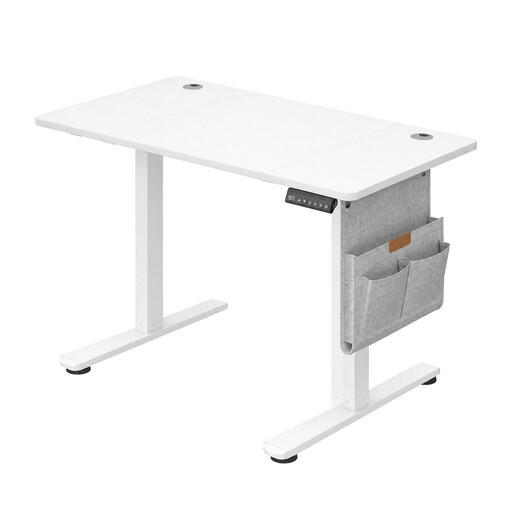
Why this fits the profile: The compact size is suitable for a small home workstation, student room or bedroom. The white finish complements a light interior.
The product information mentions four memory heights, cable grommets, a storage bag and a hook. This means you don't have to focus only on the lowest price or the adjustment range.
Dimensions of 120 x 60 cm, adjustable from 72 to 120 cm and a stated static weight capacity of 70 kg.

Why this fits the profile: The wide workspace offers room for multiple screens, a laptop and accessories. This suits office professionals, freelancers and an extensive standing desk for a home office.
In addition to the size, the product description mentions a steel frame, cable management and a USB-C port. The stated weight capacity remains 70 kg, so you can calculate the total load.
160 x 70 cm, four memory presets, USB-C port, three hooks and an adjustment range of 72 to 120 cm.

Why this fits the profile: This size offers a middle ground for intensive home working, studying or gaming. The USB-C port and memory presets are practical for a fixed workstation.
The specifications mention cable management, a USB-C port, four memory presets and a steel frame. Do check the required charging capacity of your device beforehand.
140 x 60 cm, adjustable from 72 to 120 cm, static weight capacity of 70 kg and three hooks.
First set up your chair and monitor before saving the memory presets. Keep your elbows relaxed and place the screen directly in front of you. Then alternate between sitting and standing in a way that suits your tasks. An ergonomic desk helps mainly because you can adjust the working height; the complete setup determines how practical the workstation is.
Do not place electrical components near liquids. Leave enough space free during adjustment and do not exceed the stated weight capacity. If you encounter assembly problems, it is wise to follow the manual rather than modifying parts yourself.
We have compiled a full, up-to-date list of products that fully meet these strict selection criteria and comply with current European safety regulations.
The power consumption depends on the motor, the number of adjustments and the standby mode. Check the product specifications for the power rating when available. A desk that is adjusted only a few times a day typically uses power only briefly during movement.
The lifespan depends on the motor, load, assembly and frequency of use. Do not exceed the stated 70 kg static weight capacity and avoid prolonged continuous adjustment. A level surface and securely tightened connections help prevent unnecessary play and strain.
A gaming desk can be suitable when the desktop is large enough for your monitor, keyboard and other equipment. However, a traditional gaming desk is not always electrically adjustable. If you want to work both sitting and standing, it is better to search specifically for an electric desk with sufficient depth, a memory function and cable management.
