
Livraison le jour même et le lendemain

Qualité garantie

Débloquez vos offres de bienvenue: Livraison GRATUITE | Jusqu'à -80 % | 30 jours d'essai gratuits à JoyPlus
Téléchargez l'application
An electric sit-stand desk can be useful if you want to change your working position regularly while working, studying or gaming. However, a low price or a long list of features does not automatically mean that a desk will suit your space and needs. Stability, dimensions and controls are especially important in determining whether you will enjoy using the desk every day.
In this buying guide, the Joybuy Product Recommendation Officer discusses the most important points to check. This is followed by three product choices for different user profiles.
A load capacity of, for example, 70 kg sounds generous, but check exactly what it means. The stated maximum is often a static load. A monitor arm attached to the edge, a heavy PC and a speaker can place different demands on the desk than a laptop lying flat on the desktop.
Also consider the total load capacity of the frame, desktop and any accessories. Do not exceed the stated maximum.
A 120 x 60 cm desk is suitable for a laptop, one monitor, keyboard and documents. However, the depth may be limited if you use two monitors, a desktop computer or a lot of study materials.
A 160 x 70 cm desk offers more space, but also requires a larger room and enough clearance around the desktop for movement. So do not just measure the area where the desk will stand. Check that the desktop will not hit a windowsill, cupboard or wall as it is adjusted.
A desk with a memory function can quickly recall saved height settings. This is convenient, but the function will not automatically set the correct working height for you. You still need to adjust the height to suit your chair, height, monitor and keyboard.
Some models offer two or four memory settings. Choose the number based on how you plan to use the desk: two settings may be enough for one user, while four are more convenient in a shared home office.
Check the minimum and maximum height range. For example, the models in this selection adjust from approximately 72 to 118 or 120 cm. This range is suitable for working both seated and standing, although the ideal position varies from person to person.
A digital control panel shows the current height. A single motor can be suitable for daily use, provided you follow the stated load capacity and usage restrictions. Always read the instructions regarding maximum operating time and any required waiting period between adjustments.
A steel frame and a stated load capacity of 70 kg are specifications that can be checked. Stability also depends on the construction, the width of the legs, the weight of the desktop and the floor surface.
Place the desk on a level floor and tighten all fixings securely after assembly. A larger desktop can provide more workspace, but with a lightweight construction it may also be more susceptible to movement when the desk is at its highest setting.
Pay attention to the material and finish of the desktop. The JoySelect product information specifies a P2 board with lower formaldehyde emissions. This is a product specification, not a medical or health claim.
For a tidy desk with cable management, cable apertures, an organiser or a storage hook are useful details. Check where the power adapter is positioned and whether the cables are long enough when the desktop is raised. A USB-C connection, such as the one included on one of the JOYFURNOS models, can be useful, but check exactly what the connection is intended for.
According to the product information, the two JoySelect models are supplied with CE marking and reference to European standard certification. A CE marking is a declaration that the manufacturer states that the product complies with applicable EU requirements; it is not a general quality mark. Keep the instructions and check on delivery that the adapter, controls and fixings are all included.

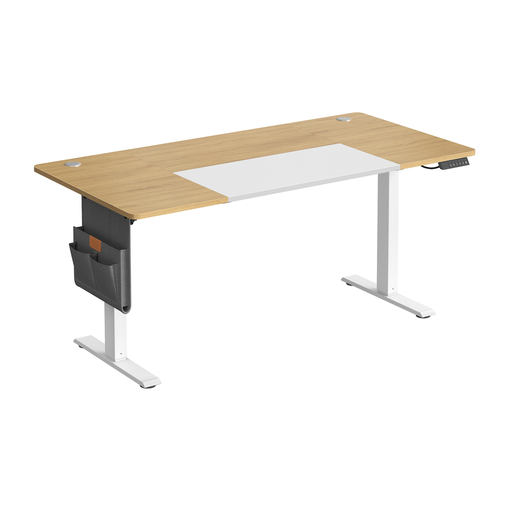
Why it suits this profile: This compact model is ideal for a home worker, student or gamer with one main screen and limited space. The desktop measures 120 x 60 cm and the height adjusts from 72 to 118 cm.
The height, 70 kg load capacity and dimensions are clearly specified. The digital panel has two memory settings, so you do not have to keep searching for the right working height.
120 x 60 cm, 70 kg load capacity, digital display, two memory settings and two hooks. Available with an oak desktop and white frame.
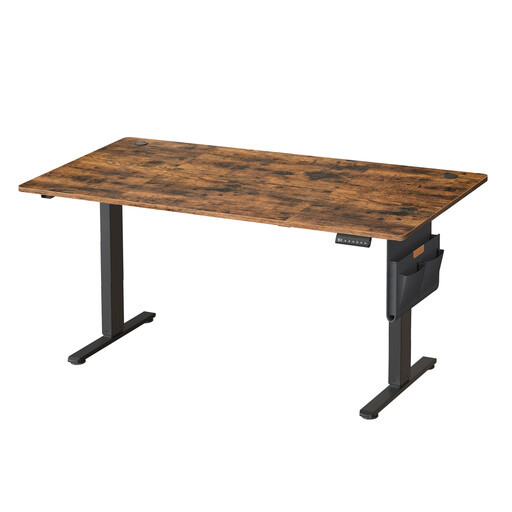
Why it suits this profile: The wide desktop is designed for a spacious home office or an office sit-stand desk. It provides room for multiple screens, accessories and documents.
The product information specifies not only the dimensions, but also a maximum static load of 70 kg and a height range of 72 to 120 cm. It also includes a warning about overheating protection during prolonged, continuous adjustment.
160 x 70 cm, four memory settings, USB-C connection, cable management, three hooks and a 70 kg load capacity.
Why it suits this profile: This spacious electric standing desk is ideal for gamers, intensive home workers and users with multiple screens or peripherals.
The product information lists a built-in collision sensor, cable management and a clear 70 kg limit. Do not place the desk directly against a wall, and keep electrical components away from liquids.
160,1 x 70,1 cm, four memory settings, height from 72,1 to 120,1 cm, steel frame and storage space for accessories.
We have put together a complete, up-to-date list of products that fully meet these strict selection criteria and the applicable European safety regulations.
An electric desk is usually supplied as a flat-pack kit. Before assembly, check that all parts are included and follow the instructions step by step. Place the frame on a level surface and test the adjustment mechanism before adding monitors or other equipment.
Keep the following points in mind:
Yes, an electric sit-stand desk can be suitable for working from home if its dimensions, height range and load capacity match your workspace. For a laptop and one monitor, 120 x 60 cm is often practical. For multiple screens or additional equipment, 160 x 70 cm provides more room.
First, adjust your chair and armrests correctly. Then place your feet firmly on the floor and let your arms rest comfortably towards the keyboard. Adjust the height until your shoulders remain relaxed and your screen is at a comfortable viewing height. You can then use the memory function, if available.
Power consumption depends on the motor, the number of adjustments and the standby mode. The motor mainly uses energy while the desk is moving up or down; if you rarely change the height, consumption is generally limited. For an accurate calculation, check the wattage in the product information and unplug the adapter when the desk will not be used for an extended period.
