
Livraison le jour même et le lendemain

Qualité garantie

Débloquez vos offres de bienvenue: Livraison GRATUITE | Jusqu'à -80 % | 30 jours d'essai gratuits à JoyPlus
Téléchargez l'application
An electric sit-stand desk can make your workspace more flexible. You can switch between sitting and standing without manually moving the desktop. However, many models look similar. The differences often come down to dimensions, height range, controls and stability.
Before you buy an electric desk, watch out for these three common pitfalls:
A height-adjustable desk needs to suit both your height and your chair. Don’t just check the lowest and highest settings; look at the controls too. For example, the models in this selection have a range of around 72 to 118 or 120 cm.
Preset memory positions are useful when you alternate between sitting and standing while working from home or studying. A height-adjustable desk with a memory function lets you quickly return to your saved positions. Check how many positions are available: some models have two, while others have four.
A 120 x 60 cm desk is suitable for a laptop, one monitor, a keyboard and documents. A 160 x 70 cm desk offers more space for an extensive home-working or gaming setup. Also consider the desk’s depth and the space available behind the desktop for cables.
The maximum static load capacity of the models mentioned is 70 kg. This includes monitors, a computer, lamps and accessories. Distribute heavy equipment evenly and don’t exceed the stated limit.
A digital control panel makes it easier to check the height. A desk with cable management helps keep cables for your monitor, laptop and charger tidy. A desk with a USB-C port can be handy for charging compatible devices, but always check the charging function and power output actually stated for the product.
Also look out for:
A CE mark indicates conformity with applicable European product regulations. It doesn’t guarantee that every desk will be equally stable or comfortable for every user. Always compare the specific product details.
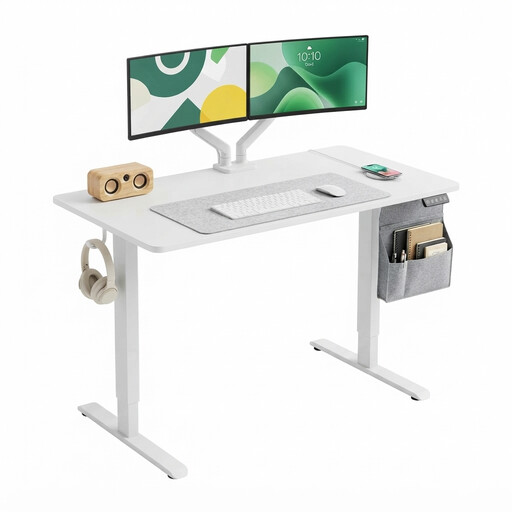
Why it suits this user: Its compact size works well in a bedroom, student room or small home workspace. The white finish is easy to pair with a range of interiors.
The product specifications state a height range of 72–118 cm, a load capacity of 70 kg and a digital control panel with two memory settings. This means the key details are clear before you buy.
120 x 60 cm, two memory settings, digital display, two hooks and a stated load capacity of 70 kg.

Why it suits this user: This spacious desk is ideal for professionals, home workers and anyone with multiple screens or extra equipment.
The specifications list dimensions of 160 x 70 cm, a memory function, a USB-C connection, cable ports and adjustable feet. This makes it easy to check the practical features.
Spacious desktop, height range of 72–120 cm, USB-C port, two cable holes and a stated static load capacity of 70 kg.

Why it suits this user: Four memory settings are useful when several people share the same desk or you often switch between working and gaming heights.
The product information lists cable management, hooks, a USB-C port and a height range of 72–120 cm. It also explains the overheating protection that applies during prolonged height adjustment.
Four memory settings, 140 x 60 cm, USB-C port, cable management and a maximum static load capacity of 70 kg.

Why it suits this user: The wide desktop has room for a monitor, laptop, keyboard and accessories. That makes it a good fit for gaming, long hours of office work and creative projects.
The product description lists two cable holes, an organiser, a hook, a memory function and a USB-C connection. The maximum load capacity of 70 kg gives you a clear limit for your equipment.
160 x 70 cm, height range of 72–120 cm, USB-C port, memory function and storage features for cables and accessories.
We’ve put together a complete, up-to-date list of products that meet these strict selection criteria and comply with current European safety regulations.
When sitting, your forearms should rest roughly horizontally on the desktop, without your shoulders being raised. The same principle applies when standing. The right height varies from person to person and also depends on your chair, monitor and keyboard. Use the memory function if you switch positions regularly.
Its lifespan depends on assembly, load, how often it’s used and maintenance. Check regularly that the screws and electrical connections are secure. Use the desk indoors only and stay within the maximum load capacity. The product information may also specify a maximum continuous adjustment time and a cooling period.
Power consumption depends on the motor, how often you adjust the desk and its standby mode. The motor uses most energy while raising or lowering the desk. A control panel with an energy-saving function may reduce consumption when the desk is idle, but check the product specifications for exact figures.
