
Livraison le jour même et le lendemain

Qualité garantie

Débloquez vos offres de bienvenue: Livraison GRATUITE | Jusqu'à -80 % | 30 jours d'essai gratuits à JoyPlus
Téléchargez l'application
An electric sit-stand desk might seem simple at first: press a button and switch between sitting and standing. In practice, models vary considerably in size, stability, controls and safety features. If you only look at the price or maximum load capacity, you could end up with a desk that’s too small, wobbly or lacking enough space for cables and equipment.
This buying guide helps home workers, office staff, students and gamers compare the key specifications without taking marketing claims at face value.
A load capacity of, say, 70 kg doesn’t tell you everything about day-to-day use. Also check the weight of the desktop, the type of frame and how stable the desk is at its highest setting. A desk supporting monitor arms, speakers and a desktop computer will be loaded differently from one holding just a laptop.
Also check the difference between static load and the load while the desk is being adjusted. Product specifications usually list only the maximum static load. So allow a safety margin and position heavy equipment as centrally as possible.
A height-adjustable desk measuring 120 x 60 cm is often a good fit for a student room, bedroom or compact home office. However, this size can feel restrictive if you need space for two screens, a desktop PC and paperwork.
A height-adjustable desk measuring 160 x 70 cm gives you more room, but also needs a larger clear area. Check the distance from the wall before buying. An electric desk must be able to move without hitting a wall, cupboard or windowsill.
A desk with a memory function makes it easier to select saved heights. However, the desk won’t automatically work out the right working height for every user. Adjust it so that your shoulders stay relaxed and your forearms rest roughly horizontally on the desktop.
A reminder function isn’t a substitute for taking your own breaks, either. According to the product descriptions for some models, this feature can remind you to change position regularly, but how it works and how it can be set up may vary between models.
For many users in the Netherlands, a range of around 72 to 120 cm is suitable for alternating between sitting and standing. Shorter users should check that the lowest setting is low enough when used with their office chair. Taller users should compare the highest setting with their height.
Consider the type of controls:
A 120 x 60 cm desktop works well for a laptop, one monitor and a keyboard. For a more fully equipped electric standing desk, 140 x 60 cm or 160 x 70 cm is more practical. Check whether the desktop is made of chipboard, MDF or another material, and how the surface should be cared for.
A steel frame and adjustable feet can help the desk sit steadily. That doesn’t mean every desk will be completely wobble-free in all conditions. The floor surface, weight distribution and assembly also make a difference.
Cable holes, an organiser or cable management can stop cords getting caught behind the desk when the desktop moves up. A desk with a USB-C port can also be useful for charging compatible devices. Check that the USB-C connection supports charging and look at the stated charging capacity. A USB-C port doesn’t automatically replace a full laptop charger.
A CE mark on a product means the manufacturer declares that the product complies with the relevant European requirements. It isn’t a general guarantee of performance, stability or lifespan. When assembling and using the desk, always follow the manual and observe the stated maximum load.

Why it suits this profile: Its compact size makes it a good fit for a student room, small home office or simple gaming setup. The desk adjusts electrically from 72 to 118 cm.
The dimensions and adjustment range are clearly stated. The digital controls offer two memory settings, so you don’t have to keep adjusting the desk manually to find a sitting or standing height.
120 x 60 cm, maximum static load of 70 kg, two memory settings and two hooks included.
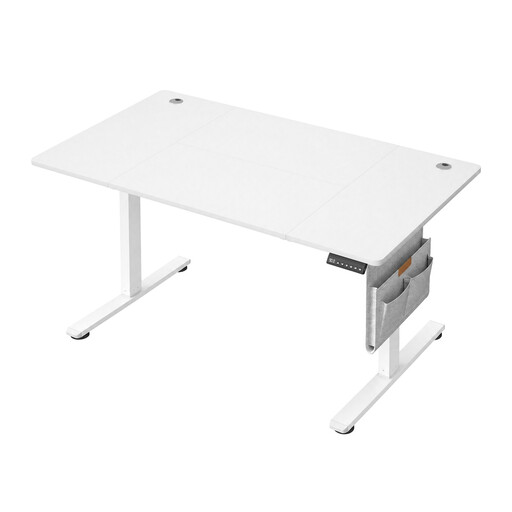
Why it suits this profile: This generous desk offers room for multiple screens, documents and accessories in a home or office workspace.
The product specifications list an adjustment range of 72 to 120 cm, four memory settings, cable holes and a USB-C connection. This makes it easy to check the key practical features before buying.
160 x 70 cm, four memory settings, USB-C port, cable management and a stated maximum static load of 70 kg.

Why it suits this profile: A practical mid-size option for users with several working positions and accessories who want four heights they can call up at the touch of a button.
The 140 x 60 cm size means you don’t have to go straight for a large 160 cm desktop. Four memory settings and stepless height adjustment offer more flexibility than simple up-and-down controls.
140 x 60 cm, adjustment range of 71 to 120 cm, four memory settings, USB-C port and maximum static load of 70 kg.
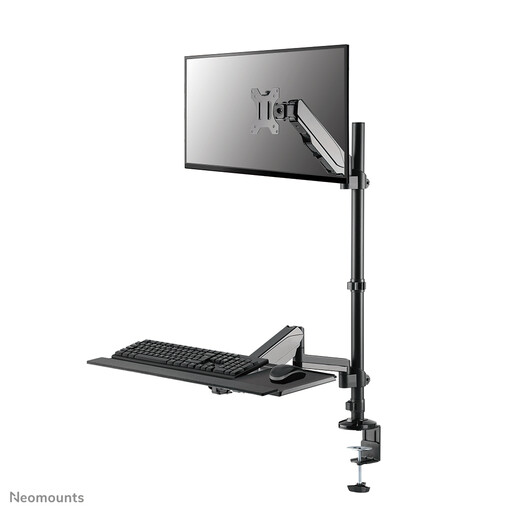
Why it suits this profile: Ideal if you don’t want to replace your whole desk but would like to convert an existing desktop into an adjustable sit-stand workspace.
The system has a clearly stated adjustment range of 44 to 95 cm and includes cable management. Before buying, check whether your screen uses VESA 75 x 75 or 100 x 100 mm.
Suitable for screens from 17 to 32 inches, supports up to 9 kg for flat screens, gas-spring adjustment and an included keyboard tray.
We’ve put together a full, up-to-date list of products that meet these strict selection criteria and the applicable European safety requirements.
Start by adjusting your office chair and placing your feet flat on the floor. Set the desktop so that your shoulders stay relaxed and your elbows are at roughly a right angle. Then check the standing height separately. Save both positions using the memory function, if the desk has one.
Its lifespan depends on the motor, frame, assembly and how you use it. Stay within the stated maximum load and avoid raising and lowering the desk continuously. On several models in this guide, an overheating protection feature activates after around two minutes of continuous adjustment; you’ll then need to wait before adjusting the desk again.
The motor mainly uses electricity when raising or lowering the desk. Power use is generally limited when the desk is idle, but exact consumption varies by motor and controller. An energy-saving mode, as listed for some JOYFURNOS models, can help reduce standby consumption. For an accurate estimate, check the technical specifications for the specific model.
