
Vandaag of morgen in huis

Kwaliteit gegarandeerd

Welkomstaanbiedingen ontgrendelen: GRATIS bezorging | Tot 80% korting | Gratis 30 dagen JoyPlus-proefperiode
Download de app
An electric sit-stand desk can make an ordinary workstation more flexible. At the touch of a button, you can switch between sitting and standing without having to move your monitors, laptop or keyboard each time. However, not every electric height-adjustable desk is suitable for every room or user.
The biggest buying mistakes usually result from three common pitfalls:
Also always check whether the desk is intended for indoor use, how long the motor can run continuously and whether space is needed between the desktop and the wall.
A typical height range for an electric desk is around 72 to 120 cm for the models mentioned. This accommodates different users, but the correct setting depends on your height, chair and working posture. When typing, your shoulders should remain relaxed and your forearms should rest approximately horizontally on the desktop.
Beforehand, measure:
A desktop measuring 120 x 60 cm will often fit in a compact study or home office. For two screens, speakers, documents or a larger gaming setup, 140 x 60 cm or 160 x 70 cm is more practical. Also allow for cables at the back and sufficient legroom.
The product information for the electric height-adjustable desks discussed here states a maximum static load of 70 kg. This is the total weight of equipment and accessories while the desk is stationary. A monitor arm, desktop PC, printer and heavy speakers all count towards this figure.
Pay attention to the following points:
A desk with a large desktop is not automatically more stable. Spread heavy equipment across the surface as evenly as possible instead of placing it all along one edge.
A desk with a memory function can save two or four favourite heights, depending on the model. This is particularly useful if several people use the same desk or if you frequently switch between sitting and standing. The function makes adjustment quicker, but it does not determine whether the selected height is ergonomically suitable.
A USB-C connection is a useful extra for charging compatible devices. Before buying, check whether the product specifies the charging function and power output you need. Without this information, you cannot assume that every laptop or tablet can be charged with it.
Several JOYFURNOS and Ochama models state that the motor activates overheating protection after approximately two minutes of continuous adjustment. According to the product information, you must then wait 18 minutes before adjusting the height again. This is generally less relevant for occasional everyday adjustments, but it is important for intensive use or frequent height changes.
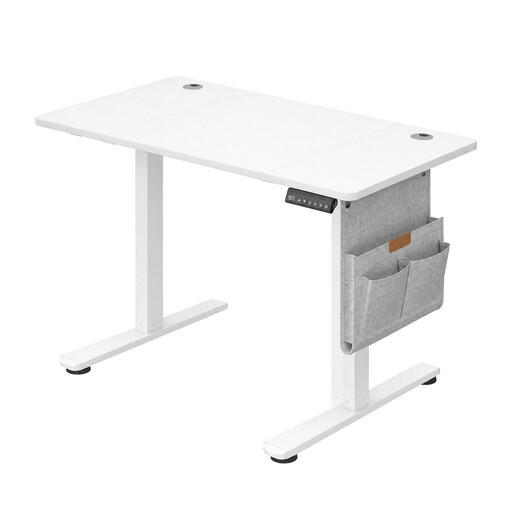
Why it suits this profile: A compact desk for a laptop, one monitor and everyday work or study. The four memory heights make switching between positions easy.
The specifications state the 72–120 cm range, a 70 kg load capacity and cable-management holes. This lets you check in advance whether the desk suits your space and equipment.
120 x 60 cm, four memory settings, steel frame, storage bag and hook.

Why it suits this profile: The spacious work surface accommodates multiple screens, documents and accessories. The USB-C port and control-panel lock function are practical extras.
The height range, maximum static load and dimensions are clearly stated. This prevents you from judging the desk solely by its appearance or USB-C function.
160 x 70 cm, adjustable from 72–120 cm, USB-C, memory function and adjustable feet.

Why it suits this profile: Suitable for office work, studying and gaming when a digital control panel and two memory settings are sufficient.
The model specifies 72–118 cm, a 70 kg load capacity and a digital display. According to the product information, this model is CE-marked and European-certified; check the current documentation when buying.
Two memory settings, digital display, 120 x 60 cm desktop and two hooks.
We have put together a complete, up-to-date list of products that fully meet these strict selection criteria and the applicable European safety requirements.
Start with a low sitting position where your feet are fully flat on the floor and your shoulders remain relaxed. Then set a standing position with your elbows bent at approximately 90 degrees. Check that the monitor and keyboard are at a comfortable height. Save both positions if the desk has a memory function.
Its lifespan depends on the motor, frame, assembly, load and frequency of use. Keep to the maximum load of 70 kg where this is stated in the specifications. Avoid adjusting the desk continuously for long periods, keep electrical components away from liquids and check the connections regularly after assembly.
Exact consumption varies depending on the motor and standby mode. Since the required wattage information is not provided for all the models mentioned, you cannot attach a fixed cost to it. Check the product label or manual for the power rating. Unplug the desk when you will not be using it for an extended period, provided the manual allows this.
It can be, provided the desktop is large enough for your monitor, PC and accessories and the total load is not exceeded. A 160 x 70 cm model offers more space than a compact 120 x 60 cm desk. A separate gaming desk with lighting or extra connections is not automatically height-adjustable, so check this feature separately.
