
Vandaag of morgen in huis

Kwaliteit gegarandeerd

Welkomstaanbiedingen ontgrendelen: GRATIS bezorging | Tot 80% korting | Gratis 30 dagen JoyPlus-proefperiode
Download de app
An electric height-adjustable desk can be useful if you want to switch regularly between sitting and standing during a working day or study session. However, not every sit-stand desk is equally suitable for your space, equipment or needs. An attractive photo, low price or long list of features says little about how practical it will be in everyday use.
Pay particular attention to these three common pitfalls:
For a desk used for working from home or studying, depth is at least as important as width. With 60 cm depth, there is usually enough room for a laptop or one monitor and a keyboard. If you need more freedom of movement or multiple screens, it is better to look at 70 cm depth.
Measure the following in advance:
An electric sit-stand desk must not come into contact with a wall or fixed object while it is being adjusted. The product information for several JOYFURNOS models therefore states that the desk should not be placed directly against a wall.
A height-adjustable desk should be suitable for both sitting and standing. The models in this selection have height ranges of around 72 to 118 or 120 cm. Check whether this suits your office chair, height and screen position.
A digital control panel makes adjustment straightforward. With an adjustable desk with a memory function, you can save your preferred heights. This is useful when several people share the same desk or when you want to switch quickly between two working positions.
Also pay attention to operating limitations. According to the product descriptions of various JOYFURNOS desks, overheating protection may be activated if the desk moves up or down continuously for around two minutes. The same information states that you must then wait approximately 18 minutes.
Do not only look at the maximum load capacity; add up the weight of your equipment:
The electric desks selected below have a stated static load capacity of 70 kg. This is a verifiable product specification, but heavy equipment should still be distributed evenly across the desktop. A steel frame, adjustable feet and a level floor can also help to reduce wobbling.
A CE mark or reference to European standards should be viewed as product information provided by the manufacturer or seller. According to the product description, the JoySelect models are CE- and European Standard-certified. This is not a general guarantee that every electric desk has the same certification; check this on each product page.
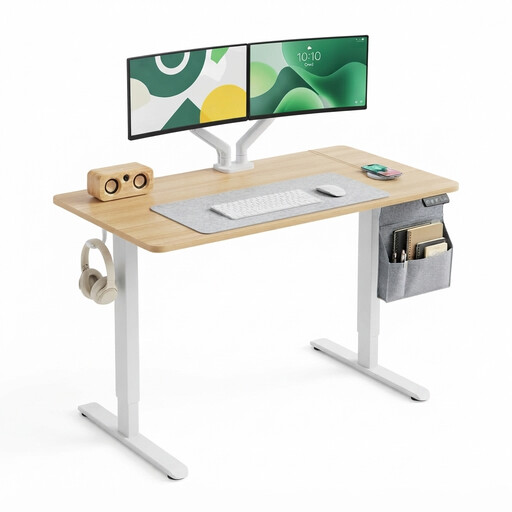
Why it suits this profile: This compact desk is suitable for a student, school pupil or home worker with one screen and limited space. According to the product information, the height ranges from 72 to 118 cm.
The product page lists a digital display, two memory settings and a load capacity of 70 kg. This makes the key information clearer than with a desk that only gives a general height claim.
120 × 60 cm desktop, two memory settings, two hooks and, according to the brand’s own product information, CE and European Standard certification.
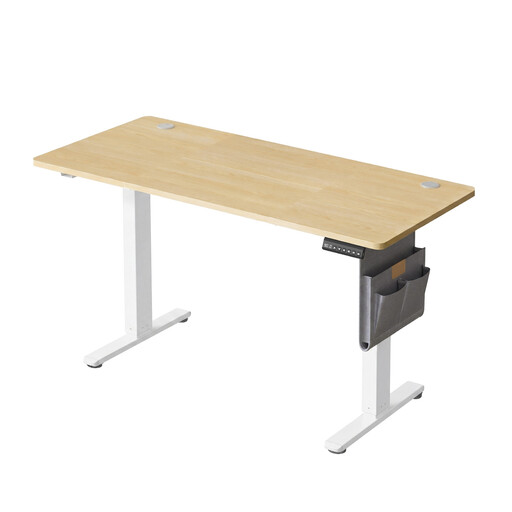
Why it suits this profile: The larger desktop provides room for a comprehensive home office, multiple screens or a combination of work and study materials.
The 160 × 70 cm dimensions avoid the most common space limitation of compact desks. The product information also mentions adjustable feet, two cable holes and lockable controls.
Height range of 72 to 120 cm, maximum static load capacity of 70 kg, USB-C port and cable management according to the product description.
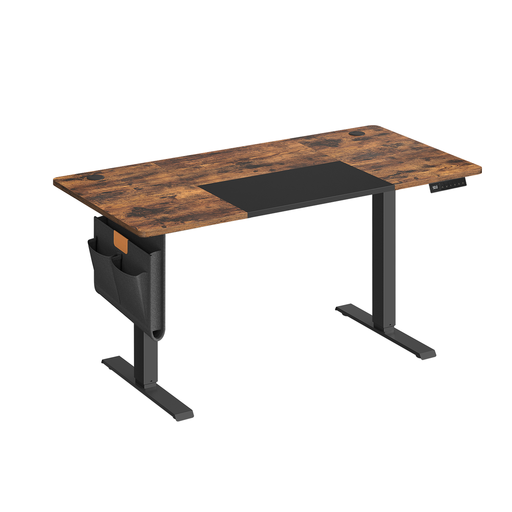
Why it suits this profile: This model is suitable for users who frequently switch between working heights, for example in a shared workspace, home office or gaming setup.
Four memory settings make operation more straightforward than with a desk where you have to find the right height manually each time. The stated 70 kg load capacity makes the limit easy to verify.
140 × 60 cm desktop, four memory settings, USB-C port, cable management and a height range of 71 to 120 cm according to the product details.
An electric height-adjustable desk is generally delivered flat-packed. Before use, check that all screws, cables and plugs are securely connected. Place the desk on a level surface and keep liquids away from the electrical components.
Do not automatically load a gaming desk beyond its stated limit. A desktop PC, several monitors and an arm can quickly add up to a considerable weight. Also bear cables in mind: leave enough slack so that they do not become taut when the desktop is raised.
A memory function helps you switch quickly, but it does not automatically determine the correct working height. Adjust your screen so that you can look straight ahead comfortably, and make sure your forearms can rest in a relaxed position. Then alternate between sitting and standing according to your own preference; a desk is no substitute for a good chair or regular breaks.
Power consumption depends on the motor, the number of adjustments and standby mode. As the motor usually runs only briefly, consumption during adjustment is generally limited. For exact figures, check the technical specifications for the specific model. An energy-saving mode, as mentioned for some JOYFURNOS models, can help reduce power consumption when the desk is not in use.
Its lifespan depends on the frame, motor, assembly, load and frequency of use. Do not exceed the stated load capacity of 70 kg and avoid prolonged, continuous adjustment. Check the mechanical and electrical connections from time to time, and follow the manufacturer’s maintenance instructions.
For a laptop or one monitor, 120 × 60 cm is often practical. If you use two screens, a desktop PC or lots of documents, 140 × 60 cm or 160 × 70 cm is a better choice. Measure your room first and leave enough space for the desktop to move.
We have compiled a complete, up-to-date list of products that fully meet these strict selection criteria and the applicable European safety regulations.
