
Livraison le jour même et le lendemain

Qualité garantie

Débloquez vos offres de bienvenue: Livraison GRATUITE | Jusqu'à -80 % | 30 jours d'essai gratuits à JoyPlus
Téléchargez l'application
An electric height-adjustable desk is handy if you want to alternate between sitting and standing while working, studying or gaming. Even so, a digital display or sleek design says little about day-to-day usability. A desk might offer too little legroom, wobble at its highest setting or not have enough space for your monitor and accessories.
So watch out for the following pitfalls before you buy an electric sit-stand desk.
A load capacity of 70 kg sounds generous, but check exactly what is meant. With many models this refers to the static load: the total weight the desk can support when stationary. Add up the weight of your monitors, laptop, speakers, armrests and other equipment.
A desk with dual motors, such as the FlexiSpot E6 frame, is an interesting option if you want to build a heavier workstation. According to the product listing, this frame supports up to 160 kg. If you’re buying the frame on its own, make sure your tabletop is suitable for the mounting and the load.
A top of 120 × 60 cm will often fit nicely in a study or compact home office. For two monitors, a full‑size keyboard and documents, however, this size can quickly feel cramped. A size of 140 × 60 cm gives you more breathing space, while 160 × 70 cm makes more sense for multiple screens or a gaming desk.
Don’t just measure the wall width. Factor in cables, room to move, and the distance to a chair or cabinet.
When you adjust the height, power leads and monitor cables move too. Without a desk with cable management, cables can be pulled taut or snag behind a wall, windowsill or cabinet. Don’t place the desk directly against a wall and check that your cables are long enough.
The product information for various JOYFURNOS models mentions cable grommets, an organiser and hooks. According to the product listing, these models also feature a sensor function that can help detect obstacles while moving. This is no substitute for keeping the movement zone clear: always check the space yourself.
Compare the full height range, not just the lowest and highest setting. According to the product information, JoySelect models run from 72 to 118 cm. Many JOYFURNOS desks offer a range of around 72 to 120 cm. Whether that suits you depends on your height, chair and preferred working posture.
An ergonomic desk doesn’t happen automatically just because it’s electrically adjustable. Set the top so your shoulders stay relaxed and your forearms point comfortably towards the keyboard. Switching between sitting and standing can be practical, but also take regular breaks and keep fine‑tuning your setup to your posture.
Also look at the build. A steel frame, adjustable feet and an even floor all contribute to a stable setup. According to the product listings, JOYFURNOS models have a steel frame and a maximum static load of 70 kg.
A desk with a memory function can store two to four heights, depending on the model. That way you can switch more quickly between sitting and standing without having to find the right position each time. According to the product information, JoySelect desks have two memory presets and a digital display. Various JOYFURNOS models and the FlexiSpot E6 frame offer four memory positions.
Check usage limitations too. Several JOYFURNOS products state that after about two minutes of continuous movement, the height adjustment temporarily switches off due to overheating protection. According to the product information, you then need to wait 18 minutes. That matters if you move the desk often or keep readjusting it during a meeting.
A desk with a USB‑C port can be handy for charging a phone or compatible accessory. Do check whether the port actually suits your charger and whether “fast charging” applies to your device according to the product details. A USB‑C port is no substitute for solid cable management or a safe power strip.
For home working, an electric desk for the office or a desk for the study, materials and upkeep also matter. The models mentioned use materials including chipboard and steel. Keep electrical parts away from liquids, use a soft slightly damp cloth, and follow the assembly instructions. CE marking and mention of European standards can be useful checkpoints, but always read the full product information and safety instructions.

Why this suits the profile: The compact size is ideal for a laptop, a single monitor and study materials in a smaller home office or study.
The product information states a digital display, two memory presets and a load capacity up to 70 kg. That makes the key specifications clear up front.
Height range of 72–118 cm, 120 × 60 cm desktop, CE marking and two hooks included.
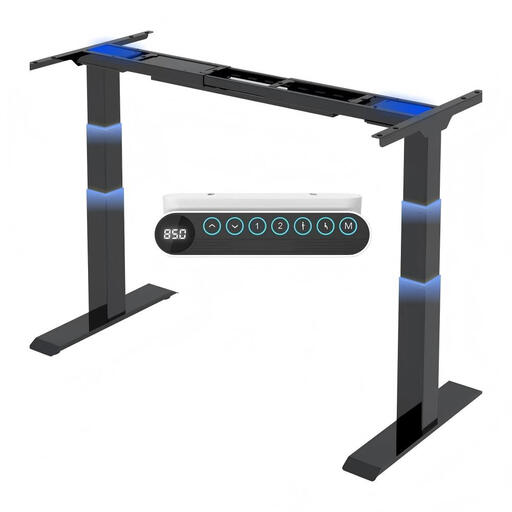
Why this suits the profile: This standalone frame lets you choose a suitable top for a spacious workstation, office or professional home setup.
Dual motors, three‑stage legs and four memory presets address the key concerns of stability, range and speedy operation.
According to the product listing, maximum load capacity of 160 kg, four memory positions and a USB port.
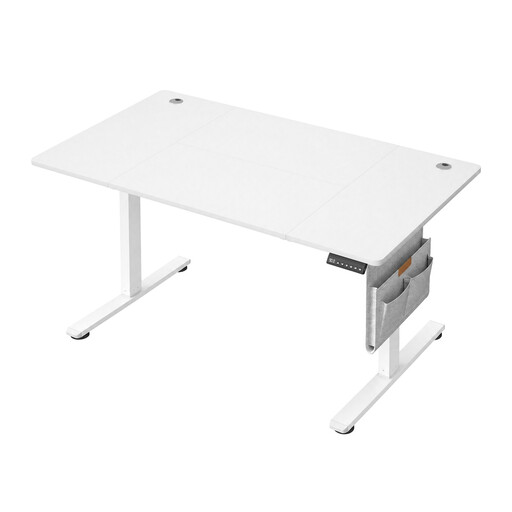
Why this suits the profile: The generously sized top is suitable for multiple screens, documents, study materials or a gaming desk with extra accessories.
Dimensions, maximum static load of 70 kg, cable grommets and adjustable feet are clearly listed. That makes it easier to compare than relying on design alone.
160 × 70 cm work surface, memory function, USB‑C port, cable management and storage hooks.

Why this suits the profile: The combination of a large worktop, USB‑C port, storage pouch and hooks suits daily home working with multiple devices.
The product information states a maximum load of 70 kg and provides specific safety guidance on liquids, wall clearance and the temporary overheating protection.
Memory function, USB‑C port, cable management, three hooks and a range of 72–120 cm.
We’ve put together a comprehensive, up‑to‑date list of products that fully meet these strict selection criteria and current European safety regulations.
Start with a comfortable sitting height: your feet rest on the floor and your shoulders stay relaxed. Then set your standing height with your forearms roughly horizontal. Save both positions with the memory function if one is available. Before adjusting, check that your chair, cables and other objects are clear.
Lifespan depends on the motor, frame, load, usage frequency and assembly. Don’t exceed the stated load capacity and follow the instructions on continuous adjustment. After assembly, regularly check that fixings remain tight. Manufacturers may offer additional warranty and maintenance terms; check these with the product.
Power consumption mainly occurs while moving up or down. When idle, the adaptor typically uses little or no power, depending on the model and any energy‑saving mode. If you want the exact figure, check the technical data or measure usage with a suitable power meter. A USB‑C port can add consumption when you charge a device.
