
Vandaag of morgen in huis

Kwaliteit gegarandeerd

Welkomstaanbiedingen ontgrendelen: GRATIS bezorging | Tot 80% korting | Gratis 30 dagen JoyPlus-proefperiode
Download de app
An electric height-adjustable desk makes it easier to alternate between sitting and standing while you work. However, many models look similar, even though differences in size, controls, stability and cable management can make a noticeable difference in everyday use. For people working from home, students, gamers and office workers, it’s particularly important that the desk works practically in your space.
When comparing a height-adjustable desk, don’t just look at the lowest price or a modern design. Check the adjustment range, maximum load, available space and the features you’ll actually use.
A compact 120 x 60 cm desk fits easily in a bedroom, student room or home office. It’s generally a practical size for a laptop, keyboard and one monitor. However, add two monitors, speakers and paperwork, and the desktop can quickly become crowded.
If you use more equipment, consider a 140 x 60 cm desk or 160 x 70 cm desk. Before you buy, measure not only the available wall width, but also the space you need to use a chair and move the desk.
A display and memory buttons are useful, but only if you first set the right sitting and standing heights. An electric height-adjustable desk with memory function saves a setting; it won’t automatically work out which height is right for your chair, height or monitor.
Set the sitting position so your arms rest comfortably on the desktop. Then check that the screen is directly in front of you and that you don’t have to lean forwards when working while standing. You can then use the memory settings for a consistent sitting and standing position.
A brand may describe a motor as quiet, smooth or especially stable. According to the product descriptions of the models featured here, their motors are designed for smooth height adjustment. However, your experience will also depend on assembly, flooring, the load and the surface beneath the desk.
So look for verifiable details such as:
An electric sit-stand desk with a range of 72 to 118 cm or 72 to 120 cm can accommodate different working positions. Always check that the lowest setting works with your office chair and that the highest setting is suitable for your height.
A digital control panel shows the current height. Two or four memory settings can make it quicker to switch positions. Some models also have a lock function or a reminder to change position regularly. Think of this as a practical aid, not a substitute for setting up your workstation properly.
A load capacity of 70 kg is the total static load the desktop is designed to support, including monitors, a laptop, a lamp, books and accessories. Distribute heavy equipment as evenly as possible. Also check whether the stated weight refers to the static load; this doesn’t automatically indicate how the desk will behave while adjusting.
A steel frame, sturdy legs and adjustable feet can help keep the desk stable on an uneven floor. Tighten all the connections securely after assembly and check them again after a while.
A desk with cable management helps prevent cables from hanging around moving parts. Cable grommets, a fabric organiser and hooks offer simple ways to keep adapters, headphones and accessories tidy. A desk with a USB-C port can also be useful for charging compatible devices.
Make sure you check exactly what the USB-C port supports. A product listing may mention fast charging, but you’ll need to check the product information for charging capacity and compatibility. Keep electrical components away from liquids, too.

Why it suits this profile: The compact desktop is suitable for a laptop, monitor, keyboard and documents in a smaller workspace or study area.
The product information lists an adjustment range of 72–118 cm, two memory settings and a load capacity of up to 70 kg. This means the key details are clear from the outset.
120 x 60 cm, digital display, two memory settings, two hooks and a steel and aluminium alloy frame.
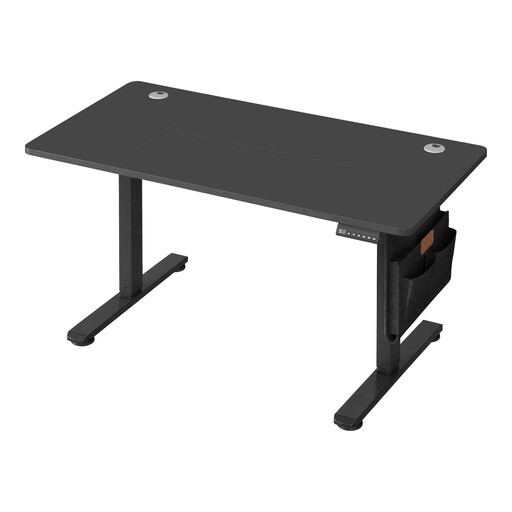
Why it suits this profile: The extra length gives you more room for a well-equipped home or office workspace, without going straight to a deeper desktop.
The specifications list a memory function, two cable grommets, an organiser, a USB-C port and a lock function on the controls.
140 x 60 cm, height range of 72–120 cm, maximum static load of 70 kg and adjustable feet.

Why it suits this profile: This wide desktop is well suited to users with multiple screens, lots of documents or a gaming setup with extra peripherals.
The product information lists cable management, cable grommets, an organiser, hooks and a USB-C connection. The load capacity is capped at 70 kg.
160 x 70 cm, height range of 72–120 cm, memory function, USB-C port and adjustable feet.

Why it suits this profile: Its compact size, four memory height settings and storage space make it a practical choice for a flexible study or home-working setup.
Four memory height settings mean you don’t have to keep adjusting it from scratch. Cable grommets, a fabric pocket and a hook help keep loose items organised.
Height range of 72–120 cm, four memory settings, maximum static load of 70 kg and integrated cable management.
We’ve put together a complete, up-to-date list of products that meet these strict selection criteria and current European safety requirements.
Start by adjusting your chair, then set the desk height. Position your monitor directly in front of you and make sure the cables don’t become taut as the desk moves. Test the full adjustment range before placing equipment on the desktop. Leave space between the desk and a wall or other fixed objects, as outlined in the product instructions.
Its lifespan depends on assembly, load, how often it’s used and maintenance. Don’t exceed the stated 70 kg capacity or run the motor continuously for long periods. Some JOYFURNOS models are said to have an overheating protection feature that may activate after around two minutes of continuous adjustment. If this happens, wait before changing the height again.
Most of the electricity is used while the desk is moving; exact consumption depends on the motor and how often you adjust it. A control panel with an energy-saving mode can reduce power use in standby. Check the product specifications before buying, and unplug the adapter when the desk won’t be used for an extended period, if the manual allows.
